Bootloaders
42 files
-

Universal EFI for all recent macOS versions including Sequoia and Tahoe
By kgp
Attached for download my universal opencore EFI-Folder distribution for all recent versions of macOS (also works with Sequoia and Tahoe). This EFI-Folder distribution is especially designed for the X299 community and all my former followers, however, with a few changes, it might be also applicable for other more recent builds and SMBIOS Versions different from SMBIOS macPro7,1. In case of questions or issues just leave your comment below. There is also now a short and complimentary guide update
in addition to my well established but somewhat outdated guidelines for X299.
---------------
Version 1.1.5 of this EFI-Folder distribution contains three different EFI-Folders:
1.) EFI-KGP-public-v.1.1.5-BCMC: Everything is configured to use BCMC (Wi-Fi) together with OCLP-Mod (AppleHDA) under macOS Tahoe, and OCLP (Wi-Fi) under macOS Sequoia and Sonoma. For Wi-Fi under Tahoe, use Apple BCM943602CDP or BCM943602CS in combination with the BCMC FullMAC patch and Local Send instead of Airdrop. Be aware that the BCMC FullMAC patch is currently in early beta and therefore not recommended for production systems, but it may become a viable solution in the near future. Otherwise follow all guide lines by the author @Austere.J! This EFI folder implements a min/max kernel configuration for using BCMC (Wi-Fi) and OCLP-mod (AppleHDA) under Tahoe as well as OCLP (Wi-Fi) under Sequoia and Sonoma. This min/max kernel configuration is also valid for all other macOS versions. If possible, disable DisableIOMapper and DisableMapperMapping in the config.plist, i.e. AppleVTD enabled. This min/max kernel approach has been verified to work with both BCM943602CS and BCM943602CDP cards. Note that the BCMC patch does not work with Fenvi cards (BCM94360). For macOS OTA updates and clean installs, create and use a second EFI folder with all BCMC Wi-Fi components removed. Otherwise, OTA updates and clean installs may stall.
2.) EFI-KGP-public-v.1.1.5-OCLP-Broadcom: EFI-Folder for BROADCOM Wi-Fi, using the Experimental Fork of OCLP 3.0.0 Nightly (modern Wi-Fi [AWDL] and modern Audio [AppleHDA] patch for Tahoe) originally published by lzhoang2801. For Sequoia and Sonoma, it is recommended to stay with OCLP 2.4.1 (Wi-Fi) for now. This EFI folder is configured accordingly. The patch should work with all Broadcom chipsets, including Fenvi.
Starting with macOS Tahoe 26.4 beta 4 and a matching KDK, the following patchers can be used:
- OCLP 3.0.0 Nightly (amfipassbeta variant) [kgp/lzhoang2801]
- OCLP 3.0.0 Nightly [kgp/lzhoang2801]
- OCLP-Plus 3.1.9 [MakAsrock/YBronst]
- OCLP-Mod 3.1.9 [laobamac_yyds].
All four patchsets are backwards-compatible with macOS 26.0 to 26.3.
Implemented Prerequisites:
- OCLP 3.0.0 Nightly (amfipassbeta variant), OCLP-Mod 3.1.9 and OCLP-Plus 3.1.9 work with AMFIPass.kext and boot argument `-amfipassbeta`
- OCLP 3.0.0 Nightly requires boot argument `amfi=0x80` Due to `amfi=0x80`, some applications (e.g. Firefox) may fail to launch. To mitigate this, also add boot argument `ipc_control_port_options=0` (credits to @badbrain).
- SecureBootModel = disabled
- csr-active-config = 03080000
- AppleVTD disabled, i.e. DisableIOMapper=true
- Same com.apple.iokit.IOSkywalkFamily replacement like under Sequoia
- Ensure the following NVRAM entries are present under:
NVRAM → Add → 7C436110-AB2A-4BBB-A880-FE41995C9F82
bluetoothExternalDongleFailed = 00 bluetoothInternalControllerInfo = 00000000 00000000 00000000 0000 Additional Implemented requirements:
- SSDT-DTPG.aml
- SSDT-X299-Slot5-PC01-BR1A-SL01-ANS3-ARPT.aml (adopt your ACPI path based on the information provided by Hackintool -> PCI and remove everything GPU/HDAU related).
3.) EFI-KGP-public-v.1.1.5-OCLP-Intel: EFI-Folder for INTEL Wi-Fi, using the Experimental Fork of OCLP 3.0.0 Nightly (modern Wi-Fi [AWDL] and modern Audio [AppleHDA] patch for Tahoe) originally published by lzhoang2801. The patch has been successfully applied at least with the Intel AX210, Intel AX201 CNW, Intel 7260, Intel 3165 and Intel BE200.
Starting with macOS Tahoe 26.4 beta 4 and a matching KDK, the following patchers can be used:
- OCLP 3.0.0 Nightly (amfipassbeta variant) [kgp/lzhoang2801]
- OCLP 3.0.0 Nightly [kgp/lzhoang2801]
- OCLP-Plus 3.1.9 [MakAsrock/YBronst]
- OCLP-Mod 3.1.9 [laobamac_yyds].
All four patchsets are backwards-compatible with macOS 26.0 to 26.3.
Implemented Prerequisites:
- OCLP 3.0.0 Nightly (amfipassbeta variant), OCLP-Mod 3.1.9 and OCLP-Plus 3.1.9 work with AMFIPass.kext and boot argument `-amfipassbeta`
- OCLP 3.0.0 Nightly requires boot argument `amfi=0x80` Due to `amfi=0x80`, some applications (e.g. Firefox) may fail to launch. To mitigate this, also add boot argument `ipc_control_port_options=0` (credits to @badbrain).
- SecureBootModel = disabled
- csr-active-config = 03080000
- AppleVTD disabled, i.e. DisableIOMapper=true
- Same com.apple.iokit.IOSkywalkFamily replacement like under Sequoia
- Ensure the following NVRAM entries are present under:
NVRAM → Add → 7C436110-AB2A-4BBB-A880-FE41995C9F82
bluetoothExternalDongleFailed = 00 bluetoothInternalControllerInfo = 00000000 00000000 00000000 0000 Additional implemented requirements:
- AirportItlwm.kext v2.3.0 (Ventura) @openintelwireless
- Spoofing of IOName to pci14e4,43a0 under DeviceProperties (adopt your device path based on the information provided by Hackintool -> PCI)
- BlueToolFixup.kext v2.7.2 @acidanthera
- IntelBluetoothFirmware.kext v2.5.0-d2 @lshbluesky
- IntelBTPatcher.kext v2.5.0-d2 @lshbluesky
- SSDT-DTPG.aml @kgp
- SSDT-X299-Slot5-PC01-BR1A-SL01-ANS3-ARPT.aml @kgp (adopt your ACPI path based on the information provided by Hackintool -> PCI and remove everything NVMe related).
Important Note:
a.) For macOS Tahoe 26.5 and later, use IntelBluetoothFirmware v2.5.1 by lshbluesky (includes an updated IntelBluetoothFirmware.kext and IntelBTPatcher.kext with the Bluetooth LE fixes for macOS Tahoe 26.5 developed by Z3c0ld and Vinhts).
Download: https://github.com/lshbluesky/IntelBluetoothFirmware/releases/tag/v2.5.1
b.) For Intel BE200 use AirportItlwm 2.3.0 (Ventura) from https://github.com/OpenIntelWireless/itlwm/issues/955 or just download Ventura.zip.
For guidelines and further details on Broadcom-Wi-Fi and Intel-Wi-Fi with OCLP see:
--------------
Starting with version 1.1.1 of this EFI-Folder distribution, IntelLucy.kext version 1.1.553 provides now ethernet connectivity for all Intel X520, X540 and X550 NICs under all macOS version including Tahoe with and without AppleVTD enabled. Successfully tested with direct NIC -> router LAN connection as well as with my MikroTik CRS309 switch with H!Fiber Marvel 113C SFP+ RJ45 (30m) and MikroTik S+RJ10 transceivers. No way to get IntelLucy work with my former Netgear ProSafe XS508M switch! Many thanks for all the kind help and hard work of @Mieze
Starting with Version 1.1.1 of this EFI-Folder distribution also implements a Kernel Patch developed by @Max.1974 to avoid FileVault activation during OTA updates and clean installs of Tahoe.
Please add/delete or enable/disable all system specific kexts for your build in EFI/OCI/Kexts and config.plist -> Kernel -> Add .
Else, just complete your SMBIOS credentials with Opencore Configurator (OCC) and use your own USB-Mapping-Kext before booting with this EFI. If you don't have any, follow my XHC USB Kext Creation Guideline (sorry, this guideline is not in any other forum) or use USBMap.
For the adaptation of SSDTs and ACPI-patches in EFI/OC/ACPI, config.plist->ACPI -> Add and config.plist->ACPI -> Patch (by default everything disabled), see my else partly outda installation guide for Mojave. Important note: If you do not adopt and enable SSDT-X299-HDEF.aml, add bootarg "alcid=2" or the layout-id you need for your onboard sound chip. The boot args are in NVRAM -> UUID -> 7C436110-AB2A-4BBB-A880-FE41995C9F82 -> boot-args. Otherwise AppleALC.kext won't inject. If you do not adopt and enable the CPxx -> PRxx replacements for your CPU in config.plist->ACPI -> Patch, edit SSDT-PLUG.aml and replace PR00 by CP00, save the file and enable it for booting.
Good luck! 👍
Build: ASUS X299 Sage 10G, i9-7980XE, 128GB Corsair Dominator Platinum DDR4, Radeon VII, GC-Titan Ridge, Broadcom BCM943602CDP, Intel AX210S, LG 5K 34WK95U-W, Samsung ProXPress C2680FX, Edifier S360DB 2.1 Soundsystem (optical in), HyperX QuadCast 2 - USB Microphone, Logitech MX Brio Webcam, MikroTik CRS309 switch with 3x H!Fiber Marvell AQR113C SFP+ RJ45 (30m) and 1x MikroTik S+RJ10 transceivers, running macOS: Sequoia 15.7.7 and Tahoe 26.5.2/26.6 beta 3 with OpenCore 1.0.7. For further details see my build description.
EFI Folder Overview:
2661 downloads
Updated
-

0 comments
Updated
-
EFI Dell 3050 Tahoe
By Leo Mauti
As per the title I am posting my efi
Using Oclp-mod, for audio and more
104 downloads
Updated
-

EFI - macOS Tahoe Beta 8 - Sequoia 15.7 - All-in-one - Install Pen Drive and to Run (Tahoe-Sequoia) 25-08-2025
EFI - macOS Tahoe Beta 8 - Sequoia 15.7 - All-in-one - Install Pen Drive and to Run (Tahoe-Sequoia) 25-08-2025
Here the list of Kexts this EFI has:
AMFIPass.kext
IO80211FamilyLegacy.kext
AppleALC.kext
IOSkywalkFamily.kext
AppleIGC.kext
Lilu.kext
BlueToolFixup.kext
NVMeFix.kext
BrcmFirmwareData.kext
RealtekRTL8111.kext
BrcmPatchRAM3.kext
RestrictEvents.kext
CPUFriend.kext
SMCProcessor.kext
CryptexFixup.kext
SMCSuperIO.kext
DebugEnhancer.kext
USBMap.kext
ECEnabler.kext
VirtualSMC.kext
FeatureUnlock.kext
WhateverGreen.kext
HibernationFixup.kext
XHCI-unsupported.kext
The platform I created this EFI is for Rocket Lake (11 gen Intel)
My Hardware is an B560M-H Motherboard from Gigabyte.
But I guess it will work on other hackintoshes at least the Pen Drive to run Install macOS Beta (26.0 - Tahoe) Beta 8.
The same EFI will work even to run installed macOS Tahoe / Sequoia 15.7, it´s fully compatible.
I saw that people are using one EFI for Pen Drive and another one to run the installed system (macOS Tahoe),
now I had made this EFI that runs for Pen Drive (Vanilla macOS Tahoe)
sudo ./createmediainstall --volume /Volumes/your_pen_drive
then put the EFI I made in EFI boot partition of your created pen drive with the command.
After that when you installed the Tahoe, it will boot with the same EFI too.
1310 downloads
Updated
-
EFI for Gigabyte Z490 VISION G / i5-10600 / Sapphire Nitro+ Radeon RX 590
By verdazil
EFI for Gigabyte Z490 VISION G / i5-10600 / Sapphire Nitro+ Radeon RX 590
Not suitable for installation. Only for running the installed system.
150 downloads
0 comments
Submitted
-
EFI folder for install and run macOS Tahoe beta on Acer-315-56 notebook
By verdazil
EFI folder for install and run macOS Tahoe beta on Acer-315-56 notebook
132 downloads
0 comments
Submitted
-

0 comments
Updated
-
.thumb.png.bf3f151b774fc4215da54586ac412490.png)
0 comments
Submitted
-
0 comments
Submitted
-

OpenCore Theme - GlowTime - 1920px Screen Size
By litemintx
Hi Everyone, My first ever opencore(1.0.1) theme, tested on T480.
This is for those with 1920px screen size.
Monterey to Sequioa Icons
1 - ZorinOS icon
and other system icons
litemint09 theme.mp4151 downloads
Updated
-
Updated efi's for install and boot Sonoma 14.5 Alienware M17XR3
By ovidoi
Hi, this is EFI files for install and boot Sonoma 14.5.
Follow : https://www.insanelymac.com/forum/files/file/1062-efis-clover-and-opencore-for-catalina-and-sonoma-1421/
Smbios MBP 16.4 work good.
L.E. Still need help for Brightness hardware slider (only software) and USB 3.0 chip NEC.
57 downloads
0 comments
Submitted
-
Efi's Clover and Opencore for Catalina and Sonoma 14.2.1
By ovidoi
Hi, I upload two efi's for Laptop Dell Alienware m17x R3.
1. is for install with OC for Sonoma with no issue, after install OS download OCLP 1.4.3 and install for DGPU AMD radeon HD 6850M acceleration. SMBIOS install is MBP 16.3.
2. is for booting post install Catalina and Sonoma. Catalina works all function with FN key including sleep and wake lid and power button ( if no, remove ssdt-usbx from acpi/patched folder).
For Catalina graphics install OCLP 0.4.3
For Sonoma now not works all key's, ex. brightness slide not display in display setting.
Boot both OS'es SMBIOS is MBP 11.5 for detect correct sensors, MBP 8.3 not accurate detecting and use Macs fan control for good work fan's.
L.E. I use ssd-usbx for full speed cpu (I don't know how it works) because I have battery issue and cpu work only 1,8 GHz, with this ssdt work in full speed 3,1 GHz but not work brightness.
In Sonoma cpu work with 2,2 GHz with this ssdt but no turbo.
In clover ACPI is more ssdt's files for any variant of settings and cosmetics
Still working for Sonoma, working good and speed is ok for this Laptop in special Catalina.
If anybody have more knowledge I am open for collaboration.
Good luck and enjoy.
P.S. I have issue with ssd trim enabler in Sonoma, refuse to activate in all mods, in Catalina working. Eny idea?
I try to install Sonoma 14.4 but have issue with "still waiting for root device" only 14.2.1 work, not try with 14.3.
295 downloads
0 comments
Updated
-
0 comments
Updated
-
Submitted
-

Lenovo ideapad 100 15ibd Intel Iris 5100
By Ludox
OC_EFI installation and startup, OpenCore-Patcher is required.
251 downloads
0 comments
Updated
-

0 comments
Submitted
-
EFI with OpenCore 0.8.7 for Z390 Aorus Elite + RX 6600
By miliuco
There are 4 config.plist files for different SMBIOS:
config-13-imac-amd.plist: iMac19,1 + dGPU AMD + iGPU enabled in BIOS config-13-imac-intel.plist: iMac19,1 + iGPU enabled in BIOS as main card config-13-imacpro.plist: iMacPro1,1 + dGPU AMD + iGPU disabled in BIOS config-13-macpro.plist: MacPro7,1 + dGPU AMD + iGPU disabled in BIOS. Remember to fill in your serial and ROM numbers (they are empty).
188 downloads
Submitted
-
Bootdisk Utility
By cvad
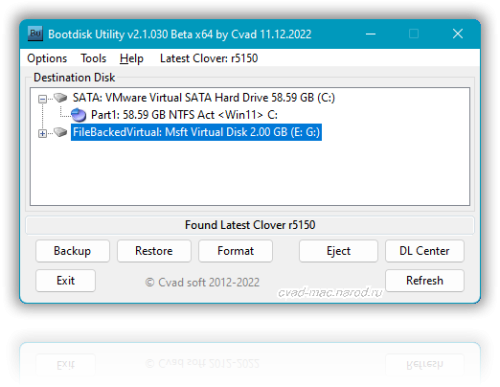
Make bootable USB Flash Disk for MAC OS X with Latest Clover bootloader revision fast and easy by one click! under OS Windows.
Special utility from cvad & russian MAC community for new hackintosh users.
Enjoy...
For more information and complete instructions please see this topic.
Anyone who likes the program, please support its Community Score.
Feel free to "Rate File"
43589 downloads
Updated
-

EFI's of Real Mac (MacBookPro12,1) - MacBook Pro 13'' Retina Early 2015 with Latest OpenCore 0.8.7 and Latest Kext's
EFI's of Real Mac (MacBookPro12,1) - MacBook Pro 13'' Retina Early 2015 with Latest OpenCore 0.8.7 and Latest Kext's today's version 11-19-22.
Use this OpenCore to boot into Ventura 13.0.1 or Monterey 12.6.2 with latest OpenCore 0.8.7 provided by OCLP 0.5.2.
This EFI is ready for booting in Windows 11 22H2 (BootCamp). Has the latest kext's today's 11/19/22 version. From https://dortania.github.io/build-repo/
Works everything OOB.
Intel Iris Graphics 6100 1536MB.
Now BrightnessKeys is working.
Battery Info is working too.
Everything is Working.
To work acceleration in Intel Iris Graphics 6100 with Ventura 13.0.1 or Beta 13.1, you need to install OCLP 0.5.2 Official Release with Root Patches. => https://github.com/dortania/OpenCore-Legacy-Patcher/releases/download/0.5.2/OpenCore-Patcher-GUI.app.zip
421 downloads
Updated
-

EFI - Gigabyte B560M-H - OpenCore 0.8.7 - All Working - Ventura 13.0.1 or Monterey 12.6.1
EFI - Gigabyte B560M-H - OpenCore 0.8.7 - All Working - Ventura 13.0.1 or Monterey 12.6.1
All kexts are from today's files from https://dortania.github.io/build-repo/ (11/19/22) - Latest!
Everything is working (11th Gen Intel(R) Core(TM) i5-11400 @ 2.60GHz)
AMD Radeon RX 570 4GB
530 downloads
Updated
-

EFI - Acer Aspire ES1-572 - OpenCore 0.8.6 - Ventura 13.0.1
Latest EFI with OpenCore 0.8.6 for Acer Aspire ES1-572.
Everything is working even Card Reader.
Full support for Ventura 13.0.1.
151 downloads
- acer aspire
- acer
- (and 4 more)
0 comments
Submitted
-
EFI folder for Dell Latitude 5510 opencore 0.8.5 Monterey 12.6.1
By Aigors
Efi folder Opencore 0.8.5 for Dell Latitude 5510 for Monterey 12.6.1
What works
Graphics even external port
Audio
Sleep
Touchpad and trackpad with Gestures
microsd card reader
WiFi
Bluetooth
435 downloads
Submitted
-
OpenCore 0.8.4 (build 2022-08-24) EFI for Monterey and Ventura
By miliuco
Although it is a beta version, it works very well without errors (at least in my case). Included recent versions of the kexts.
It works fine on my hardware (Z390 Aorus Elite + i9 9700 + RX6600) although with the proper customization of kexts it can work well with Z390 boards and 9th gen CPUs.
There are several configuration files, the ones starting with config-12 are for Monterey and the ones starting with config-13 are for Ventura. Variants are included for 4 possible SMBIOS options:
iMac19,1 with AMD dGPU + iGPU headless mode iMac19,1 with iGPU as main card without dGPU iMacPro1,1 with dGPU + iGPU disabled MacPro7,1 with dGPU + iGPU disabled.
List of config.plist files:
config-12-imac-amd.plist: macOS 12 + iMac19,1 + dGPU AMD + iGPU enabled in BIOS config-12-imac-intel.plist: macOS 12 + iMac19,1 + iGPU enabled in BIOS as main card config-12-imacpro.plist: macOS 12 + iMacPro1,1 + dGPU AMD + iGPU disabled in BIOS config-12-macpro.plist: macOS 12 + MacPro7,1 + dGPU AMD + iGPU disabled in BIOS config-13-imac-amd.plist: macOS 13 + iMac19,1 + dGPU AMD + iGPU enabled in BIOS config-13-imac-intel.plist: macOS 13 + iMac19,1 + iGPU enabled in BIOS as main card config-13-imacpro.plist: macOS 13 + iMacPro1,1 + dGPU AMD + iGPU disabled in BIOS config-13-macpro.plist: macOS 13 + MacPro7,1 + dGPU AMD + iGPU disabled in BIOS
Notes:
rename selected config file to config.plist for RX 580 and other Polaris cards remove agdpmod=pikera from boot-args add serial numbers for the SMBIOS model thanks to OC-Anonymiser by @dreamwhite (Python script for removing sensitive data from OpenCore's config.plist).
624 downloads
0 comments
Updated
-

Clover 5149 EFI for Monterey and Ventura. Recent versions of the kexts are included.
By miliuco
It works fine on my hardware (Z390 Aorus Elite + i9 9700 + RX6600) although with the proper customization in terms of kexts it can work well with other Z390 boards and 9th gen CPUs, with integrated and/or AMD GPU.
There are 2 configuration files:
config-imac-amd.plist: iMac 19.1 + AMD dGPU + iGPU headless mode config-imac-intel.plist: iMac19,1 + iGPU as main - without dGPU. Notes:
rename selected config file to config.plist for RX 580 and other Polaris cards remove agdpmod=pikera from boot-args add serial numbers for the SMBIOS model. thanks to @Slice and others (jief666, vectorsigma72, @LAbyOne @Sherlocks etc.) for this work.759 downloads
0 comments
Submitted
-
Unsupported Mac A1502 - EFI (MacBook Pro Early 2015 Retina) - OpenCore 0.8.4 - Ventura 13 beta 6 - Intel Iris Graphics 6100 spoofed as Intel HD 4000 in OCLP 0.5.0
Unsupported Mac A1502 - EFI (MacBook Pro Early 2015 Retina) - OpenCore 0.8.4 - Ventura 13 beta 6 - Intel Iris Graphics 6100 spoofed as Intel HD 4000 in OCLP 0.5.0 .
Need Root Patches with OpenCore Legacy Patcher 0.5.0 - OpenCore-Patcher.app.
269 downloads
0 comments
Updated
-
Top Downloads
-