All Activity
- Past hour
-
 1mm888us1 joined the community
 -
 Gati Logistic Packers Movers joined the community
 -
 pkr98comtop joined the community
 -
 f1688world1 joined the community
 -
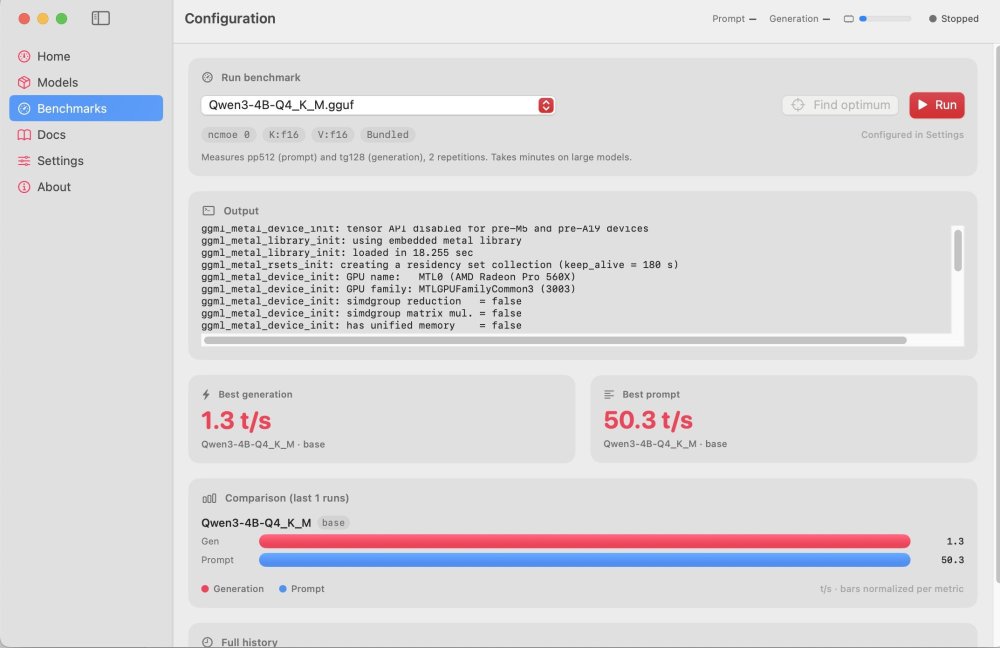
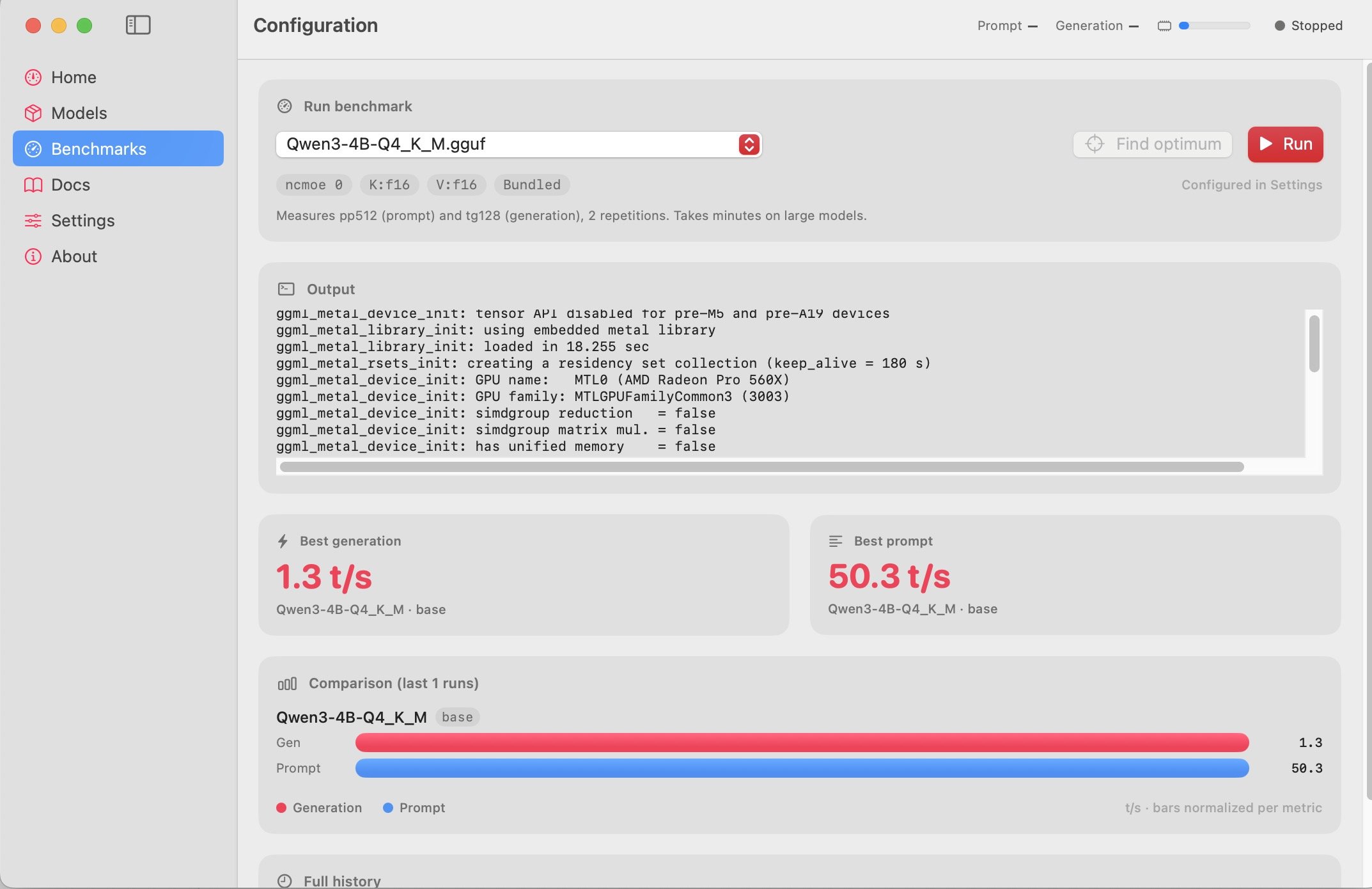
 Hi, worked on my Hackintosh with RX 5600 XT - I5 12400F 4,8 GHZ OC DDR5 ( and Macbook Pro RX560x - but very slow) Mobile RX 560X on MacbookPro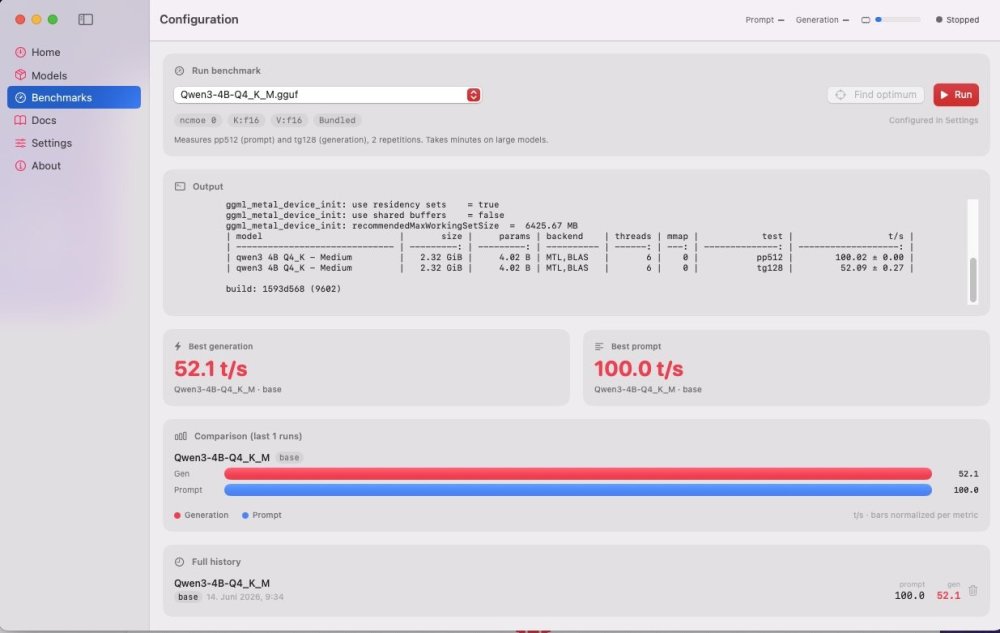
-
nk88tours joined the community
-
 suavemanagement joined the community
 - Today
-
 Xu Kinser joined the community
 -
@mnfesq, VoodooHDA was working with Nvidia HDMI. New changes are intended for AMD HDMI if not break old functionality. But first you you have to do nvidia framebuffer working.
-
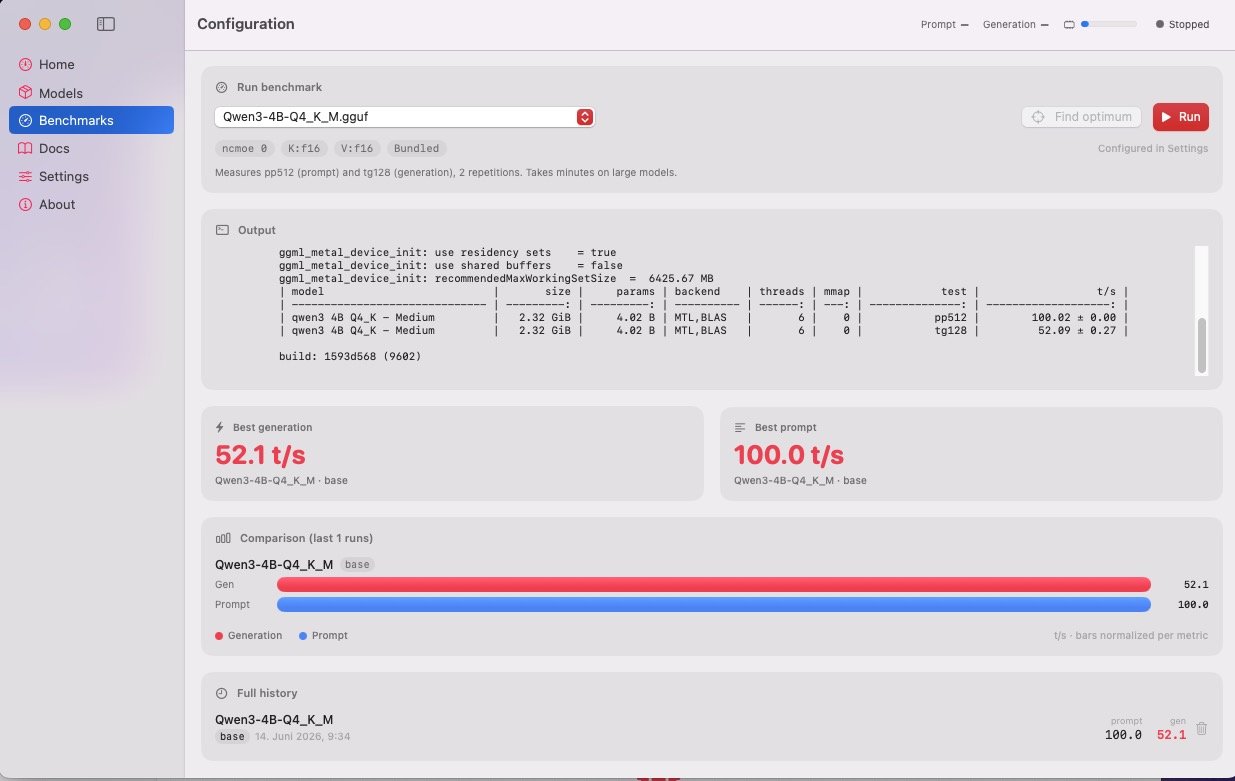
 Hi all, im sharing a project that might be useful to anyone running an AMD GPU on a Hackintosh. The problem: local‑LLM tooling on macOS targets Apple Silicon. On Intel Macs with discrete AMD GPUs, stock llama.cpp under Metal produces corrupted output and is painfully slow over PCIe. ToshLLM is a native SwiftUI app (pure Swift Package Manager, no external deps) that bundles llama.cpp built with AMD‑specific patches and wraps it in a real GUI: Correct Metal output on AMD dGPUs at full speed Qwen3‑8B Q4: ~101 t/s prompt / ~57 t/s generation Qwen3.6‑35B‑A3B (MoE, hybrid offload): ~123 t/s / ~18.6 t/s, up to ~25.7 t/s with MTP Native chat (Markdown, code copy, file attachments), model manager with per‑model VRAM/RAM estimates, automatic MoE CPU‑offload, MTP speculative decoding, dual engines (official + TurboQuant for 100k+ ctx), built‑in benchmarks, OpenAI‑compatible API, bilingual EN/ES New macOS 26 “Tahoe” Liquid Glass interface (degrades to translucent materials on macOS 14/15) Hardware: developed on RX 6700 XT 12 GB + [NootRX](https://github.com/ChefKissInc/NootRX); runs on any working Metal setup Its beta. DMGs aren’t notarized yet (first launch needs “Open Anyway” or `xattr -dr com.apple.quarantine`). The AMD patches live in the repo (`patches/`), so you can build from source too. License: GPL‑3.0. Repo, source and DMG releases: Link to Github Project Would love testing reports from other AMD cards (6600/6800/6900, RDNA3, Polaris/Vega).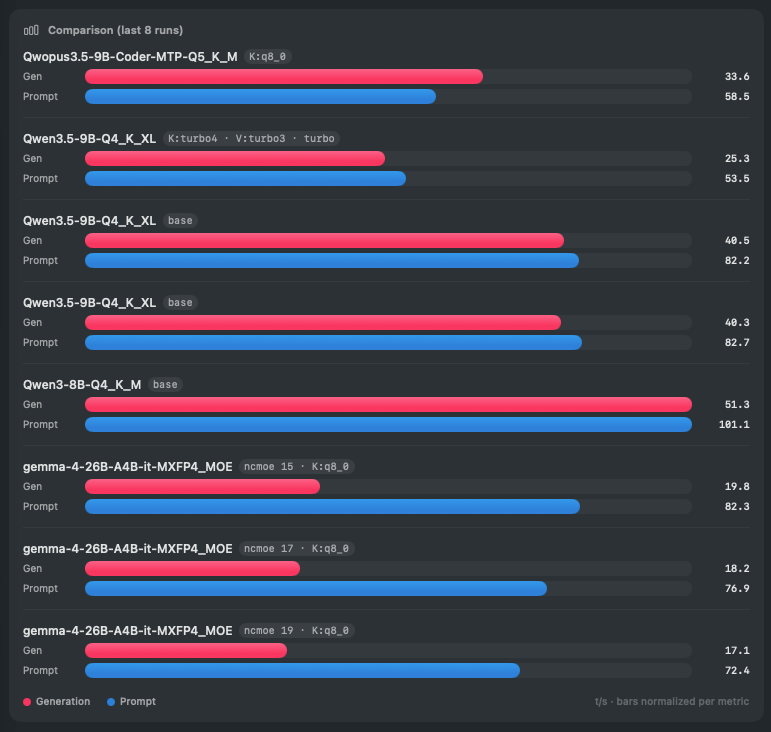
- 1 reply
-
- 1
-

-
 光辉武 changed their profile photo
 - Yesterday
-
Installed Ok On My Mac mini With 256GB SSD Running 26.5.1, iPad Mini, Not Enough Free Space To Install Itt On My iPhone12 mini Serve Me Right For Getting A 64GB One Attempted To Install To My Main System, 512GB SSD, NO ROOM I Delete Some Stuff And Still Shows The Same Amount Free, WTF Formatted My External And Will Try Again With It
-
.thumb.jpg.5a65d490f7e06447977081fd718e99c2.jpg) riamathur changed their profile photo
riamathur changed their profile photo -

Update to 26.5.1 and no sound on Gigabyte B760 Xgaming
verdazil replied to iSpirit81's topic in OSx86 26.0 (Tahoe)
It is safe, but the sequence of actions depends on whether OCLP was used. For sound you need either AppleHDA.kext or VoodooHDA.kext- 1 reply
-
- 1
-
-
I've been following this thread and trying some of the fixes offered but without success. Here's what is going on with my new laptop (see specs in my signature): I started out with MaLd0n's EFI from Olarila but sleep didn't work so I extracted my DSDT using Clover and modified all _PRW methods from 6D to 09 as suggested here: https://github.com/grvsh02/A-guide-to-completely-fix-sleep-wake-issues-on-hackintosh-laptops. Now, sleep works great but, when my laptop wakes from sleep I lose audio in my internal speakers but audio still works fine using bluetooth headphones/speaker or the pin plug for headphones. Also, this laptop has IGPU (Intel UHD 630) and DGPU (Nvidia RX3000) and I believe that digital audio/HDMI is linked to the DGPU. Of course, I'm using VoodooHDA or I wouldn't be posting this here. I'm thinking that a modification of my DSDT or an SSDT might make the internal speakers work after waking from sleep. As for HDMI, 2 laptops ago, I had the same or similar problem and was able to fix it by injecting the Nvidia device even though it had no driver and HDMI would then be handled by the IGPU. So far, that hasn't worked but I probably injected the wrong information and am still working on it. But I was intrigued by MaLd0n's injection of ATI DGPU properties into VoodooHDA and wondered whether that could work for Nvidia as well. Any insights would be appreciated.
-
 Hs Haid changed their profile photo
 -
Well I Downloaded tthe Beta App And Installed It To An External Drive, Ha, Don't BootI I Think It Wants To Be Installed To My 26.51 Internal SSD Wont't Do That, But Will Have A Go Installiing It To My Mac mini
-
 楞宇 changed their profile photo
 -
 Michael Baziwe changed their profile photo
 -
 mmsalmalki Almalki changed their profile photo
 -
Just A Place Holder Till I Install The Beta
-
 Hello volks I am on 26.0 i plained to update to 26.5.1 and i have no sound on board Which kext do i need ? its safe to update ?
 -
 For all Intel Wi-Fi users following the ongoing Tahoe testing: I have opened AirportItlwm issue #1062 to investigate the current AWDL situation under macOS Tahoe. Wi-Fi, Bluetooth, AirPlay, Screen Mirroring and Handoff appear to be working with the current AirportItlwm/OCLP approach, but AirDrop, Personal Hotspot and Continuity Camera remain unavailable due to the apparent absence of awdl0. Additional test results, logs and feedback from AX2xx, BE200 and older Intel chipsets are highly appreciated. GitHub issue: https://github.com/OpenIntelWireless/itlwm/issues/1062
 -
 collin syllaba changed their profile photo
 -
Alright cool, thanks for the info, i gone into installing 26.6 and 26.5.1 both of them broke the sleep wake, i switch back to 26.5 alone and the sleep wake functions again. Seems going above that version, it totally broke the sleep wakes.
-

Apple unveils "macOS Golden Gate"
Irish_Man replied to fantomas's topic in Front Page News and Rumors
From what I can tell, this release isn’t about improvements—it’s about dropping Intel. I installed it on an external NVMe drive connected to my Mac mini M4, and I can really notice a difference in speed. I'll give them that. As for new features, there’s practically nothing worth mentioning. New Siri? Big deal. I haven’t tested everything yet, but so far, nothing really stands out. -
 debetreviewtop changed their profile photo
 -
 Hey guys! Great news if you're a fan of AOE 2 DE, now it's available at Steam for macOS. But there's a catch, only for Mx processors. A nice thing to see, it's that even the A18 Pro (Macbook Neo) can run it 😁 PS: If you already buyed the Windows version, you don't need to buy it again.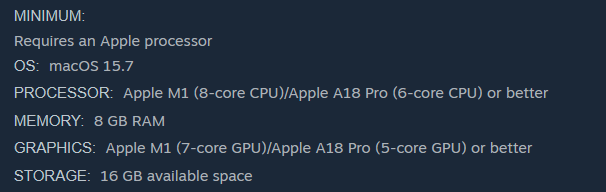
-
- 5
-
-

-
 shoya changed their profile photo
 - Last week
-
Very ugly names. I'l try check it.
-

Apple unveils "macOS Golden Gate"
Max.1974 replied to fantomas's topic in Front Page News and Rumors
Hi guys, I uninstalled Golden Gate on my M4 Pro because a few bugs are interfering with two of my essential professional activities. First, Firefox no longer receives passwords directly; authentication now only works via code and through Safari. Second, VS Code with the Chat for Copilot extension is unable to sign in to GitHub. Additionally, compiling older apps such as Clover, which require deployment targets as far back as macOS 10.6, is no longer possible, as it only accepts macOS 12 as the minimum target. For these reasons, I have already erased Golden Gate and reinstalled Tahoe. Good luck to the new users testing it. In my opinion, however, only a few things have changed, and nothing particularly extraordinary. -
 Md Abdullah changed their profile photo
 -

Apple unveils "macOS Golden Gate"
chris1111 replied to fantomas's topic in Front Page News and Rumors
Ok now its HackMacintosh -
I've tested the latest version of @MaLd0n and it works fine HDMI/DP is not working
-
The shrink will come with macOS 28, when Rosetta 2 and all remaining x86 code are removed—though probably not back down to 5 GB.
- 35 replies
-
- 2
-
-
- macos
- golden gate
- (and 1 more)
-
Is it the LayoutId that makes it display as Internal Speakers?
-
 He's using VirtualSMC.kext without boot-arg vsmcgen=1. As far as I know, that won't work. He can add the boot-arg or switch to FakeSMC. Haven't heard from him for a while, so maybe he really is lost.
 -
Thank you, @MaLd0n, meu querido neto! VoodooHDA.kext posted here continues to work well for my HP EliteBook 850 G7 laptop's internal HD Audio. The Intel iGPU HDMI Audio is detected, but wasn't working when I last tested. Should I be testing any of the new versions with iGPU HDMI Audio? Thank you again to all Devs for maintaining this great audio solution!

-
Hi Regards
- 35 replies
-
- 1
-
-
- macos
- golden gate
- (and 1 more)
-
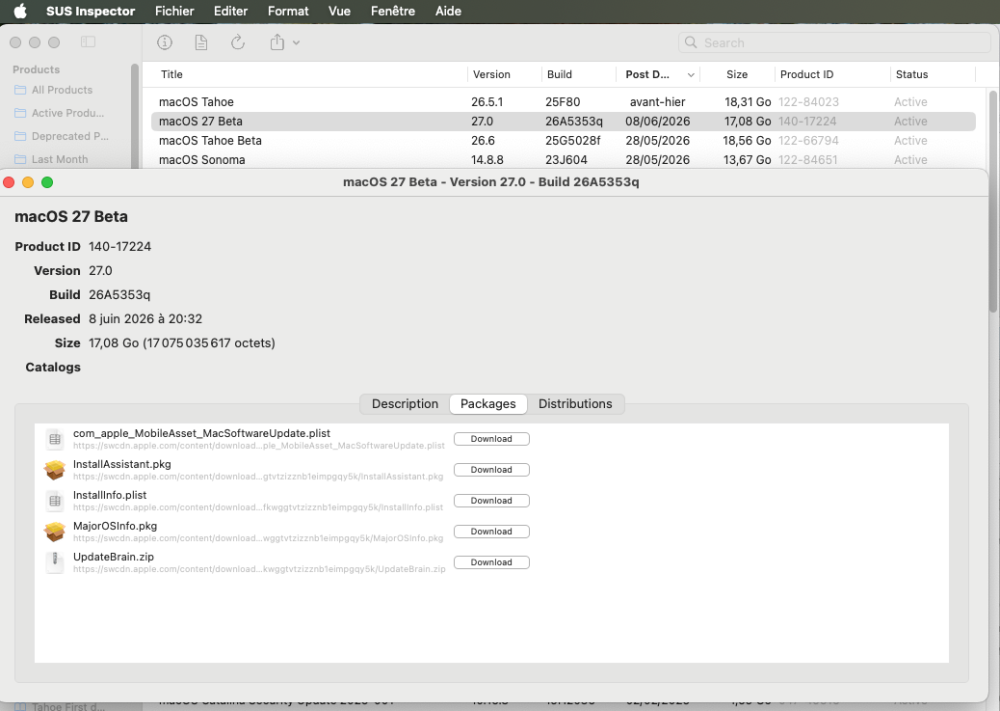
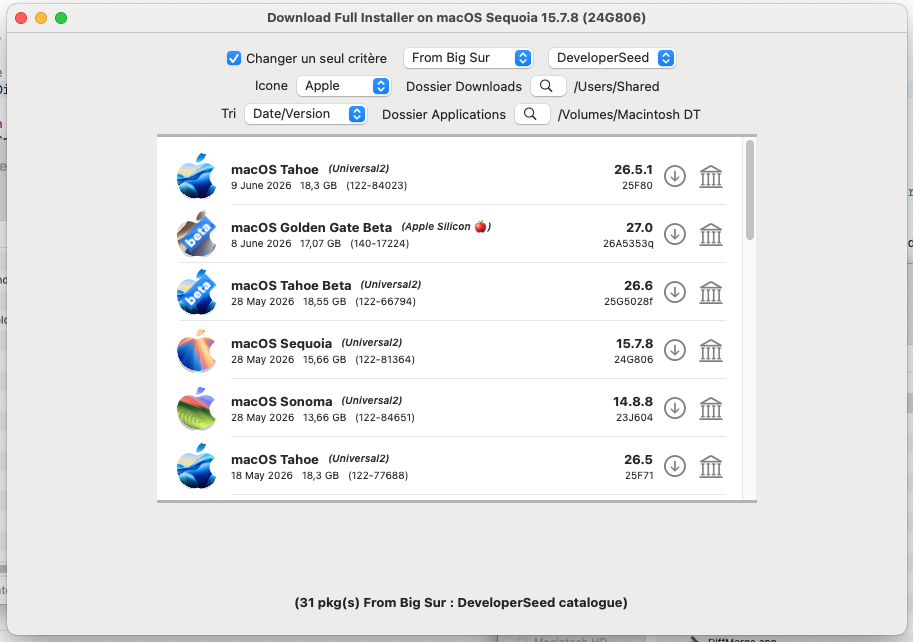
What I found interesting is that, even with only Apple Silicon support, the installer was still 17-18GB in size. :)) Remember when they used to be around 4-5GB? I know there's probably a lot of "AI" in there now. But yeah...I was kind waiting for them to decrease. Now I'm not sure they will ever go back to that size.
- 35 replies
-
- 2
-
-
- macos
- golden gate
- (and 1 more)
-
 I have still working computer GA 965P-S1, E6300 Conroe, Radeon HD5570, ALC888 (VoodooHDA 334), OS⌘ 10.11.6 (15G22010) It booted by Clover. Works fine but it is ancient not supporting modern programs.
 -

Apple unveils "macOS Golden Gate"
crazybirdy replied to fantomas's topic in Front Page News and Rumors
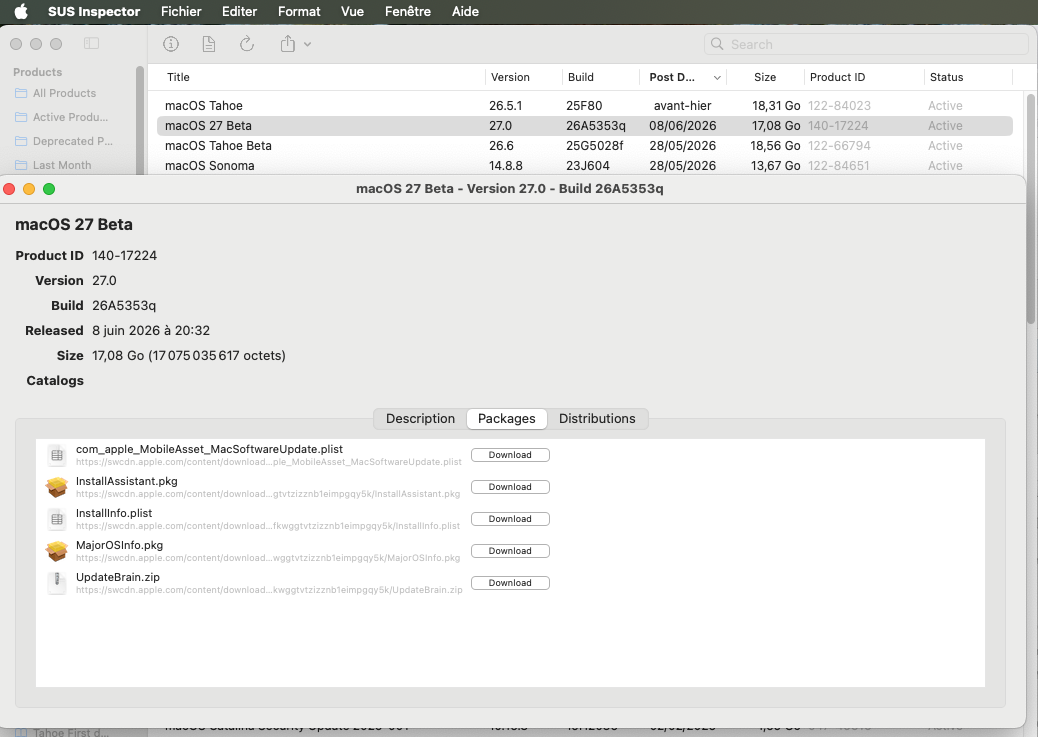
Now I need a M4 mac anything. 😎 2026-06-08 18:32:00 .. 140-17224 .. 27.0.0.26A5353q macOS 27 Beta https://swcdn.apple.com/content/downloads/57/01/140-17224-A_P1A9GDNMB4/u67ywguno7fkwggtvtzizznb1eimpgqy5k/InstallAssistant.pkg







.thumb.jpeg.7082d67b3394c9399e80144027a7b397.jpeg)