
Jump to content

Presenting the multi-capability and entirely useful OSx86 Tools Utility, brought to you by our very own ~pcwiz! This utility combines a variety of common tasks, hacks, and commands into one program with an easy-to-use user interface, designed to be helpful to both Hackint0sh newbies and seasoned sages. Actively undergoing the final stages of beta development, OSx86 Tools Utility is now open for public testing in order to find and fix any remaining bugs.


Currently implemented functions include:

* Repair Permissions

* Set permissions for Extensions folder

* Clear Extensions cache

* Run CRON Maintenance Scripts

* Backup Extensions

* Restore Extensions backup

* Backup kernel

* Install or restore kernel

* Force shutdown computer

* Force restart computer

* Install kext (one at a time) to any drive

* Running FDISK on Partitions/Disks

* Installing EFI v8 by netkas

* Installing Chameleon (fake EFI implementation) by zef

* Install standard Darwin (no EFI) bootloader

* Add EFI boot strings

* Add kernel flags, quietboot, timeout, and graphics mode to com.apple.Boot.plist

* View PCI Device/Vendor information and IDs

* Nice new GUI screen for viewing device IDs (LSPCI)

* Minor bugs fixed, Restart buttons added

* Restore System to Factory Defaults

* About this Mac modifier (not zephy's, this is a different one of our own, set CPU, RAM, and Image!)

* Clear User Application Cache

* Clear System Application Cache

* Update Prebindings

* New version of Chameleon (1.0.11)

* A new icon (DiaboliK's icon with Paranoid Marvin mod)

* Self updater

* Built in application help

* Touch Extensions Folder

* Enable/Disable Quartz GL

Latest Screenshot:
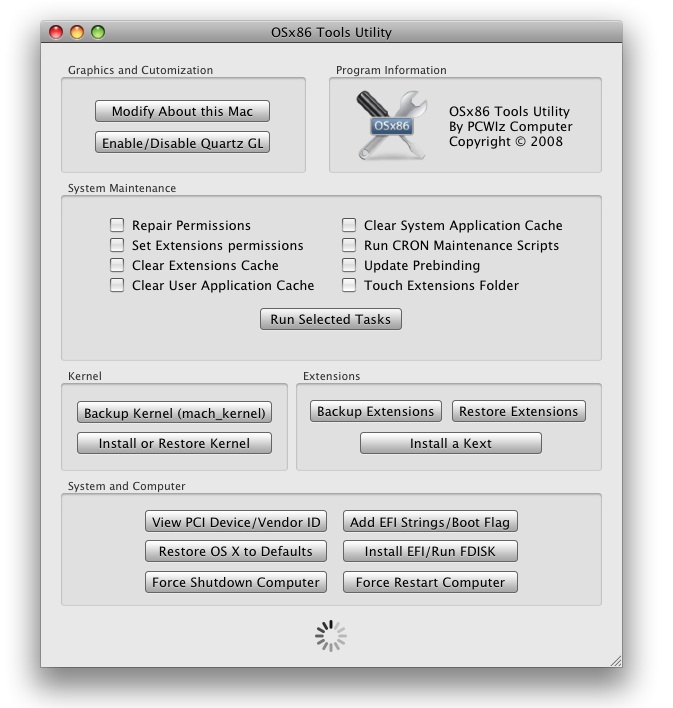
 

post-16720-1214028138_thumb.jpg

So what are you waiting for? Download OSx86 Tools Utility now, and report feedback to ~pcwiz!


Important Links:


Official Homepage

Google Code Project Page

OSx86 Tools Utility Forum Thread


Download the Latest Release:


OSX86Tools_1.0.148.zip


Report Bugs:

Bug Tracker


User Feedback

Recommended Comments


teknojunkie

Posted

this is probably one of the most sickest utilities for us Hackintosh users yet, making it easy for anyone, Its soon coming to a close with hacking Mac OSX for PC. 2 more days till EFI-X, this and soon we will have an ultimate hack, my bad not a hack but a real Mac. Epic 6/21/08 and 6/23/08

~pcwiz

Posted

Thanks for FPNing the article REVENGE :D Good job on the writing :D Hope everyone finds OSx86 Tools useful!

Ingram

Posted

Really awesome that all the hack(read mac)-people do those nice GUI-s to do power-user tasks. Keep up the great work!

REVENGE

Posted

Thanks for FPNing the article REVENGE :D Good job on the writing :D Hope everyone finds OSx86 Tools useful!


Thanks for making the hackint0sh life easier for us man. :P

khaled_acmilan

Posted

Thank you very much PCwiz and KEEP GOING!.:(

shaybc

Posted

PCWiz, amazing work, great job man, can't wait to install and report.


keep them coming we love your work.

~pcwiz

Posted

Thanks for the comments everyone. cabron just sent me the idea for localizations, so I will be adding more languages :( If you want a localization in your language, then just send me the (localized) files :)

Detosx

Posted

Sunday just found a purpose!


I exaggerate but good job good sir. Nicely done! :)

splits

Posted

Thanks alot dude, awesome work !

Mebster

Posted

I gotta say that screen shot looks fantastic.


Now we only need a Windows version :)

teknojunkie

Posted

Thanks for FPNing the article REVENGE :) Good job on the writing :) Hope everyone finds OSx86 Tools useful!


dude PCwiz excellent program would be pretty cool in a future version of this adding another feature where you can edit the stuff in system profiler like model, motherboard and all that. that would be awesome good program again btw

~pcwiz

Posted

dude PCwiz excellent program would be pretty cool in a future version of this adding another feature where you can edit the stuff in system profiler like model, motherboard and all that. that would be awesome good program again btw


That would be relatively easy to do, except most of that info comes from the AppleSMBIOS.kext, and to be able to do that, you would have to have an editable version of AppleSMBIOS.kext where you can set the values in info.plist, for example, mac.nub's SMBIOS rev.6 and Duvel3000's modified mac.nub SMBIOS.


Mebster,


I am making a Windows version that has one big button in the middle that can simulate a BSOD :) jk

cabron

Posted

Yeah, would be great if more users can do it. :)

Lets move on guys.


Im still making it here, but here is a sneak peek (no "cute preview" yet, lol)

imagem1ik7.png


Thanks for the comments everyone. cabron just sent me the idea for localizations, so I will be adding more languages :lol: If you want a localization in your language, then just send me the (localized) files :)
~pcwiz

Posted

Yeah, would be great if more users can do it. :lol:

Lets move on guys.


Im still making it here, but here is a sneak peek (no "cute preview" yet, lol)

imagem1ik7.png


Lookin' good cabron, even though I can't understand anything :)

drumthrasher109

Posted

Wow this looks nice!


Is Quartz GL what is also known as 'QE' when people say 'QE/CI'???

cabron

Posted

Wow this looks nice!


Is Quartz GL what is also known as 'QE' when people say 'QE/CI'???


As i know,

Quartz GL is the same thing of "Quartz 2d Extreme" from Tiger.


But in 10.5 Apple rename it to Quartz GL, and this is not really the same thing

but gives you a boost on graphics performance IF your card has support for this.

~pcwiz

Posted

Nope, QE is "Quartz Extreme". Wouldn't that be nice to have full QE/CI support at the touch of a button? :D BTW, cabron has asked me to mention that if you enable Quartz GL on an unsupported graphics card, the next time you reboot, loginwindow.app will crash and you won't be able to get into OS X. Solution to fix it if it accidentally happens:


1) Boot with -v -s

2) Run these commands:


/sbin/mount -uw /
defaults write /Library/Preferences/com.apple.windowserver QuartzGLEnabled boolean -NO
reboot


:)

^_^

Posted

Tried it! Love it! Thanks PCWiz!!!

REVENGE

Posted

:()-->

QUOTE(^_^ @ Jun 21 2008, 09:17 PM) <{POST_SNAPBACK}>
Tried it! Love it! Thanks PCWiz!!!


Dammit, who let users be named emoticons?? :D

SpeedfreaK

Posted

i wanna help you localizing your program!

___

Posted

Great Job.

I think there is one thing that will make this PERFECT (at least for me :D ).

I'm thinking.... Bootable, especially concerning the Kernels/Extensions/and Disk Utilities in the App, this would be very helpful for the Newbies Crashing problems. This would give the app a huge popularity and will make it referenced in almost all pages in the forum for those :censored2: who are posting their problems :D .

mayoxy

Posted

not working for me.

i just want edit my CPU info and look..

http://tinyurl.com/4gxmbn


pentium D, asrock conroe 945G-dvi, netkas kernel, jas 10.5.3 update

kiu777

Posted

@mayoxy

your link doesn't work

YangYangYang

Posted

awesome!Thanks alotDoes it have a chinese translation? I can translate it if not available yet. :)And, I think you could add a "Force Change Resolution & Refresh Rate"(just like SwitchResX and DisplayConfigX) function in next release version. :(

~pcwiz

Posted

mayoxy,


I saw that, its easy to fix. Read this (from the bug tracker):


http://######.com/osx86tools/tracke...ort.php?bugid=3


I AM attempting to make a bootable version of this, REVENGE maybe you should add that since several people have asked already. YangYangYang, sure you can do a Chinese translation if you want :hysterical:


×
×
  • Create New...