Jump to content

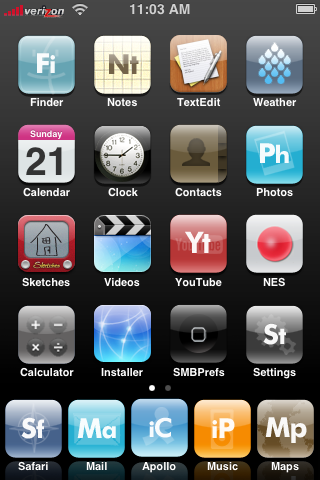
Just this morning, many hackers released a very easy way to jailbreak your iPhone. In fact, you don't even need your computer! Just go to Safari and then to go jailbreakme.com. At the bottom of the page, just select "JailBreak Me" and then Safari will quit, bringing you to the home screen. Do not touch your iPhone until you see the "Slide to Unlock" page. When you next see the home screen, it will have Installer.app waiting right there for you to use it. You might have to restart your phone if it seems slow. Jailbreaking puts your Phone in a state of letting files be able to be written to it, so 3rd party apps can be installed.
 

foo_1.png

An Extreme Case


Full Story


User Feedback

Recommended Comments

JedixJarf

Posted

Works like a charm. :unsure:

bofors

Posted

Interesting, does any body now how JailBreak gets Safari to do this trick?

Archion

Posted

It appears to use the tiff exploit and then patches the hole when it's done. Looks like worst thing that would happen is to need a restore.

skyhighmac

Posted

Does it work on verizon??? I wish!

Special-K

Posted

Does it actually work on Verizon? Cause if so, maybe I could get it to work on Helio. Hmmmmmm.............

failurbydesign

Posted

i dont see how it could work since verizon is cdma..but its weird to have the verizon logo..

Special-K

Posted

Damn......well then it's photoshopped.

jez6345789

Posted

Hi

Worked a treat on my itouch

being a ludite now I have a get out of jail free card what is the easy way to get the basic phone apps installed so at least I can book an appointment. :(


regards Jez

Numberzz

Posted

Sorry, that was Atreyu S3's iPod Touch, where he edited the iPod Carrier JPGs to say verizon. :( But it is still hella hacked.

bofors

Posted

It appears to use the tiff exploit and then patches the hole when it's done.


Thanks.


So, when Safari loads a certain TIFF file it causes some kind of buffer overfull to gain control over the phone?

lord xeon

Posted

i did it to my iPod touch and it worked flawlessly, only problem is now i can't sync my touch with my computer.


how do you fix this?

Jeezoflip

Posted

...o i was gonna say... i wasnt aware that they got the iPhone to work with verizon :(

Numberzz

Posted

i did it to my iPod touch and it worked flawlessly, only problem is now i can't sync my touch with my computer.


how do you fix this?

Try Restarting...the iPod I mean :(

kernalzero

Posted

risks of completely bricking phone?

what is the restore process? (if different than a normal system restore)

success vs failure stories?


I've got an activated iphone through at&t so if this is as simple as running it and I'm good, restoring to 1.1.1 when apple updates again i'm ready to go...

Numberzz

Posted

No risks. The worst thing you will have to do is restore it. Restoring backs up your settings and then downloads the newest iPhone firmware.

picture_1-20071030-190842.jpg

JonMS

Posted

Just this morning, many hackers released a very easy way to jailbreak your iPhone. In fact, you don't even need your computer! Just go to Safari and then to go jailbreakme.com. At the bottom of the page, just select "JailBreak Me" and then Safari will quit, bringing you to the home screen. Do not touch your iPhone until you see the "Slide to Unlock" page. When you next see the home screen, it will have Installer.app waiting right there for you to use it. You might have to restart your phone if it seems slow. Jailbreaking puts your Phone in a state of letting files be able to be written to it, so 3rd party apps can be installed.


foo_1.png

An Extreme Case


Full Story


sorry for not messaging you back numberz and yes its fine haha

GanjaManja

Posted

Does it not seem incredibly worrying that a simple website can 1) crash your browser 2) run code that makes it reset (and do who knows what else) 3) leave behind a program for you to run ?


It is certainly very nice that someone set this up just to unlock your iPhone , but honestly, I could never be cool with some website running any code they wanted to muck with the inside of your computer/phone's OS. Seems a stone's throw away from installing anything the website wants.


If I were a virus writer, getting viruses onto iPhones & iPods (with Bluetooth, Wifi & CELLULAR access) would be a dream come true! Think of all the penile enlargements that could be sold!


Anyway, not too surprising if many things break. More surprising that it sounds like the site really is made just to unlock your phone and (well,l so far) Not install viruses.

~pcwiz

Posted

Its an honest site. It has worked for people! The worst thing that you could possible have to do is a software Restore...

SurferSD

Posted

Instructions for Jail Breaking a non-activated phone (i.e. you have T-Mobile or another GSM carrier in Europe)


1. enter *#307# press call, now use the back button on the top of your screen to remove *#307# , now enter 0 , press call, press answer, press hold, press decline. And you get to the contact list. And thereafter every time you push the homebutton you just slide the "emergency call" slide, then enter 0 , press call, press hold, press decline


2. Push contacts, end call and you get called again, this time hit decline and you access one of menus with favorites, you can edit contacts, do a test ride on keyboard, take photos etc.


3. Now edit a new contact and type in "prefs://11" as web-address and "http://jailbreakme.com" as an additional URL.


4. When you tap "prefs://11" you can now select your favorite WiFi gateway.


5. Now press the home button and move the slider to the dial-pad.


6. Now you can go back to the contact list by Dialing 0, push call, then answer, then contacts, then hit that web address you typed in.

~pcwiz

Posted

Those instructions are on the jailbreakme site.

SurferSD

Posted

Those instructions are on the jailbreakme site.

Actually, they aren't. If you compare my instructions to theirs, mine is a lot easier as it directs you to the system preferences where you can select your WiFi and input any WEP/WPA key as needed and you don't have to be "really quick and select a network before the phone freezes" ... their instructions read like this (http://www.jailbreakme.com/safari.html):


1. enter *#307# press call, now use the back button on the top of your screen to remove *#307# , now enter 0 , press call, press answer, press hold, press decline. And you get to the contact list. And thereafter every time you push the homebutton you just slide the "emergency call" slide, then enter 0 , press call, press hold, press decline


2. Push contacts, end call and you get called again, this time hit decline and you access one of menus with favorites, you can edit contacts, do a test ride on keyboard, take photos etc.


3. Now edit a new contact and type in http://jailbreakme.com as web-address.


4. When you tap the address safari opens but only displays an error saying that it cannot access the website, it also looks like safari freezes up.


5. Now press the home button, and for a split second the iPhone shows a screen where you can select wi-fi networks. Now you have to be really quick and select a network before the phone freezes.


6. Next you get Back to the "emergency call page" and every on screen button has frozen so the only thing you can do is turn off the phone.


7. Turn the iPhone off then on again


8. Now you can go back to the contact list by Dialing 0, push call, then answer, then contacts, then hit that web address you typed in.

~pcwiz

Posted

Sorry, yours looked almost the same so I assumed it was. Sorry for the mistake.


×
×
  • Create New...