Jump to content

1 Screenshot

About This File

Stacks In Da Place lets you easily customize your Stacks icons. Simply drag and drop an icon and click "Apply Icon"—the app does the rest!
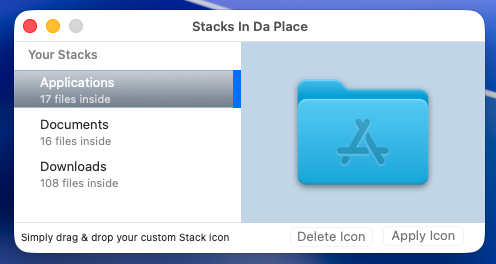
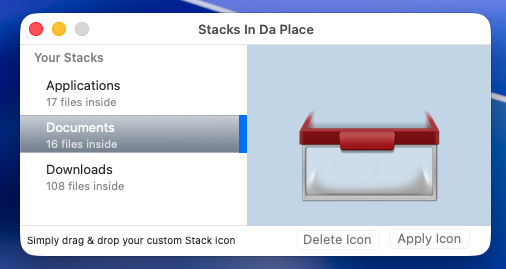


Screenshot 2026-04-29 at 21.22.14.pngScreenshot 2026-04-29 at 21.22.27.png

Screenshot 2026-04-29 at 21.23.19.png


What's New in Version 05/01/26 01:47 PM   See changelog

Released

  1. Fixed a bug that displayed a static list of the current Stacks in the Dock instead of a dynamic list.
  2. The list of current Stacks is updated in real time (with a latency of ~ 5s) after each Dock's modif (deleting or adding a stack).

  • Like 5

User Feedback

Recommended Comments

fantomas

Posted

Hi everyone. :)


Here is another one of my old "favorite" app that I really enjoyed back in the Mac OS X Leopard days and later.

It was just an app that let you to customize your Stacks icons (created by yourself or downloaded from sites like deviantArt).

but compatibility stopped at macOS 10.13 and there were no further updates (certainly a loss of interest from the developer or maybe it wasn't meant to go that far)


Maybe the app has taken on a different name or form; in any case, I haven't found anything that resembles it, either in its simplicity and, especially, its free access.  :D 


So I wanted to create one that would succeed the original app, even if it wasn't a 100% faithful reproduction.


Indeed, the app doesn't do much except replicating a well known hack that can be done manually, that's all. To be honest, customizing the UI was longer and more painfully than the function itself.  :frantics:


In any case, I hope you'll enjoy it. ^_^

  • Like 4
kgp

Posted

@fantomas, can you upload the specific icons you are using above for Applications, Documents and Downloads? 

  • Like 3
fantomas

Posted

@kgp


PM sent. ;)


To ensure the icon is clearly visible, you need to display the folder as a stack in the dock.


Screenshot 2026-05-01 at 07.26.05.png

  • Like 2
kgp

Posted (edited)

On 5/1/2026 at 7:25 AM, fantomas said:

@kgp


PM sent. ;)


To ensure the icon is clearly visible, you need to display the folder as a stack in the dock.


Screenshot 2026-05-01 at 07.26.05.png


@fantomas, many thanks for the icon link 🙏


Yet, I have not fully understood what makes “Stacks In Da Place” so unique or different.


How do you manage custom icons for other stacks beyond Applications, Documents, and Downloads?


Generally, you can change any folder or file icon by right-clicking it → Get Info → and then dropping your .icns, .png, .jpg, etc. onto the default icon in the upper-left corner. 😉


image.thumb.png.32806b71e6cbfe3badf2b4962bdb5ff9.png


image.png.f947336465e4e51b533c6c7a2954bf5b.png


image.png.ff74080854740b58e5ee8a9e2b3ec842.png


Edited by kgp
  • Like 1
  • Thanks 2
fantomas

Posted

@kgp


It's about Stacks Icons in your Dock, not Apps Icons. :)


dfc22041661ec2ee3cb3450b0c14eb94.png


The left side of the separator line is for the apps, the right side is for the files and folders. And it's this part that can be displayed either as a folder or a stack. "Stacks In Da Place" lets you customize your Stacks icons, not your Apps icons.

The app makes no other claims, much less pretend to be unique or different. You can chalk that up to my nostalgia.  :D


  • Like 3
fantomas

Posted

v2 - Made some minor fixes:

  1. Fixed a bug that displayed a static list of the current Stacks in the Dock instead of a dynamic list.
  2. The list of current Stacks is updated in real time (with a latency of ~ 5s) after each Dock's modif (deleting or adding a stack).
  • Like 3
kgp

Posted (edited)

2 hours ago, fantomas said:

v2 - Made some minor fixes:

  1. Fixed a bug that displayed a static list of the current Stacks in the Dock instead of a dynamic list.
  2. The list of current Stacks is updated in real time (with a latency of ~ 5s) after each Dock's modif (deleting or adding a stack).


The fix with the dynamic list works flawlessly 👍

Thanks for this nice tool to play with :thumbsup_anim: 


image.png.925a24b0c20fe0da08dd089699f783f4.png


image.png.53062650c9697e64fd3f0290fbf7fec2.png

          Downloads   Documents   Applications        Desktop               Bin

image.png.9dea5a0155d659dc10dca96081cfcd1c.png

Edited by kgp
  • Like 3
×
×
  • Create New...