
Jump to content

1 Screenshot

About This File

ESP Mounter Pro is a new top bar application to manage your EFI System Partition(s). You can mount or umount any ESP you have on any disk you have directly from its popover window.


**ESP Mounter Pro v1.9.1 / Require 10.9 +**


NEW: since v1.4 can mount/umount all partitions you have, for example each Recovery HD partitions you have also!!


This app use advanced APIs to perform all operations and no AppleScript or scripts are used: only code!
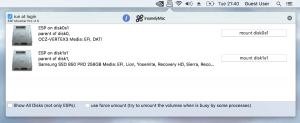
 

post-674334-0-09135100-1473191292.png


New: Dark Mode support (automatic switching):
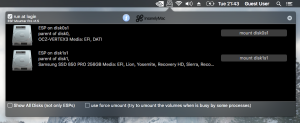
post-674334-0-31414400-1473191279.png


Retina Display Support!


Require 10.9 +, works good in macOS Sierra!


//

// Created by Micky1979 on 15/06/16.

// Copyright © 2016 Micky1979 & InsanelyMac. All rights reserved.

//


app icon by Mirone (thanks)


Does not show an EFI Partition if your disk is not GPT (or if smaller than 1GB). Cannot mount it if corrupted!.


What's New in Version 1.6

Released

  • now the window get closed as soon the mouse click elsewhere. (thanks ErmaC for making me aware)

  • Like 7
  • Thanks 6

User Feedback

Recommended Comments


Micky1979

Posted

My laptop has 1 hdd and 1 ssd, and it didn't show EFI partitions on both drives. However it did show EFI partition on USB drive. :(

Can you show me the output of this in terminal?

diskutil list

Also a ioreg is appreciated

Thanks

Micky1979

Posted

link still gives 1.1 version..  typo or..?

Sorry, did not notice that the app was reporting the incorrect version, forgot to apdate it. Now is ok, re-uploaded v1.3 with correct wording.

nguyenlc1993

Posted

Can you show me the output of this in terminal?

diskutil list

Also a ioreg is appreciated

Thanks


Problem solved, due to not setting partition's name to "EFI System Partition" when creating EFI partition with GParted. Thanks Micky1979 for helping me to find out the cause. :D

  • Like 1
camillionario

Posted

A very useful tool in this world,, thanks Micky1979

  • Like 1
dm4n

Posted

Awesome! Thankyou - works great :)


Design-wise - would you consider using or giving users a Preference option for a black and white menubar icon eg something from here?

Micky1979

Posted

Awesome! Thankyou - works great :)


Design-wise - would you consider using or giving users a Preference option for a black and white menubar icon eg something from here?

Done!

Added "Black Mode" support.... also added "Retina display" support!

matxpa

Posted

Hi 


thanks a lot for your unavoidable Tool


Best regards


  • Like 1
Micky1979

Posted

Thanks! :)

camillionario

Posted

Thank you for supporting your app. Cheers

  • Like 1
Micky1979

Posted

runs in Sierra?

Why not?

Micky1979

Posted

doesn't work for me


"doesn't work for me" means that the app crash (you should have a log in "/Library/Logs/DiagnosticReports" to show me), or your System does not have any ESP to mount?

PoisonApple666

Posted

Sorry...I effed Up!!!....Runs fine.....pilot error

azur_

Posted

Thank you 

  • Like 1
camillionario

Posted

not work with 10.12.1 .  Update??

Micky1979

Posted

Sorry not yet updated (I'm on 10.12). Tonight will look into this.

  • Like 1
camillionario

Posted

Thanks, it seems that I have spoken prematurely. I have rebuilt caches and repair permissions and it worked again


Sorry

  • Like 1
Micky1979

Posted

Thanks, it seems that I have spoken prematurely. I have rebuilt caches and repair permissions and it worked again


Sorry


Yep, just installed the update to 10.12.1 and it works like before.

... and I'm confident that will work for a long time since there are no deprecated libraries to build the project.. ;)

  • Like 1
Kuebeker

Posted

Excellant appz! 


I have an issue where "Login Items" keeps forgetting where ESP Mounter Pro is, yellow triangle, on reboot.


Any one else have this issue? 

ipcsky

Posted

great!!!!

AppleBytes

Posted

Hey Micky1979, looks like a handy util!

I'm trying to cobble up a Mavericks install, and thought this might be handy. But only have a SL to work on, and your app said NO!

Don't suppose you have an old one around that'll work on SL?

Thanks! :)

JennyDavid

Posted

Mickey1979


Great app and thank you.  :thumbsup_anim:  :thumbsup_anim:  :thumbsup_anim:

glasgood

Posted

Excellent App, I like how it provides the volume name. Working on High Sierra.


×
×
  • Create New...