Jump to content

The macOS Mojave final release it's out!


Some of the new things on this system.

Dark mode:
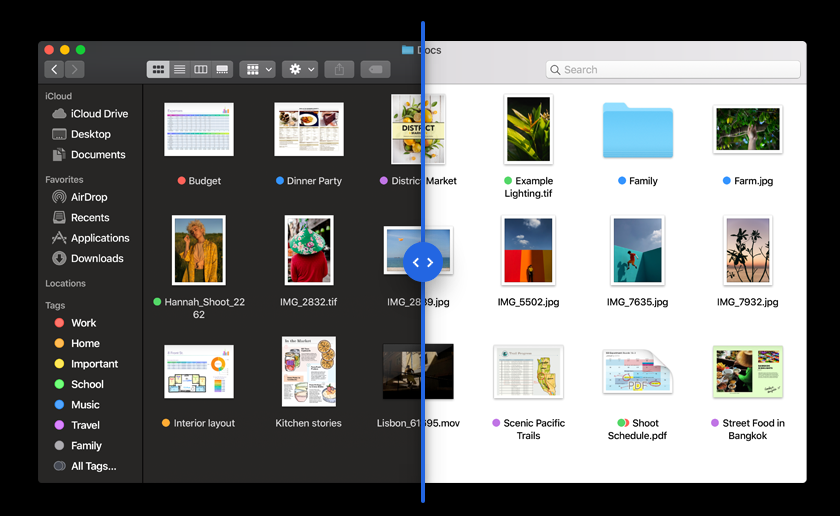
Screen Shot 2018-09-24 at 10.49.39.png


Desktop Stacks:


More improvements with screenshots:


And others very important:

  • Better Control of Your Data
  • Enhanced Tracking Prevention

  • Automatic Strong Passwords


As you guys are doing tests with the betas versions, maybe in this version all the things are going to be more stable.

Cross your fingers!! ;)


USB Installation using 'createinstallmedia' way:

sudo /Applications/Install\ macOS\ Mojave.app/Contents/Resources/createinstallmedia --volume /Volumes/USB

Source: Apple

Edited by Allan
Title changed and command tool.


User Feedback

Recommended Comments


Max.1974

Posted

Awesome!!! :thumbsup_anim:

  • Like 1
Cyberdevs

Posted (edited)

I'm so excited to see what's new in macOS Mojave's Final version :D  

Edited by Cyberdevs
  • Like 2
fantomas

Posted

58 minutes ago, Cyberdevs said:

I'm so excited to see what's new in macOS Mojave's Final version :D  


Maybe we'll finally have a dark mode?  :frantics:

  • Haha 2
Cyberdevs

Posted

Just now, fantomas1 said:

Maybe we'll finally have a dark mode?  :frantics:

A Dark mode? Hmmm, yeah that would be a great feature :D :robot:

  • Like 1
fantomas

Posted

Just now, Cyberdevs said:

A Dark mode? Hmmm, yeah that would be a great feature :D :robot:


I have the feel that we'll have the first 10.14.1 beta seed before that final 10.14 release.  :lol:


less than 7 min

  • Haha 4
Cyberdevs

Posted

I'm so excited! :D

Although I tested all the beta and the DP versions but I feel so excited :frantics:

  • Haha 3
fantomas

Posted

4 minutes ago, Cyberdevs said:

but I feel so excited


7nZ_Uu.gif


:lol:

  • Haha 3
Mork vom Ork

Posted

it IS released: Build# is 18A391...

  • Like 1
  • Thanks 1
Cyberdevs

Posted

5 minutes ago, fantomas1 said:

:lol:

162703726_ScreenShot2018-09-24at8_35_26PM.png.7cd965cd0f36894469294b3fbc16548d.png

Yay!!!!!!!! :thumbsup_anim:

  • Like 2
Allan

Posted

Wow 6.02GB?? :|

Cyberdevs

Posted

It's the full installer1251831859_ScreenShot2018-09-24at8_36_46PM.thumb.png.7240f0be402cb9c1ecabfa6e04a6f907.png

Guest

Posted

241264165_ScreenShot2018-09-24at7_13_34PM.png.458fc8bb44b800c84cd969aec122f62c.png

BALDY_MAN

Posted

not showing in my updates from apple store yet im in the uk


Guest

Posted

:))))


1357136278_ScreenShot2018-09-24at10_36_17AM.png.7f34ecf4c892811684061573b7d9f4b5.png

Qwels

Posted (edited)

Mojav.thumb.png.d3365f2f71c3d8c634e9bc3fa1ed7113.png


Download  :)  6.03 Gb. ( GMT+7)

Edited by Qwels
ameris_cyning

Posted

Nice. Cant wait to see Apple releasing the kernel sources so we can get this going on our AMD machines.

  • Like 5
LAbyOne

Posted

well useless to say for those impatient to get it swscan.apple.com can give you a little hand ...  packages are under 041-08708 

LAbyOne

Posted

1104723529_ScreenShot.png.0498f4f6e7865d6bd47d97180388be7a.png

  • Like 1
PippoX0

Posted

Just got it !


Cheers

d5aqoep

Posted

Waiting for Nvidia drivers. Hope the wait is not too long.

  • Like 2
BALDY_MAN

Posted (edited)

@Herve thanks just installed. just repatched Sound kext with AppleHDAPatcher


Edited by BALDY_MAN
Matthew82

Posted (edited)

All good on x299 and new Lenovo 720 laptop204042839_Zrzutekranu2018-09-24o22_18_03.thumb.png.229b5cbb14eae0c8add1bfe3ab03af13.png


Edited by Matthew82
  • Like 1
asdesoso

Posted

The blurry font-rendering sub-pixel antialiasing in the final version of Mojave is still present? I saw that the font rendering from beta 1 to GM is blurry and bold on non-retina displays.

Thanks in advance.

Allan

Posted

Hey guys!


The command for using 'createinstallmedia' are into the first post. :)

  • Thanks 1


Guest
This is now closed for further comments

×
×
  • Create New...