Jump to content

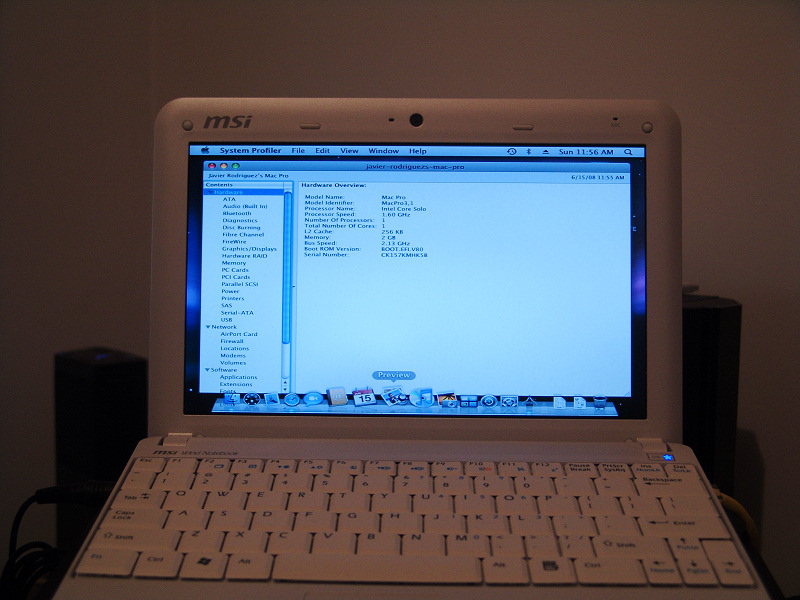
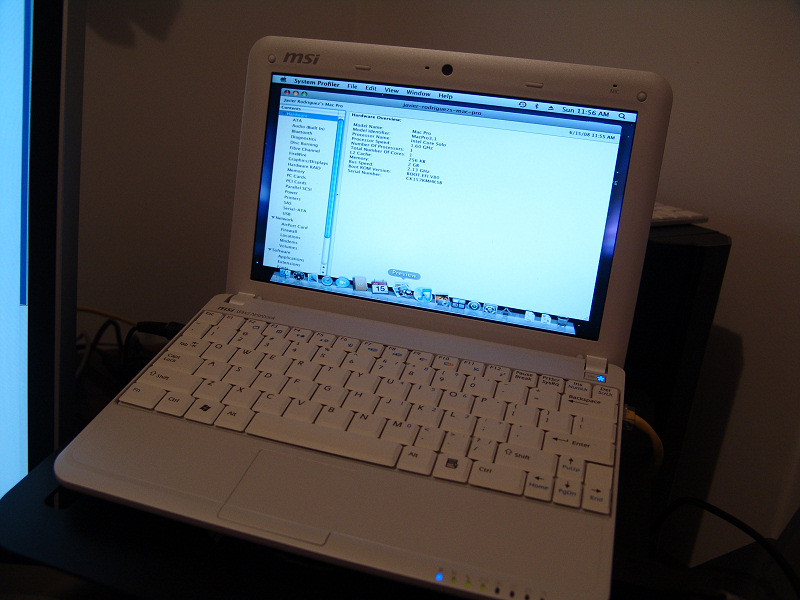
A hacker, and a member of our forums, has managed to get Mac OS X Leopard running on the MSI Wind. This is what jav had to say about getting it on his MSI Wind. It's translated from spanish.

Well, here it is. The new MSI Wind running Kalyway 10.5.2. I still have to make some adjustments, such as the resolution and the wireless card, but I couldn't stop myself from posting these images that I'm sure will get the interest from more than one person. Ethernet and Bluetooth work right out of the box, so I'm really expecting a lot from this small notebook.

All that and the MSI Wind isn't even going to be released until July 7th.

EDIT: It appears that the sound also works OTB. The resolution and wireless are the only things that we know of that don't work.
post-52313-1214691277_thumb.jpg

post-52313-1214691298_thumb.jpg

post-52313-1214691375_thumb.jpg


Forum Thread (Spanish)

If you speak English, post here :P


User Feedback

Recommended Comments


Korrupted

Posted

Yeah, it was posted a few pages back, but it's true. The onboard really works. :D

formerglory

Posted

So with these new WiFi drivers, all that's missing are some true blue audio drivers then?


If so, I'm gonna plunk down for a Wind ASAP.

elastic

Posted

no one with a targa clone yet?


looking for the WiFi Atheros AR928x solution..

battista

Posted

Just found this link:


<mod edit> NO TORRENT LINKS. GRRRRR. </mod edit>

pilsator

Posted

After updating to 10.5.6 the akoya mini got slower, system profiler reports just 1 core (instead of the 2 logical cores under 10.5.5) and Quartz Extreme is not supported.

Are there any solutions for that?

Harvey Dent

Posted

Well i dunno about aloya but my wind is rocking hard with 10.5.6 on it running pcefi v9 and voodoo kernel all is great so far and it sems snappier quartz and core image working you must reinstall graphice driver and do a efi gfx string for graphics to work i used pcwiz osx tool to do it everything is working great when i did 10.5.6 update lost power management and ps2 and keyboard just reinstalled it along with graphics and it works great.

Acid_Burn

Posted

system profiler reports just 1 core (instead of the 2 logical cores under 10.5.5) and Quartz Extreme is not supported.

Are there any solutions for that?


The Atom CPU in the MSI Wind and Akoya has a Atom CPU with 1 Core. With HT (Hyper Threading) have the Atom CPU 2 virtual Core but 1 real Core.

Synaesthesia

Posted

Check Activity Monitor - it should show 2 logical cores. Otherwise something is wrong.

Acid_Burn

Posted

Check Activity Monitor - it should show 2 logical cores. Otherwise something is wrong.


The Screenshot is from Wikipedia

post-10343-1229882192_thumb.jpg

pilsator

Posted

Activity monitor shows 2 (logical/virtual) cores.

So I will try to install the latest graphic kexts along with the gma950 efi string as suggested by Harvey Dent.

pilsator

Posted

Still no luck with quartz extreme after installing newer graphic kexts (AppleIntelGMA950.kext 1.5.36.25 and AppleIntelIntegratedFramebuffer.kext 1.5.30.17), deleting natit.kext and applying the gma950 efi string.

Kernel is Darwin 9.6.0 (10.5.6 vanilla), not voodoo.

I installed pcefi v9 and applied the dsdt patch before the 10.5.6 update.

Acid_Burn

Posted

You need the

0x27ae.zip
VGA Package, all Strings in boot.plist too.
pilsator

Posted

Could you post a link?


Edit: already found with google. But it's from August and includes natit.kext, so I think it's the one I had installed before installing newer kexts (both without QE and CI support).


Or do you mean some other brandnew kexts?

pilsator

Posted

I already tried this script. I know that it works for other people but I can't boot after applying it. Boot ends up in a black or blue screen. Maybe I have to install the system again.

pilsator

Posted

Tried with a fresh install - same result. 10.5.6 boots with the stock graphic kexts but after running the patch27ae.command script I first saw the grey apple during boot with the spinning wheel, then the usual blue screen, then nothing more happened.

I couldn't apply the script with kexthelper after logging in as root. It seemed to install the kexts but didn't write the 027ae.... kexts to the extensions folder and didn't have any effect. So I logged in as root and doubleclicked on the script. Then the extensions got installed but the system wouldn't boot. I cleaned up all caches before booting with OSX86Tools for sure and repaired permissions.

For any reason my akoya mini refuses to work with 10.5.6 and these kexts.

kubi

Posted

Has anyone gotten the BisonCam ver 0.03 to work with photobooth? it seems the MSI Wind shipped with 3 types of webcam.. Sonix, BisonCam Ver 0.2 and Ver 0.3.


I unfortunately have the 0.3 version.. and cant get photobooth to work..


And ideas ?

dadrkside40

Posted

Can someone give me a hint how to enable the "normal" PC Type Keyboard Layout of the Wind on OSX, so you can see what you Type?


So that for exampe the @ sign is not on the L button but on the Q button?

Acid_Burn

Posted

Has anyone gotten the BisonCam ver 0.03 to work with photobooth? it seems the MSI Wind shipped with 3 types of webcam.. Sonix, BisonCam Ver 0.2 and Ver 0.3.


I unfortunately have the 0.3 version.. and cant get photobooth to work..


And ideas ?

On my Wind works the Webcam with Photobooth. Even on fresh install i can take a scapshot for Userpicture with my internal Webcam. Thats amazing. i don´t no 0.3 or 0.2 Webcam.... It works oob....
r0b0d0c

Posted

Has anyone gotten the BisonCam ver 0.03 to work with photobooth? it seems the MSI Wind shipped with 3 types of webcam.. Sonix, BisonCam Ver 0.2 and Ver 0.3.


I unfortunately have the 0.3 version.. and cant get photobooth to work..


And ideas ?


Same here - I hope it's OK here to refer to another forum, but there's a thread on this exact topic at Bisoncam and Photo Booth discussion. Maybe a new thread here on this specific topic would be productive, as it might get lost in this lengthy discussion thread here?


If it's against forum policies here to refer to another forum, please delete my post, and accept my apologies.


On my Wind works the Webcam with Photobooth. Even on fresh install i can take a scapshot for Userpicture with my internal Webcam. Thats amazing. i don´t no 0.3 or 0.2 Webcam.... It works oob....


Could you check with webcam your Wind has (under "System Profile" ---> USB). If it's BisonCam, it should also list either v 0.02 or 0.03. TIA

dadrkside40

Posted

So i just did a retail DVD install at the Wind of my Girlfriend. wasnt such a big problem with the help of the wind-osx86 wiki.


So i installed OSX 10.5.0 added drivers and then made the Update to 10.5.5 via Combo Update, so far so good.


The only thing i am missing is the Battery Status, it dosent show the icon becouse it says that there is no Battery, what do i have to do to get my Battery Icon back?

imadosser

Posted

Anyone tried 10.5.6 yet?

Acid_Burn

Posted

Could you check with webcam your Wind has (under "System Profile" ---> USB). If it's BisonCam, it should also list either v 0.02 or 0.03. TIA

I have 0.02 in Sys Profiler.


Anyone tried 10.5.6 yet?


My Wind works with 10.5.6


×
×
  • Create New...