Jump to content

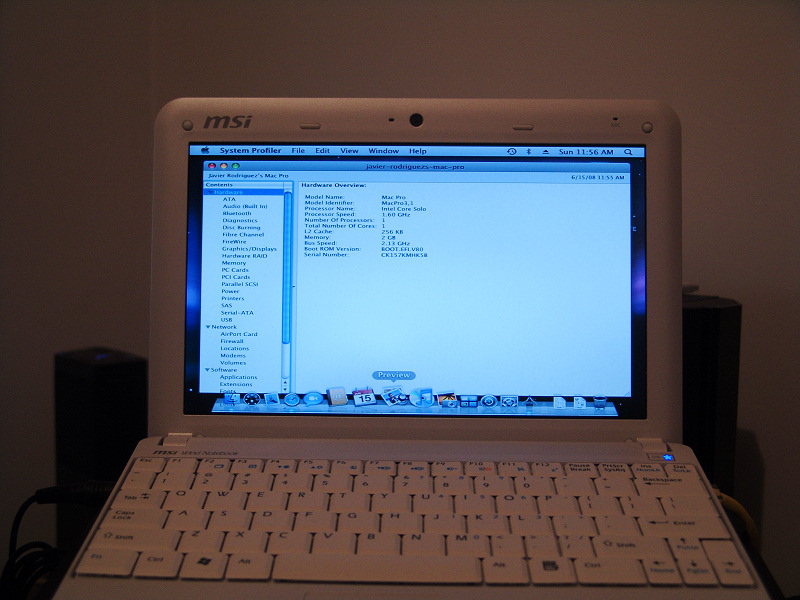
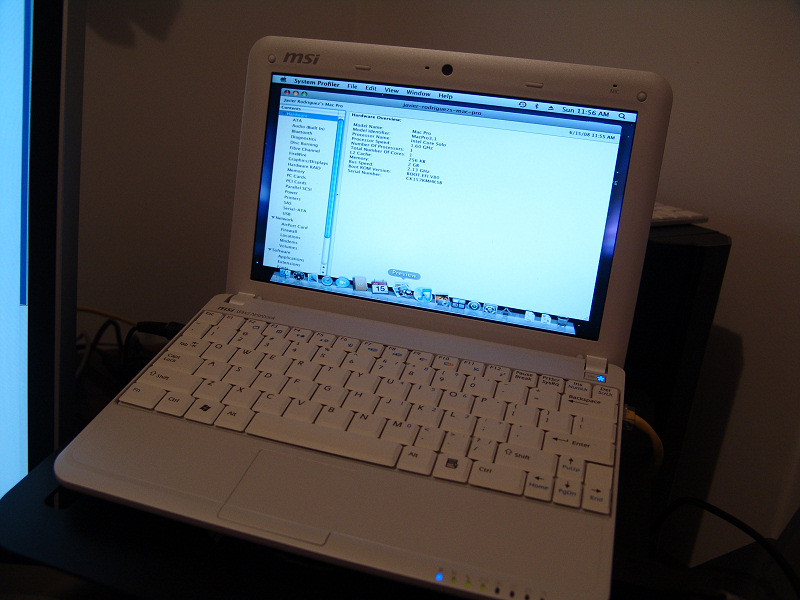
A hacker, and a member of our forums, has managed to get Mac OS X Leopard running on the MSI Wind. This is what jav had to say about getting it on his MSI Wind. It's translated from spanish.

Well, here it is. The new MSI Wind running Kalyway 10.5.2. I still have to make some adjustments, such as the resolution and the wireless card, but I couldn't stop myself from posting these images that I'm sure will get the interest from more than one person. Ethernet and Bluetooth work right out of the box, so I'm really expecting a lot from this small notebook.

All that and the MSI Wind isn't even going to be released until July 7th.

EDIT: It appears that the sound also works OTB. The resolution and wireless are the only things that we know of that don't work.
post-52313-1214691277_thumb.jpg

post-52313-1214691298_thumb.jpg

post-52313-1214691375_thumb.jpg


Forum Thread (Spanish)

If you speak English, post here :P


User Feedback

Recommended Comments


redratfish

Posted

With a little bit of acetone, and silver spray paint ...


macbooknano3570ve3.jpg:angel:

___________________________________________________________________________


When I plug my in MacMouse (or any mouse) after it has fully booted, my MSI/Medion doesn't recognize it.

However when I have it plugged in white booting, then it works.

But after it goes to sleep, again it isn't recognized anymore.


Anyone?


it may be the same problem with kernel version and system kext/ do a seach for usb hot plug fix . am thinking of buying the msi . but need to know what works and what dos not

SaxMachine

Posted

I have a problem with AppleACPIplatform...work only kext on 10.5.2...

Anyone have this problem?

FavleX

Posted

I have a problem with AppleACPIplatform...work only kext on 10.5.2...

Anyone have this problem?


Take a shot here

SaxMachine

Posted

Take a shot here


Thanks but my problem is different...

I have installed 10.5.2 but if i upgarde to 10.5.3 i have kernel panic or still waiting for root device...

The problem is AppleACPI.


I can not understand why I do not work and all the others ...

SaxMachine

Posted

Ok... I have donwloaded MSIWindOSX86.iso and work... I have reinstalled Vanilla Kernel on 10.5.4 and now work very fine!


Anyone have a problem with PhotoBoth and WebCam?

For me work only ichat skype etc...

U.C.

Posted

On my install my Webcam works from the get go, with everything. Though if you have the Akoya, it wont work in Photobooth, coz its only 0.3 MP.

alucard_xs

Posted

wrong. it works great, just don't forget to use firmware upgrade under xp.

midireebs

Posted

Did someone already try BIOS update 1.06? Could it cause trouble with OSX?


Ive done up 2 identical (w/ the exception of wireless cards) : 1 wind with bios .105 and a newer 1 with .106... my first wind .105 doesnt need switchrex to boot consistantly 1024 x 600 but the newer bios .106 the machine would occasionally boot in 800 x 600 with no 1024 x 600 listed in displays hence the need for switchresx. That is the only difference I can see.


By the way on the newer one I used Dell PN#430-2547 the dell 1510 wireless N mini pci-e card and it works flawlessly post installation of MSIWINDOSX86.iso. The first one I just tore the G card out of an HP NX6325 which also worked flawlessly post install of MSIWINDOSX86.iso.


The only thing I cant figure out so far is why the screensaver wont kick in at the appointed time? It works with Wallsaver running in the background and also works if you enable Hot Corners to be the screensaver... curious... ?

mst0192

Posted

Regarding the GMA950 and 1920x1200 I doubt it, might be too much for the few megs available to handle...


i'm running 1920x1200 on a asus barebone with gma950 (desktop version) via dvi...

FavleX

Posted

The only thing I cant figure out so far is why the screensaver wont kick in at the appointed time? It works with Wallsaver running in the background and also works if you enable Hot Corners to be the screensaver... curious... ?


For working regularly u must try to log out and login again , then it should starts at right time.

It's a well known prob on variuos osx86 installation.

kamikaze

Posted

Just a quick msg to let everybody know that I got 10.5.5 working on the wind.

Just vanilla install using the netkas method.


You will have to reinstall the gfx drivers but all the rest was working as before.

U.C.

Posted

BTW Bios 1.08 is also working great on the Wind with 10.5.5.


Only PgUp/PgDn/Numpad keys dont work. Fn related software functions dont work in Bios 1.08. But you get Overclocking.

sandmanfvrga

Posted

I started to look into these. I want a nice laptop, nothing super powerful. It looks great this wind laptop, but I worry about:


Headphones not working

No firewire.


I want to use it for internet, email, instant messaging, office stuff, picture editing ( jpg's from cameras, no raw stuff), audio editing (small stuff), and capture SMALL video. I had a ibook 1.33 G4 and it was fine, but chugged in some things. I don't want to do much, my pc does the video editing and I plan to go imac next year. Is this a solution for me?

U.C.

Posted

OSX runs beautifully on this thing. My only gripes are the headphones port, but then again, my BT headphones work great.


Aside from that get the 6 Cell battery and this will be your dream Mini Macbook

Arthur+Kiwi

Posted

Hi, I bought the Wind PC and I start to read this thread. So I decide to get msiwindosx86.iso

After a try or two I install it in dual boot and everything went right.

But....I have a problem with the ethernet card. It's installed because in the network tab it's present, but if I plug the lan cable (fully functionally under windows), nothing appens and it says "no cable connect" -_-


I missed something???

sandmanfvrga

Posted

OSX runs beautifully on this thing. My only gripes are the headphones port, but then again, my BT headphones work great.


Aside from that get the 6 Cell battery and this will be your dream Mini Macbook


Sounds cool. I MUST be able to do things on headphones, so blue tooth headphones work? On firewire, add on card?

Arthur+Kiwi

Posted

ok, I've got some news. The lan works , but I must turn on the pc with the cable connected....strange....


This leopard works very well :)


The "Fn" key works too, but if I turn on the bluetooth when the systen is already on it doesn't works :angel:

U.C.

Posted

Bluetooth headphones work great. The wind does not come with a FireWire port, but does have three USB 2.0 ports. No idea about addon cards though I highly doubt it.

weaksauce12

Posted

Bluetooth headphones work great. The wind does not come with a FireWire port, but does have three USB 2.0 ports. No idea about addon cards though I highly doubt it.


There aren't any Firewire cards that will work on the Wind, unfortunately. Although maybe someone will find a Mini-PCIe and mod it...haha. But, the rez is way too small to edit vids...just look at Photobooth, you can't even fit it all on the screen because of the weird 1024x600 resolution.


Syba has an $8 USB adapter on Newegg that works perfectly with the Wind. It's the size of the thumb drive, I just keep it in my earbud pouch when I take it with me.

sandmanfvrga

Posted

Well I can live without firewire, but I just wonder on the screen size having not seen one in person.

kamikaze

Posted

Anyone tried this driver with the wind?


http://www.realtek.com.tw/downloads/downlo...;Downloads=true


Either this one:


ftp://66.104.77.130/cn/wlan/87_Mac10.4_v1309.zip


or this one:


ftp://210.51.181.211/cn/wlan/87B_Mac10.4_v1117.zip


It would be very interesting to see if it gets the built in card to work.


Could someone try it?


/Klaus


I read a few forums where some people reportedly got their native wireless card to work.

The problem with these solutions (read drivers) is that you need to run a third party application to get the driver to work.


This is kind of sad... plus dell a 1490 is only a few $$$.


There is nothing better than native support ;-)


Hi, I bought the Wind PC and I start to read this thread. So I decide to get msiwindosx86.iso

After a try or two I install it in dual boot and everything went right.

But....I have a problem with the ethernet card. It's installed because in the network tab it's present, but if I plug the lan cable (fully functionally under windows), nothing appens and it says "no cable connect" ;)


I missed something???


I would recommand an exchange.


The card works fine!

echo154

Posted

For those running 10.5.5, I am sure you will enjoy a fully working GMA950 driver


packaged from this forum and confirmed to work on a wind


http://forum.insanelymac.com/index.php?showtopic=128862


Enjoy !!!


PS: You may have to rebuild the ext cache...


Hi kamikaze!


I am a newbie in this forum. I am a student in a small country.

I have an MSI Wind installed with MSIWindOSX distro and it worked fine.

The drawbacks are... I can not use Wifi (I don't want to swap my wifi card since it will void my warranty), and can not use OSX for my presentations because it can not support mirroring (how i would love to use it to dazzle my teachers with Keynote presentation :D), so i still dual boot with Winblows.

The other drawbacks, i mean no sound from earphone & microphone, is not particularly an issue for me.


Can you give me directions (preferably links... :() to upgrade my MSIWindOSX distro to Leo 10.5.5 so I can use my Wind for my presentations? Or should I do a clean install from the start with Kalyway 10.5.2?


How can i use your uploaded file?

How can i rebuild the ext cache?


Your help is greatly appreciated!


Thanks in advance...

alucard_xs

Posted

Thanks Kamikaze, I upgrade from 10.5.4 to 10.5.5 without changing my graphic drivers (akoya -> GMA950) and it works great, does your driver post above is different from the one released months ago ?


;)


×
×
  • Create New...