Jump to content

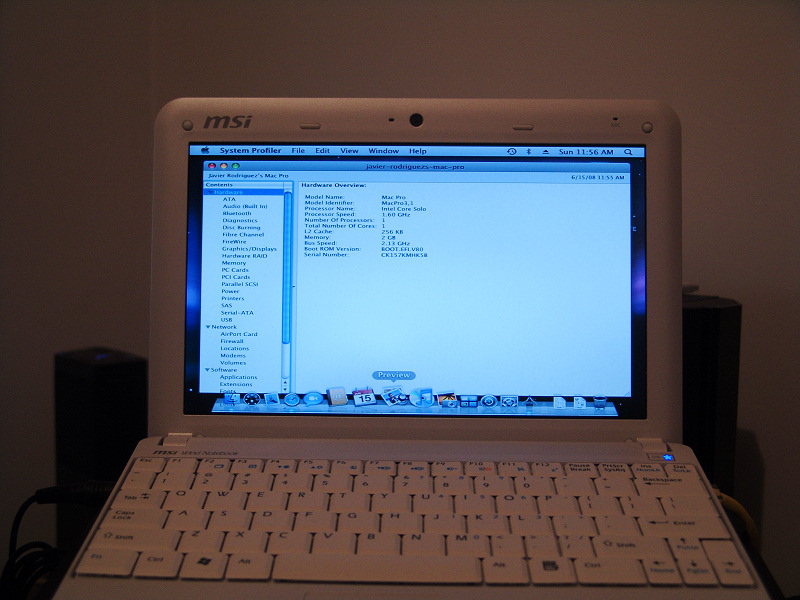
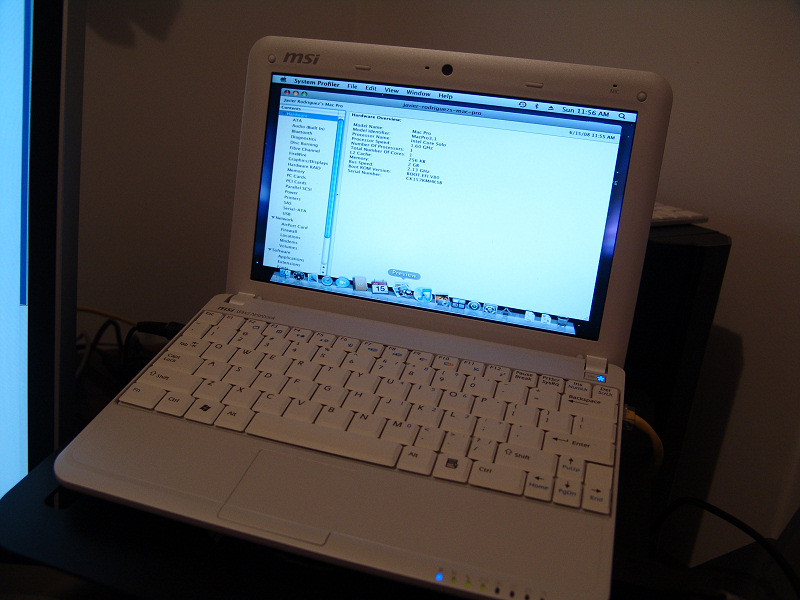
A hacker, and a member of our forums, has managed to get Mac OS X Leopard running on the MSI Wind. This is what jav had to say about getting it on his MSI Wind. It's translated from spanish.

Well, here it is. The new MSI Wind running Kalyway 10.5.2. I still have to make some adjustments, such as the resolution and the wireless card, but I couldn't stop myself from posting these images that I'm sure will get the interest from more than one person. Ethernet and Bluetooth work right out of the box, so I'm really expecting a lot from this small notebook.

All that and the MSI Wind isn't even going to be released until July 7th.

EDIT: It appears that the sound also works OTB. The resolution and wireless are the only things that we know of that don't work.
post-52313-1214691277_thumb.jpg

post-52313-1214691298_thumb.jpg

post-52313-1214691375_thumb.jpg


Forum Thread (Spanish)

If you speak English, post here :P


User Feedback

Recommended Comments


barchetta

Posted

With a little bit of acetone, and silver spray paint ...


macbooknano3570ve3.jpg:lol:


___________________________________________________________________________


When I plug my in MacMouse (or any mouse) after it has fully booted, my MSI/Medion doesn't recognize it.

However when I have it plugged in white booting, then it works.

But after it goes to sleep, again it isn't recognized anymore.


Anyone?

pakaya

Posted

Sorry I made a mistake - Mine too was £20, I was getting confused with another item I bought recently :D

Had a quick look round and that seems as cheap as you can get them too! Still... well worth £20 to have a wind running leopard and have its wifi functioning...


thanks for the info, dell.co.uk sell it for 22 now. I salvaged a realtek 8187L from sister's broken laptop. Working fine with the latest realtek drivers.


£20? Is that like $20 in US? Just wondering because £20 sounds pretty cheap for any computer and i'm intrested in it :)


EDIT: Nvm I see the price range is like $400-$600.


I am sorry to disappoint, we are talking about a wifi card for 20 :D

Colonel

Posted

With a little bit of acetone, and silver spray paint ...


macbooknano3570ve3.jpg:D

___________________________________________________________________________

Anyone?

Nicely done!

badassgn3.jpg

barchetta

Posted

Still waiting for my Dell 1490 (but living across the Northsea it may take a few days longer).

I checked the seller on eBay what he has sold recently: a whole batch of 1490's (and the odd 1390) :D !


You mentioned 15 GBP earlier, I think that's his price of the 1390.

hitman80

Posted

Hello to everybody.... :D

I have finally got a WIND U100 . icon_e_biggrin.gificon_e_biggrin.gif


My Wind is in dual boot with XP Sp3 and OSX 10.5.4 ( thanks to Stellarola & co for DVD ... it's ok for me.. very,very easy )


but I have some questions for OsX&WInd's users :


- I've installed R1000.kext from sourceforge . I have NOT installed original drivers from Realtek site . With manually configuration , after sleeping , ETH works....

I don't understand why SHARED PLACES don't appear in FINDER . Only one time I've seen my NAS (Synology ) and other PCs of my LAN ?


Why ? Doesn't Bonjour correctly work .


With CONNECT to SERVER is OK (afp or smb) , but I don't want this way ..


Any suggestions ?


- Problem with key backslash \ . It doesn't work . when I type it , appears <..


And when I type key < .... nothing appears ...


How Can I solve this problem ? I'm using Italian (PRO) layout... icon_e_confused.gif

hitman80

Posted

hitman80 wrote:.....


- I've installed R1000.kext from sourceforge . I have NOT installed original drivers from Realtek site . With manually configuration , after sleeping , ETH works....

I don't understand why SHARED PLACES don't appear in FINDER . Only one time I've seen my NAS (Synology ) and other PCs of my LAN ?


Why ? Doesn't Bonjour correctly work .


With CONNECT to SERVER is OK (afp or smb) , but I don't want this way ..


Any suggestions ?


SOLVED with google and this link:


http://www.naschenweng.info/2008/07/17/nas...res-via-bonjour


NAS is correctly shared now ... and also WinPCs... ( ?? icon_e_confused.gificon_e_confused.gif I don't understand ... but goes well... )


hitman80 wrote:- Problem with key backslash \ . It doesn't work . when I type it , appears <..


And when I type key < .... nothing appears ...


How Can I solve this problem ? I'm using Italian (PRO) layout... icon_e_confused.gif

This issue is opened for me... Can you help me ??


( I have also the same problem related by Pierrox : a mix beetwen English and Italian )


How can I solve it to having a full OS with my language ??

fonkyfresh

Posted

Hi guys, I have been carefully reading everything!

My wind is coming in two days! quite hard it was sold out almost everywhere in France.

My question is about the wifi, what if I have an extra Airport mini PCI for MacBook, will it fit?

I don't want to void the warranty and be like {censored} it does not fit :)

Thanks for the answer,

Your_destinY

Posted

it won't fit, you need an mini pci-e card

fonkyfresh

Posted

Alright, i guess i'll order a dell on ebay...

I've read that the wifi could work, need to find the exact name of it, as i dont want to void the warranty right away...

What would be the best mini pci-e N wireless adapter which would be compatible with Leo?

edit:

I got the DELL 1490 DW on ebay, i'll open up the little one to add RAM and WIFI and i'll get the best netbook ever.

Since the mic is not working, i'll simply use my Bluetooth Headset to skype and ichat!

alucard_xs

Posted

HI dudes,


Seeing I'm using iAtokos v4 and a Médion mini AKoya, can someone tell me what are the good options to choose, during the installation, there're too many thinks to choose ...


thanks :)

alucard_xs

Posted

holy {censored}, I can pass the check screen ... my dvd hangs ... I try 4x and 8x without success ... ideas ?


omfg ... now i've got the apple screen looping endlessly ...

fonkyfresh

Posted

holy {censored}, I can pass the check screen ... my dvd hangs ... I try 4x and 8x without success ... ideas ?

Dude :wacko:

On the bay you can find a distro made for these lovely little laptops.

msiwindosx86 is the right name...

Good Luck

alucard_xs

Posted

omfg ... now i've got the apple screen looping endlessly ...


i did not do aything ... help please

U.C.

Posted

I had many problems due to a faulty DVD Drive. Just restored the image onto a USB Drive, and installed PC_EFI to boot.


Also I went to MSI and I got my card swapped by them. They were happy to do it, and will put a brand new sticker(2 weeks later, they dont have the stickers in stock) on.


BTW, does anyone have the pinouts of the BT Module, mine came without one and I dont want an external BT. I have the Dell and Acer Pinouts, dont know if they will work with the Wind


EDIT: Seems like Dell/Acer have 1st four pins in the same order as USB. Hmmm. I am gonna get me a USB BT and try it out.

alucard_xs

Posted

well it seems now it works, it installed osx, i suppose, but now i'm trying to dual boot with XP using Gparted CD, but the application hangs on "libata v3..0 loaded" ... any idées ?

U.C.

Posted

make sure you are using MBR, not GUID

shoarthing

Posted

Hi guys, I have been carefully reading everything!

My wind is coming in two days! quite hard it was sold out almost everywhere in France.

My question is about the wifi, what if I have an extra Airport mini PCI for MacBook, will it fit?

I don't want to void the warranty and be like {censored} it does not fit :thumbsup_anim:

Thanks for the answer,

. . if it is an Airport from any Intel Macbook; yes of course it'll fit. They & the Wind both use mini-pcie cards. Check this sort of thing out at iFixit.
alucard_xs

Posted

ok I try and manage multiboot but my leopard does not want to load, apple screen with a 'no way" ... maybe i should start from the beginning using the default options in iatkos but, if an akoya user /osx86 could tell me the right drivers to use in the config window , it would be great.


no one ?

alucard_xs

Posted

ok install went ok it seems but I can't pass the "backup files on another mac" page ?? it keeps rebooting to the language page .... ?????!!!

U.C.

Posted

You need to have LAN working. Make sure to select Realtek 8169 Drivers selected while installing


PS Can someone with CoolBook 2.9 working, unregister it, krack it using KCN's 2.8 Krack and lemme know if it still works. Please....

alucard_xs

Posted

Tanks I'm gonna try but do I need to have an internet connection ?

alucard_xs

Posted

I tried using APPLERTL81669 drivers during installtion but it still does not work ... what can I do ????

osxow

Posted

Guys, I don't want to hijack this thread and thought about setting up a new one, but wasn't sure if it was likely to be a hackintosh hardware issue.


I am prepping for when my older iPhone arrives and wanted to get my hackingtosh setup to act as a wireless gateway to my USB 3G Dongle I am also purchasing.


I tried to get the hackintosh to work (without wep) using an XP client, but it won't connect. If I manually setup a ad-hoc network, it connects and assuming static ip's are set, will ping the osx machine.


The difference when using internet connection sharing is that the network appears as in infrastructure mode not ad-hoc mode. Could the reason it won't connect be down to the wifi card not supporting promiscious mode or something ? PS, I swapped out for a dell 1490.


As an aside, to make this post a little more appropriate I will also ask if anyone has managed to get the NIC detection working correctly. In system prefs, it doesn't know if the RJ45 is pulled out or inserted after the machine has booted. I assume the same is true following sleep. Doesn't appear to be processing all device messages correctly. I am using mach_kernel as standard from the kalway distro.


PPS - Issues with the screen resolution jumping about. My machine was fine for ages then started doing it. I noticed that the panel wasn't being detected and the graphics device selected was falling back to SVGA modes. I used DisplayConfigX and replaced the panel overrides to make sure it worked fine, but that didn't help. I ended up replacing the overrides for the SVGA device to get it to work 100% of the time. This is a bit of a cludge, but as I very rearely plug in an external screen, worked fine. Could always build a custom override with standard vesa settings, but make the detault 1024x600, I suppose.


Long babble over - any feedback welcome.

pilsator

Posted

Did someone already try BIOS update 1.06? Could it cause trouble with OSX?

barchetta

Posted

ok install went ok it seems but I can't pass the "backup files on another mac" page ?? it keeps rebooting to the language page .... ?????!!!


Upon booting, at the prompt type "Graphics Mode"="640x480x32" (incl. the quotes). The screen will be too small for the 'backup files' question :rolleyes:


Did someone already try BIOS update 1.06? Could it cause trouble with OSX?


Works like a charm.


×
×
  • Create New...