
Jump to content

2 Screenshots

About This File

Flash-Wizard-Icon.png


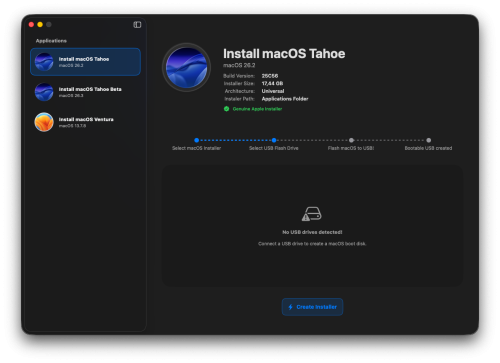
FlashWizard is another one of my personal-use apps that I decided to share with everyone. It's simple, straightforward, with no unnecessary steps or gimmicks. While there are plenty of apps out there that do the same thing create a bootable macOS drive FlashWizard can be another excellent option. With just a few clicks, you can turn your USB drive into a bootable installer, ready to install or restore macOS.


Why use FlashWizard?


    •    Simple, Intuitive, and Straightforward: No nonsense, no unnecessary steps.
    •    Fast: The flashing process is optimized to be as quick as possible.
    •    Supports multiple macOS versions: From macOS Mojave up to macOS Tahoe, it gets the job done.
    •    Secure: Uses macOS's built-in Authorization Services to ensure only user-approved commands are executed.
    •    Logs: You can find output and error logs in /tmp (note: the files are hidden).
There are still a few features to be implemented in the future. For now, if you can test it and give me feedback, I promise to reply as soon as possible. Suggestions are welcome as long as they're useful for everyone and not just personal preferences.


How to Use:


    •    Step 1: Select the macOS installer (by clicking the icon this applies to all steps).
    •    Step 2: Select your USB drive. A 16GB drive is enough to create a bootable macOS installer from version 10.9 (Mavericks) up to 13.7 (Ventura). For later versions, I recommend a 32GB drive. If you choose to format the USB, it will be formatted as JHFS+ with a GUID Partition Map.
    •    Step 3: Click Flash macOS to USB and wait. Don’t worry if an error occurs a message should appear (at least I hope so, LOL).

Edited by Mirone


What's New in Version 2.0.0   See changelog

Released

Main changes:

  • Complete redesign of the graphical user interface (GUI)
  • Application rewritten in SwiftUI
  • General performance and stability improvements
  • Internal refactoring and various optimizations
  • New Icon
  • Like 6
  • Thanks 2

User Feedback

Recommended Comments

LockDown

Posted

Welcome back and thanks for sharing another good app

  • Like 3
mengshi

Posted

image.png.3281f0a6f07b189d3ae39ee62c1c10ea.png


I get this when trying to install. Nothing to do with privacy & security setting.

  • Like 1
LockDown

Posted

sudo xattr -cr /path/to/app

  • Like 1
Mirone

Posted

I will update this app, although I don't know if it will be of interest to anyone yet.

  • Like 1
Mirone

Posted

On 10/8/2025 at 12:42 PM, mengshi said:


Spoiler

image.png.3281f0a6f07b189d3ae39ee62c1c10ea.png


I get this when trying to install. Nothing to do with privacy & security setting.

Download version 1.0.1  the app is now notarized, and you won’t see that annoying alert anymore.

  • Thanks 1
ammoune78

Posted

Hey @Mirone, thanks for the app! I've just downloaded the 1.0.1, started using it for the Tahoe, and on the final step, I've got the message of error. I can't remember the progress percentage that was done but here's the screenshot, and I'm on Sonoma, if that helps.


I don't know if the process was successfully done and it just a bug message, or it's really something goes wrong during the process of copying the files!


Quote

Flash-Wizard.thumb.png.3aa1ee8b7a3b047961744543f6a4e73e.png


Mirone

Posted

Thank you for downloading and testing the app! Open the menu and go to the logs; they are hidden. See if the error log shows anything. Did you try booting from the media created after the installation?

Spoiler

FlashWizard.png.12e01b21f05d1a76e84ab465aab4c989.png


  • Thanks 1
ammoune78

Posted

12 hours ago, Mirone said:

Thank you for downloading and testing the app! Open the menu and go to the logs; they are hidden. See if the error log shows anything. Did you try booting from the media created after the installation?

  Reveal hidden contents

FlashWizard.png.12e01b21f05d1a76e84ab465aab4c989.png


I did it, and it opened tmp folder that have 3 folders inside, but unfortunately no log file was there, the folders was empty!

Mirone

Posted

@ammoune78

Did you try creating the media again and encounter the same error? If not, could you try again?

×
×
  • Create New...