calculator2 0 Posted May 17, 2014 Working for me! Thank you! :-) (Asus P5QL-CM, ATI HD4850 Palit 512 MB)
jason1111 0 Posted May 17, 2014 Tried and tested works great on Mavericks 10.9.3 ( my Card ATI HD 4890 ) Thank you
ham4ever 64 Posted May 17, 2014 i have a problem since 10.9.2 ,, i can't use my ATI 4850 1 GB using QE/CI Exotic Patch .. I've been using it with LION and Mountain Lion , and Mavericks 10.9/ 10.9.1 but with 10.9.2 and 10.9.3 , i just get black screen after verbos loads.
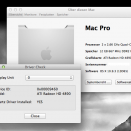
Sascha_77 69 Posted May 18, 2014 @ emwe & ham4ever Whats the Vendor- and Device ID of your Gfx card? You can find it in the Systemprofiler. In my case its 1002 + 9460. Look at my Screenshot. If you tell me your ID´s I could have a look if these IDßs are present in the Kexts and cann add it if not.
hooda 18 Posted May 18, 2014 @ emwe & ham4ever Whats the Vendor- and Device ID of your Gfx card? You can find it in the Systemprofiler. In my case its 1002 + 9460. Look at my Screenshot. If you tell me your ID´s I could have a look if these IDßs are present in the Kexts and cann add it if not. Sascha. device id is 1002 - 0x9498. when i add this device in 4800.kext > info.plist, its nothing happen. but i've been add the device id in 4600 and in your ati radeon x2000. but.. where x2000 you can get? i dont have ati x2000 kext before installing your packages..!?
Sascha_77 69 Posted May 18, 2014 Hm there is an extra AMD4600.... kext. There is no Patch around. I think you need this ... but without patch? Looks not good. I tried the Patch for the 4600-kext but no success. Perhaps its better to buy a supported card? The 4890 for example. You should get one cheap at ebay.
ham4ever 64 Posted May 18, 2014 HD 4850 1 GB Vendor: ATI (0x1002) Device ID: 0x9442 Revision ID: 0x0000 But i think problem was GraphicsEnabler=Yes made the screen black .. i used only -v as boot flag and i can boot but i get KP immedialty lol . Edit : No kp so far and my ATI works without GF=yes
sekoland 0 Posted May 26, 2014 this patch fork for me but, pc freeze always for 1-2/3 seconds. and sometimes after success boot return black screen and others works, audio vb.
Gregor Roger Strehovec 0 Posted June 17, 2014 Hi, need help with dual monitor setup. scenario: I have installed 10.9.3 on a MacPro1,1 I have ATI Sapphire Radeon HD 4890 inside (not flashed - no boot screen). Installed exotic patch for 10.9.3. problem: Only one port at once is giving me picture on 24" LCD. Screen Sharing and System Information is showing me two displays (Online: yes - for both), tho the name is ATI Radeon HD 4800. question: How can I make both screens work at once?
funimac 0 Posted June 20, 2014 Beautiful piece of creation! Works perfectly on my HD 4850 and Mac Pro 3,1.
fantomas 5101 Posted June 27, 2014 Hi, need help with dual monitor setup. scenario: I have installed 10.9.3 on a MacPro1,1 I have ATI Sapphire Radeon HD 4890 inside (not flashed - no boot screen). Installed exotic patch for 10.9.3. problem: Only one port at once is giving me picture on 24" LCD. Screen Sharing and System Information is showing me two displays (Online: yes - for both), tho the name is ATI Radeon HD 4800. question: How can I make both screens work at once? on a hackintosh? try this <key>AtiConfig</key> <string>Cardinal</string> <key>AtiPorts</key> <string>3</string> <key>GraphicsEnabler</key> <string>Yes</string>
Gregor Roger Strehovec 0 Posted July 3, 2014 Hey, sorry, for late post. It's working with DVI and VGA. I wonder now, if I upgrade to 10.9.4. Is the patch out yet?



Recommended Comments