All Activity
- Past hour
-

Problem with iMessage and Face Time in Tahoe
mnfesq replied to ccsr's topic in New Releases and Updates
I am stuck with this issue now on my laptop and can't seem to get past it. I use messages many times daily and hate that I can't text typing on a keyboard rather than with thumbs on my phone. I also used it to send photos from my phone to my laptop since Airdrop doesn't work on my laptop either. I tried all of the suggestions in this thread but nothing seems to work, not even Apple telling me that activation is authorized. - Today
-
 ck4444comtop joined the community
 -
 vn88pl1 joined the community
 -
8xbetb2com joined the community
-
 Jon Shahbaz changed their profile photo
 -
 Still waiting for you to provide your status updates in the other two threads you started: Radeon HD 5450: acceleration possible in High Sierra? E6400/El Capitan: panics with seemingly a one line kernel panic
 -
Harris Gilbert joined the community
-
 Amalcon joined the community
 -
luxe2move joined the community
-
GO88 DTAC joined the community
-
 Outdoers Adventure Travels joined the community
 -
tafanam777 joined the community
-
 Anna Halchenko changed their profile photo
 -

Macos Golden Gate - Experiment Cpu Intel
Ludox replied to Ludox's topic in Front Page News and Rumors
I read that there are the first tests "update macOS 27 constants" https://github.com/hackdoc/OCLP-R/releases -
.thumb.jpg.52e6510f6938c5ae80cb5ac02e1a6414.jpg) Spectacle Eyeware changed their profile photo
Spectacle Eyeware changed their profile photo -
.thumb.png.2094097b1d62aa32935741b679ecba3c.png) Bluum Peptides changed their profile photo
Bluum Peptides changed their profile photo -
I have a Dell Precision T1700 which I installed Big Sur on. Whenever I try to wake it from sleep, I get a Sleep Wake failure in EFI panic. Everything I can find online says this is a power management issue, but my IOReg suggests my power management is working. Anyone know how to fix this? System hardware is in my signature. config.plist and panic log are attached. config.plist panic log.diag
- 1 reply
-
- 1
-

-
 Adsdad Digital changed their profile photo
 -
 nif ahmedabad changed their profile photo
 -
.thumb.png.6a53951951b98ebdacc1df0f5e24555e.png) Smackeez Candy changed their profile photo
Smackeez Candy changed their profile photo -
(1)(1).thumb.jpg.4ec1acbabfa97adf3b28b102442993b7.jpg) DeviceBee Technology changed their profile photo
DeviceBee Technology changed their profile photo -
I haven't seen it until now. The binary in your version is identical, but you have a different info.plist.
-
 af77 net changed their profile photo
 -
 jeetwinbd changed their profile photo
 -
I Pm'd you earlier with the version i had success long time ago
-
Yes, I had kext-dev-mode=1 in /Library/SystemConfiguration/com.apple.boot.plist and now it's also added in NVRAM using the nvram command. Kext dev mode is activated in Yosemite, I could see it in the Kext Utility. But I still need some time until It is configured well enough to be cloned to the 11,5.
-
No need for OCLP. flag it with kext-dev-mode=1 and install nvmegeneric
-
Hello, I have a 2015 MacBookPro11,5 and a MacBookPro11,4. It's the same but without the Radeon. I've planned a huge task: Backup all my data from 20 years hackintosh and sell the old drives to data recovering companies. That's why I needed Yosemite which has the original Disk Utility. Because I'm planning mostly to do compressed disk images for backups, this is the version to go. The MPB11,4 has a 256 GB SATA SSD, the MBP11,5 has a 4 TB NVMe SSD. Both are using OCLP and working fine with Sequoia. I still have the old 512 GB original Apple NVME SSD from the 11,5, so I wanted to add it in the 11,4. I've cloned the Yosemite installation from the 11,4 to the 11,5 and it won't boot 'still waiting for root device'. I've tracked down NVMeGeneric.kext, modified the info.plist from 10.11 to 10.10 and the kext is loaded on the 11,4. I haven't transferred this version to the 11,5 yet, I want to do some more optimizations first. Has someone else made tests with NVMe on older OS X versions on real Macs? Is it possible to use OCLP for NVMe support? Is it possible to inject the NVMeGeneric.kext? Greets, naquaada.
-
I asked Qwen.ai about new bug in the VoodooHDA latest version 3.6.5 and he said: But there was itself! He was "hallucinating" and now tell me about this.
-
 Hello, From the screenshot, there isn't a clear kernel panic. The logs repeatedly show: shared_region_check_np(...) failed forcing CS_RUNTIME launchd service errors These messages are usually symptoms, not the root cause. For a Ryzen 5 5600 + B550 + RX 6600 XT Hackintosh, the most likely causes are: AMD kernel patches are missing, outdated, or don't match your Monterey version. Your EFI/OpenCore version is outdated. BIOS settings are incorrect (Disable CSM, Enable Above 4G Decoding, Disable Secure Boot). Wrong SMBIOS (use iMacPro1,1 or MacPro7,1 for AMD).
- 1 reply
-
- 1
-

-
I am on 27 beta. sensor-verification-Mac16,9-1784691877.txt
- Yesterday
-
You need to send me the file found on the desktop after the sensor verification procedure; use the b7 version. (use macos26 please) The file will be named something like "sensor-verification..."; I'll be waiting for it—thanks for your testing.
-
Updated to beta 4 with no issues. Updated Xcode too. All seems to be working very well. Maybe too easy 😂
- 79 replies
-
- 1
-
-
- macos
- golden gate
- (and 1 more)
-
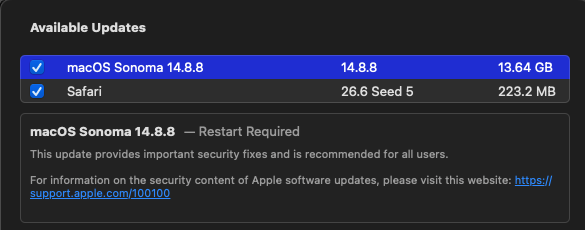
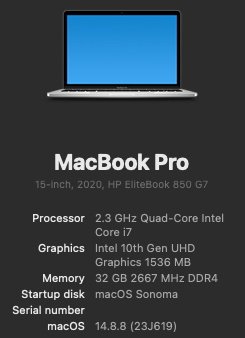
The next Sonoma 14.8.8 RC is a full update (not incremental) on my HP EliteBook 850 G7 laptop (Open Core 1.0.7, SIP fully enabled csr-active-config = <00000000>) macOS Sonoma 14.8.8 Update Easy update...
-
 @engeldlgado First of all I am sorry not for being to help you yet with the translation, I have a lot of unexpected work... I just wanted to post these tests I made with my dual d700 MacPro, working with the latest version of ToshLLM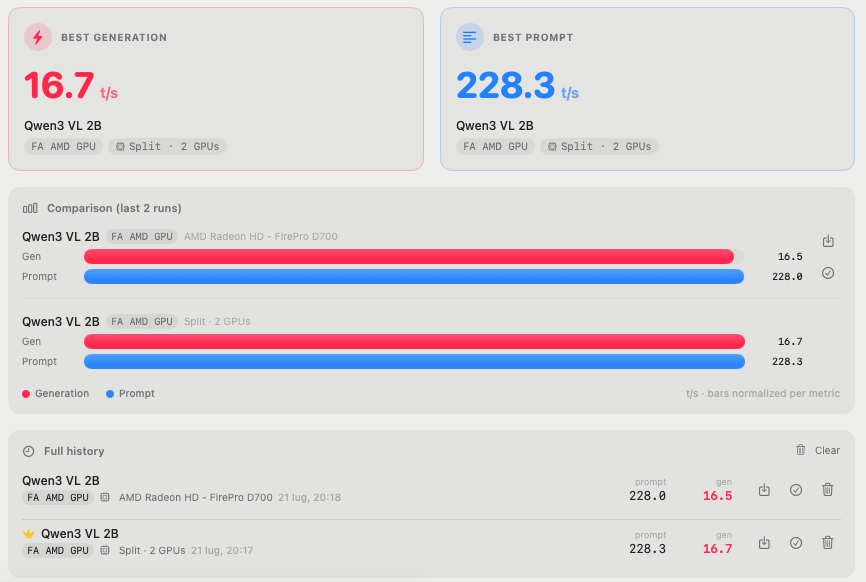
-
sensor-dump-Mac16,9-20260722-054222.txt SiliconMonitorCenter-Diagnostics-2026-07-22_0544.txt
-
[Pre-release] macOS Sequoia 15.7.8
deeveedee replied to deeveedee's topic in New Releases and Updates
@Thebes Knossos I wasn't saying that you are. Just letting you know how I got the update. Wait for the final release if you need to. The title of this thread is "Pre-release." When you see that in the thread title, you should assume that enrollment in Beta is required. -

[Pre-release] macOS Sequoia 15.7.8
Thebes Knossos replied to deeveedee's topic in New Releases and Updates
I'm not beta tester, not registered for. -
[Pre-release] macOS Sequoia 15.7.8
deeveedee replied to deeveedee's topic in New Releases and Updates

-
[Pre-release] macOS Sequoia 15.7.8
Thebes Knossos replied to deeveedee's topic in New Releases and Updates
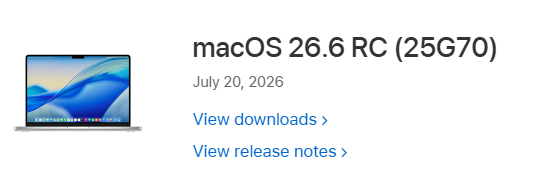
I've got nothing on the real Macbook Pro, nor in search mode. -
-
[Pre-release] macOS Sequoia 15.7.8
deeveedee replied to deeveedee's topic in New Releases and Updates
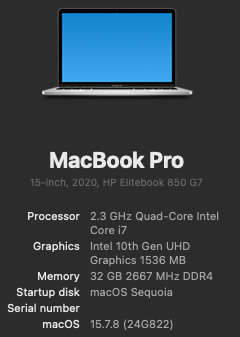
I received notice of the Sequoia 15.7.8 update. It's a full update (not incremental) on my HP EliteBook 850 G7 laptop running 15.7.8 (24G817). Sequoia 15.7.8 Software Update Easy Update: My system specs are as follows: Open Core 1.0.7 SIP fully enabled (csr-active-config = <00000000>) Wi-Fi: Intel itlwm/heliport No root patches EDIT: The Norton Transparent Proxy problem is still an issue. Must toggle Norton Transparent proxy off and on once per login session to enable network traffic for many apps (including Safari and macOS update checking).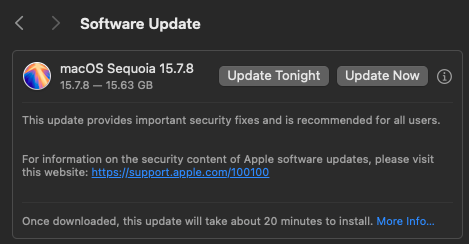
-
@Slice I didn't use AI to create this avatar. It's a photo of SpaceX Starship at night. 🚀

.thumb.jpeg.7082d67b3394c9399e80144027a7b397.jpeg)