
8 Best iPad Cleaner Apps to Try in 2026
Searching for the best iPad cleaner app but don’t want to test every option in the App Store yourself? Or maybe you already tried a few apps and realized that what they promise on the App Store page doesn’t always match what you actually get after installing them? Whatever brought you here, I get it. I’ve been there too. That’s exactly why I decided to handle the testing myself and put together a list of the best cleaners for iPad that actually do the job in 2026, both free and paid. Let’s skip the trial-and-error and go straight to the ones worth your time.
To make this list, I personally tested each app for two weeks and went through every feature I could find. At some point, I realized I’d been staring at cleaner apps for so long that I needed a second opinion, so I asked a few friends to test them too. So this ranking of the best iPad cleaner apps isn’t based just on my experience, and it also includes collective feedback from multiple real users.
Top 8 iPad Cleaner Apps to Consider
As someone who regularly uses an iPad, I’ve explored several apps to keep my device away from “Storage Full” message. Below are some of the best iPad cleaner apps I’ve come across, each offering unique features to help you manage your iPad’s storage:
Also, pay attention that a few apps here may show black borders on the sides because their layout isn’t fully adjusted for the iPad’s larger display. It’s only a cosmetic detail. The features and performance remain exactly the same.
1. Clever Cleaner

Overview: Clever Cleaner: Free Cleaner App is a completely free software from CleverFiles that can put your iPad’s media files in order. It uses AI algorithms to identify (and delete) unnecessary files, including duplicate photos, screenshots, and large files. It also offers a Live Photo compression feature.
Here’s an interesting video where Clever Cleaner is tested alongside other storage-cleaning apps for iPhone and iPad.
App Store Page: Free Download
Key Features:
- AI-powered scanning – Identifies duplicate and similar images that aren’t exactly identical, large files, and screenshots with high accuracy.
- Live Photo compression – Converts Live Photos into still images (keeps the same quality while removing the short video clip to save space).
- Large Video Cleanup – Finds the largest videos on your iPad and sorts them by file size for easier removal. If you’re not ready to delete them yet, switch to the Compress panel instead and reduce their size through video compression.
- Screenshot detection – Mirrors the Screenshots album from Photos, letting you delete all of them at once or pick only the ones you no longer need.
- Swipe mode – Lets you go through your entire photo gallery quickly and decide which images to keep or delete with a simple swipe.
- Completely free – No hidden fees or locked features.
- Free.
- Clean, colorful design.
- Accurate algorithms.
- Very fast scan compared to all tested apps.
- Shows how much space will be freed up before deletion.
- Batch deletions.
- Automatically suggests the best version when removing duplicate photos.
- No in-app purchases or ads.
- Focuses only on media files.
- Some tools in the app don’t let you sort results by date, which can make it harder to find the oldest files quickly.
Final Verdict: It’s one of the best apps I’ve tested in this category. No sneaky paywalls, no confusing settings, just a straight-to-the-point iPad cleanup tool. During testing, it found over 6GB of junk I could remove, and I loved how it showed exactly how much space I was about to free up before each action. A while back, I used a couple of apps for video editing, and over time, my library got cluttered with massive video files. The built-in Photos app doesn’t let you sort videos by size, so tracking them down was a hassle. But this app’s Heavies feature instantly pulled up a list of my largest videos, from biggest to smallest, so I could preview and delete them in seconds.
The app also unexpectedly got me into swipe-based photo cleanup. For some reason, I had always ignored that kind of feature before, but while testing the app, I gave it a try and realized how convenient it actually is. Photos are grouped by month, so whenever I had free time, I could quickly swipe through and sort old pictures without turning cleanup into a whole task. I even caught myself doing it while watching movies. Other features were just as fast, and it also handled screenshots better than most apps. Its AI algorithms for image detection were very accurate, whether it was screenshots, duplicates, or similar photos, it always identified them correctly. So, after all that testing, I can confidently call Clever Cleaner the best free iPad cleaner app I’ve tried.
2. Boost Cleaner – Clean Up Smart

Overview: Boost Cleaner is a straightforward app for iPad users looking to declutter and optimize their devices. It targets superfluous files effectively, making it a practical tool for those looking to enhance their iPad’s functionality.
App Store Page: Free Download
Key Features:
- Duplicate photo cleaner – Finds and removes duplicate photos, similar selfies, Live Photos, and GIF images.
- Photo organization tools – Filters photos by date and location for easier sorting and management.
- Smart contact cleaner – Merges duplicate contacts based on name, phone number, and email, deletes empty entries, and offers backup and restore options.
- Calendar cleaner – Scans for and removes outdated or duplicate calendar events to keep your schedule tidy.
- Photo and video compression – Reduces file sizes without noticeable quality loss to save storage.
- Large file remover – Identifies and deletes large, unnecessary files to free up storage.
- Internet speed test – Measures your current download and upload speeds directly within the app.
- Charge animation – Lets you set an animation that appears on the screen while your iPad charges.
- Easy to navigate interface.
- Full-screen mode.
- Fast scanning.
- Useful photo organization tools.
- A lot of ads that are not easy to close.
- Long scans, photos and videos are scanned separately.
- No charge for basic version.
- Weekly Premium: $6.99.
- Monthly VIP: $14.99.
- Annual Premium: $49.99.
Final Verdict: Personally, I find Boost Cleaner to be a practical, no-frills app. It’s particularly useful for those who value simplicity and direct results in managing their iPad’s space and performance. The app is well-suited for routine maintenance tasks. The photo organization tools stood out the most. Filtering images by date and location made it easy to clean up my library without sifting through everything manually. I also never really understood the point of features like the built-in speed test or charging screen animations. They’re included, so maybe someone enjoys them, but for me they felt more like filler than something genuinely useful. If you don’t mind the cost, it’s a solid tool for keeping your iPad organized, but there are other apps that offer more for less.
3. CleanMy®Phone: Storage Cleaner

Overview: CleanMy®Phone: Storage Cleaner used to be Gemini Photos, a duplicate finder app from MacPaw. Now, it has evolved into a full storage cleaner with better AI-driven scanning and more features. It still excels at removing duplicate and similar photos, but now it can also label photos as sensitive to protect them, use AI to organize your library, and even run a network speed test to check how fast your connection is.
App Store Page: Free Download
Key Features:
- AI-powered photo cleanup – Detects duplicate, similar, and blurred photos, helping clear out unnecessary images with precision.
- Smart library organization – Uses AI to categorize photos by location, category, year, and month for easier browsing.
- Sensitive photo protection – Allows labeling of specific photos as Sensitive to prevent accidental deletion.
- Contact cleanup – Detects duplicate and similar contacts, then lets you merge them to keep your address book organized without manually comparing entries.
- Email cleanup – Helps remove old emails in bulk and unsubscribe from annoying spam mailing lists directly from the app.
- Pause and resume scans – Lets you stop the scanning process and continue when convenient.
- Network speed test – Measures internet connection speed directly within the app.
- Health dashboard – Offers tips on protecting your iPhone and displays a custom storage usage graph focused on photo and video categories, rather than the default breakdown in Settings.
- Video compression – Reduces the size of videos while keeping their quality as high as possible.
- Live Photo conversion – Converts Live Photos to standard still images to save storage space.
- It offers one of the widest ranges of features among the apps in this list.
- Smooth animations and intuitive controls.
- Helps in photo organization.
- One-tap AI-powered cleanup.
- Real-time scan progress bar.
- Sometimes places photos with different people in the same category.
- “Similar & duplicate photos” and AI categories are not available in the free plan.
- Free version with in-app purchases.
- Monthly: $9.99.
- Yearly: $44.99.
- Lifetime: $99.99.
Final Verdict: CleanMy®Phone: Storage Cleaner is probably the app I had heard and read the most about before starting my testing. And it does impress with its feature set: pretty much everything you might need for iPad cleanup is here. However, this is exactly the kind of iPad cleaner app that is free to download, but the app is technically free to install, but realistically difficult to use properly without a subscription. The free version feels very limited, and most of the useful features (like duplicate and similar photo detection or AI-based photo categories) are locked behind the paywall. That still doesn’t change the fact that it’s one of the most visually polished cleaner apps I’ve tested. The interface feels premium, and the AI-powered scanning does a solid job detecting duplicates, similar photos, and blurred images.
4. Easy Cleaner.

Overview: Easy Cleaner. (yes with a dot), designed for the iPad, offers a straightforward solution for organizing and managing contacts. It simplifies the process of cleaning and updating your address book.
App Store Page: Free Download
Key Features:
- Duplicate contact removal – Scans for and deletes duplicate contacts to keep your address book organized.
- Smart contact merging – Finds contacts with similar names, numbers, or emails and merges them into one.
- Contact enrichment – Adds missing details like job title, company name, work email, and address automatically.
- Bulk contact deletion – Allows quick selection and removal of multiple contacts at once.
- Restore points – Creates backups before making changes, so you can undo any unwanted edits.
- Smart filters – Sorts contacts by creation date, company, job title, and upcoming birthdays for easier management.
- Fast duplicate detection.
- Simple, user-friendly interface.
- Automatic contact enrichment.
- Free to use.
- Only cleans contacts, unclear what its purpose is on an iPad.
- The interface is basic, and some users may find it outdated compared to more modern designs.
Final Verdict: What I also liked is that the can replace the native Contacts app for everyday management. Right inside the cleaner’s interface, you can create new contacts, edit existing ones, or remove outdated entries without jumping between apps. All changes still sync with Apple’s native Contacts app, but at that point, the default app mostly becomes something you use for calls rather than contact organization itself. Personally, it feels like a practical pick for anyone who wants to tidy up their contact list on an iPad. Its focus is narrow, contacts only, so it won’t touch your videos, images, or other clutter. But that single-minded approach works in its favor. If you want a no-nonsense contact management app, handles the job with zero fuss.
5. Clean Master – Super Cleaner
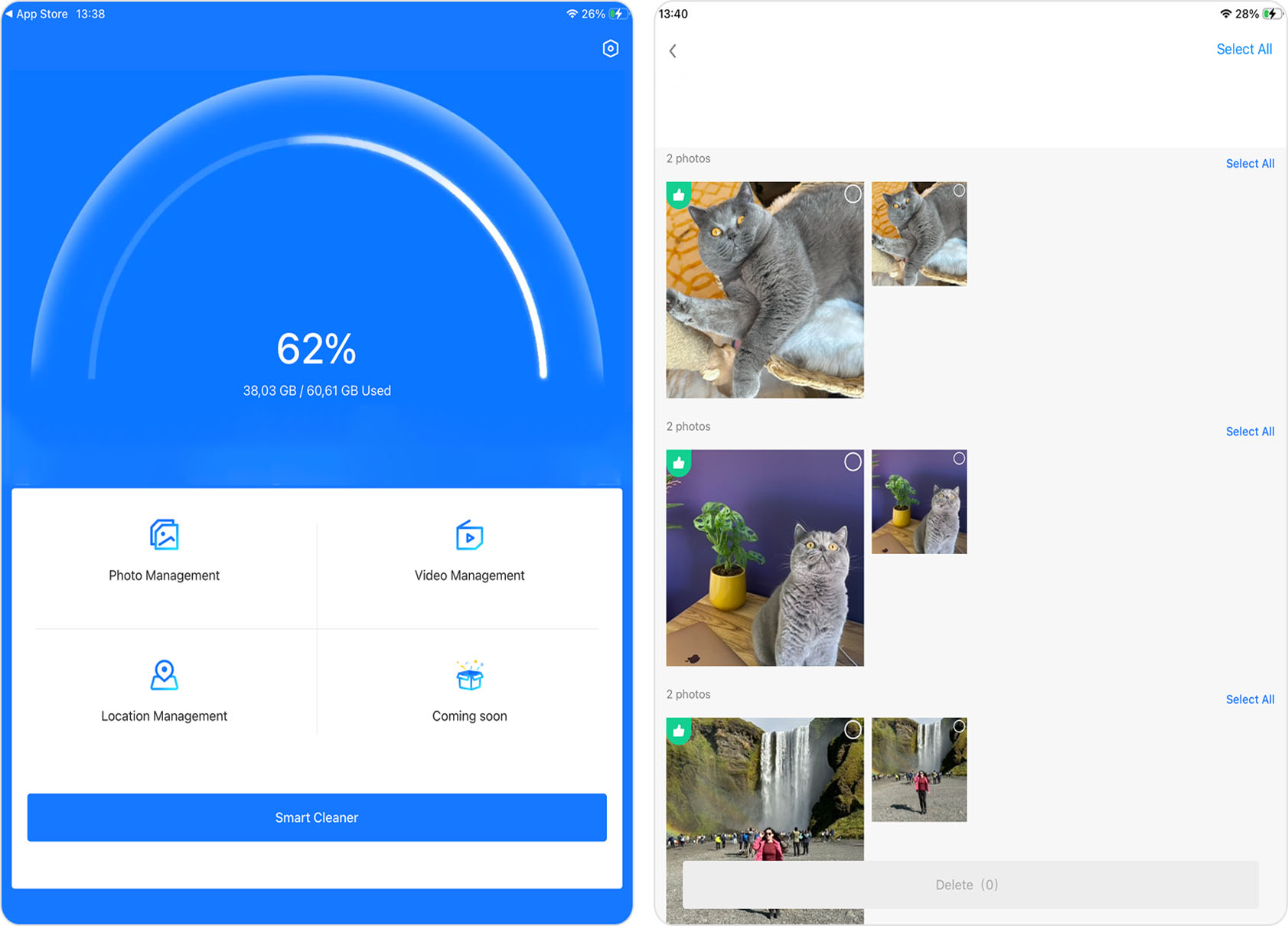
Overview: Clean Master – Super Cleaner is one of those apps that looks a bit questionable at first glance because of its outdated design, but after testing it, I realized it’s actually much more capable than it seems. The app focuses mostly on photo and video cleanup and does a surprisingly good job for a free iPad cleaner app. It can detect duplicate photos, screenshots, bursts, large videos, and even similar videos, a feature many paid competitors still don’t offer.
App Store Page: Free Download
Key Features:
- Smart Cleanup – Automatically scans your gallery and suggests unnecessary files for deletion.
- Similar photo detection – Finds duplicates, screenshots, blurry images, and burst photos.
- Similar video detection – Identifies videos that look alike, which is still pretty rare among iPad cleaner apps.
- Large video cleanup – Detects the biggest videos on your iPad to help free up storage faster.
- Clean by location – Groups photos by where they were taken, making it easier to remove similar vacation or event shots in bulk.
- Batch deletion – Lets you remove multiple files at once instead of manually cleaning everything one by one.
- Free core cleanup features.
- Detects similar videos.
- Fast scans.
- Doesn’t aggressively lock every action behind a subscription.
- Outdated interface design.
- Ads appear after larger cleanup actions.
- No “Best Shot” suggestion when removing duplicates.
Final Verdict: I expected much less from Clean Master – Super Cleaner because the interface really gives off old-school App Store energy. But after testing it, I ended up liking it more than I thought I would. The cleanup tools worked reliably, scans finished quickly, and the similar video detection genuinely stood out because almost no other app in this category handled that well.
Ads are definitely here, but they mostly appear after bigger actions and never felt overly aggressive during testing. One funny detail I noticed is that one of the menu sections is still labeled Coming Soon, clearly hinting at some future feature. The weird part is that I remember testing this same app about a year ago, and that label was already there back then too. So what this upcoming feature actually is (and whether it’s ever going to appear) remains a mystery for now. Overall, while the app doesn’t look modern, it still earns a spot on this list because it handles the basics well and includes a few genuinely useful extras.
6. AI Cleaner Max-Clean Up Device

Overview: AI Cleaner Max-Clean Up Device is a multifunctional cleaning app for iPhone and iPad. It’s designed to help users declutter their devices by removing unnecessary data, including duplicate and similar photos, outdated calendar events, and expired reminders. Its one-tap Smart Cleaning feature makes it user-friendly.
App Store Page: Free Download
Key Features:
- One-click smart cleanup – Uses AI to remove junk files, duplicates, and unnecessary system data.
- Photo cleaner – Detects and removes similar, duplicate, large, and low-quality photos.
- Video cleaner – Identifies and deletes duplicate, large, and low-quality videos.
- Contact cleanup – Merges duplicate contacts and removes empty or incomplete entries.
- Calendar and reminder cleanup – Deletes expired calendar events and reminders.
- Extra tools – Includes a custom photo widget, a sound tone generator, and disk storage monitoring, along with practical tips for extending battery life and clearing the web cache.
- Wide range of cleaning options.
- Intuitive, one-tap cleaning process.
- Helps in optimizing device storage.
- Full features require subscription.
- Each section requires a separate scan.
- Very slow.
- Pop-up ads in the free version.
- Smart Scan can crash the app.
- Free with in-app subscription.
- Weekly: $4.99.
- Monthly: $9.99.
- Yearly: $29.99.
Final Verdict: In my opinion, AI Cleaner Max-Clean Up Device is a good tool for routine device cleaning. Its diverse features are helpful, but reliance on subscriptions for complete access is worth noting. While the app does a good job of freeing up storage, some features, such as battery tips and cache cleaning, feel unnecessary, since iOS already handles them through built-in tools.
And honestly, after comparing it with other iPad cleaner apps from this list, the design started to feel a bit outdated. That’s not a dealbreaker, but the difference becomes noticeable next to more modern-looking competitors, so the inner perfectionist in me definitely deducted a few points for that. If it weren’t subscription-based, or at least didn’t require separate scans for each category, I would rate it higher. Still, it remains a solid iPad cleaner.
7. Clean Up Storage – Cleaner Kit

App Store Page: Free Download
Overview: Clean Up Storage – Cleaner Kit is an app designed to free up storage on your device by cleaning up unnecessary files, managing storage, and organizing photos and contacts. It also comes witha a variety of additional features in premium version.
Key Features:
- Duplicate photo and video removal – Detects and deletes repeating shots, blurry images, and unnecessary screenshots.
- Swipe-based sorting – Groups photos by time periods, users can swipe left to delete or right to keep.
- Automatic cleanup – Uses AI to identify and remove unnecessary files without manual review.
- Video compression – Reduces video file sizes while maintaining quality to free up storage.
- Contact management – Merges duplicate contacts and removes empty or unnamed entries.
- Calendar cleanup – Deletes outdated events and keeps the schedule organized.
- Mail cleaning – Scans and deletes unnecessary emails to reclaim storage.
- Private file storage – Allows users to securely hide sensitive photos and contacts.
- Additional features – Includes an ad blocker, charging animations, Wi-Fi and system security checks, detailed device performance stats, and the ability to set up a storage widget on the home screen.
- Intuitive interface.
- Powerful cleaning tools.
- Extra utilities.
- Fairly fast.
- Limited functionality in the free version.
- Subscription-only with no option for one-time purchace.
- Small working area, about the size of an iPhone screen.
- AI categories are available, but some might not work.
- Mixed accuracy on duplicates.
- Free version with in-app purchases.
- Weekly: $6.99
- Yearly: $29.99
Final Verdict: After testing Clean Up Storage – Cleaner Kit for two weeks, I appreciated its approach to decluttering my device. This is probably one of the most feature-packed cleaner apps on the list. It covers pretty much everything you’d expect for photo and video cleanup, while also including modules for contacts and other categories that iOS allows apps like this to access. My friends especially liked the swipe cleanup feature, and I get why. It’s implemented really well here and gives you multiple ways to sort through photos, by month, randomly, or even directly by albums from the Photos app.
Who could this become the best iPad cleaner app for? Probably users who want every possible feature in one place and don’t mind paying for convenience. Since the subscription pricing feels fairly reasonable, paying for a weekly subscription once every few months whenever your iPad gets cluttered again seems totally fine to me.
8. Cleaner Neat: Clean Up Storage

App Store Page: Free Download
Overview: Cleaner Neat: Clean Up Storage focuses on detecting and removing similar items, such as photos, Live Photos, and videos, that take up unnecessary space. It also includes tools for basic video compression and contact management. The app caters to both users who prefer quick automatic cleanup and those who want more control over what stays and what goes.
Key Features:
- AI-powered photo cleanup – Detects and removes duplicate or look-alike photos, screenshots, burst shots, Live Photos, and videos with high accuracy.
- Manual photo and video cleanup by category – Allows users to review and delete items by specific categories. Even in manual mode, the app identifies duplicates, similar shots, and matching videos for easier selection.
- Video compression – Reduces video file sizes with minimal quality loss and displays the total space saved before confirming changes.
- Contact manager – Merges duplicate and incomplete contacts, and provides contact backup options.
- Home screen photo widgets – Lets users organize and display selected photos directly on the iPad’s home screen.
- Additional features – Includes a secure folder for sensitive images and charging animations for visual flair, and an AI photo editor that can enhance image quality or fix old photos.
- Cleanup guide – Offers illustrated instructions for clearing cached data from different apps.
- Extensive categorization for photo and video management.
- Clean and simple interface.
- Option for automatic cleanup.
- Displays the percentage of occupied iPad storage.
- Useful extra tools.
- It is the most expensive cleaner app here.
- Slow scanning of photo and video libraries
- Free trial
- Weekly: $7.99
- Annual: $49.99
- Lifetime: $119.99
Final Verdict: In my opinion, Cleaner Neat: Clean Up Storage works well as a straightforward solution for removing different types of data from an iPad. I appreciate the option to search for similar videos, which is rare among cleaner apps. I also like the ability to filter and delete photos by location, which allowed me to quickly remove pictures from my trip to Prague without scrolling through the entire Photos library. While I usually find built-in guides unnecessary, the illustrated instructions in this app feel helpful rather than filler. If someone has just bought an iPad, this app can prove useful from day one. I would use it regularly if it were free, but the weekly cost of $7.99 feels steep. Still, if the price does not bother you, Phone Cleaner・AI Clean Storage has the potential to become one of your go-to apps.
Which iPad Cleaner App to Choose From This List?
Even with just eight apps, reading each description in a row can feel like a lot when you only want to pick one and try it on your iPad. I decided to make the choice a little easier by giving each app a numeric score based on several key factors. This way, you can quickly see which ones stand out before you start your own testing.
I rated every app using the following criteria. Each criterion has a set weight that affects the final score.
- Price-to-value (25%) – how reasonable the cost is compared to the features and performance you get. Free apps or those with fair pricing score higher.
- Feature set (30%) – the range and usefulness of tools the app offers for cleaning, optimization, and extra functions.
- Impact of drawbacks (15%) – how much the app’s cons affect real-world use.
- Speed and performance (20%) – how quickly and reliably the app scans and processes large media libraries without freezing or crashing.
- Extra capabilities (10%) – additional tools that enhance usability, such as widgets, location-based cleanup, or charging animations.
I scored each app on a scale from 1 to 10 for every category, then calculated the final rating using the formula (Price × 0.25) + (Features × 0.30) + (Drawbacks × 0.15) + (Speed × 0.20) + (Extras × 0.10).
Here are the results:
| App | Price-to-Value | Feature Set | Impact of Drawbacks | Speed & Performance | Extra Capabilities | Final Score |
| Clever Cleaner | 10 | 8 | 9 | 9 | 7 | 8.70 |
| Boost Cleaner | 6 | 7 | 7 | 7 | 6 | 6.65 |
| CleanMy®Phone: Storage Cleaner | 4 | 10 | 6 | 8 | 9 | 7.55 |
| Easy Cleaner. | 9 | 4 | 8 | 8 | 2 | 6.40 |
| Clean Master – Super Cleaner | 10 | 6 | 7 | 8 | 7 | 7.65 |
| AI Cleaner Max-Clean Up Device | 6 | 9 | 5 | 4 | 6 | 6.25 |
| Clean Up Storage – Cleaner Kit | 6 | 9 | 6 | 8 | 8 | 7.65 |
| Cleaner Neat: Clean Up Storage | 3 | 8 | 6 | 6 | 7 | 5.95 |
As you can see, Clever Cleaner received the highest score (8.70) thanks to being completely free, offering excellent speed, and delivering accurate AI detection, although it still has some limitations, such as the lack of contact cleanup and fewer sorting options compared to some competitors. On the opposite side, the heavily feature-packed Cleaner Neat: Clean Up Storage ended up much lower in the rankings (5.95), mostly because of its very high subscription price.
Ultimately, the choice is yours. This is only my assessment (and a little bit my friends’ too), based mostly on needs focused on cleaning the photo and video library while staying free or reasonably priced. I think that if I can get the best iPad cleaner app for free (I mean Clever Cleaner here), then I don’t really see the point in overpaying for a few additional features or built-in guides that I’ll never use anyway. That said, if price is not an issue for you, then apps like CleanMy®Phone: Storage Cleaner or Clean Up Storage – Cleaner Kit could easily become your top pick instead.
I still recommend reading the app descriptions carefully and checking my final comparison table, but don’t treat it as a fixed verdict. Look for the iPad cleaner that fits your own needs best.
FAQ