
9 Best Photo Organizer Apps for iPhone That Actually Do What Apple Photos Can’t
Looking for an app that can make sense of your photo library? Tried a few from the App Store and ended up disappointed? Or maybe you’re just starting your search for an app to organize photos on iPhone because you’re tired of constantly running into missing features in the native Photos app? We get it. That’s why we personally tested dozens of apps to find out which ones are actually worth it.
Just check our list – you’ll find the app to organize iPhone photos that’s actually worth your time.
Why Apple Photos Often Isn’t Enough
The built-in Photos app on iPhone works fine for the basics, but for many people, it just doesn’t cut it anymore. Apple Photos lacks smarter sorting options (for example, you still can’t sort by file size), deeper organization tools, and features like advanced duplicate detection (you can only merge exact duplicates) or tagging (which feels especially strange, considering this feature exists in the Files app). That’s why so many iPhone users look elsewhere.
With iOS 26, many users expected real improvements. Instead, the Photos app got a complete redesign without adding any better sorting or photo-organization features. Reddit discussions, like this one or this one, are full of users complaining that the app has become less convenient to use, with many saying Apple keeps trying to simplify the interface but ends up making navigation more complex. Many hoped for smarter photo management tools. Instead, they got a UI overhaul that’s more confusing than helpful.
But, to be fair, the redesign alone isn’t what drives most people to third-party apps: the truth is that many just want more than the native tools can offer.
How We Classify iPhone Photo Organizer Apps for This Rating
Unlike most ratings that lump everything into one big list, we split ours into three clear categories to simplify things and help you choose quickly. We decided on three categories because most iPhone photo organizer apps aren’t trying to do everything – they specialize. Some focus on cleaning, others on smart sorting and smart albums, and for some, it’s all about sharing and backups. Lumping them all together wouldn’t help anyone find what actually fits their workflow.
- Best Apps to Declutter and Reorganize Your Gallery – These apps are all about speed and cleanup. They help you get rid of duplicates, similar photos, screenshots, and anything else cluttering up your camera roll. Many also offer batch tools to quickly sort or group your images.
- Best Photo Management Apps – These are for users who want more control over how photos are labeled, sorted, and accessed. Features like smart albums, keyword tagging, face recognition, and advanced filters set them apart.
- Best Apps to Organize, Sync, and Share iPhone Photos – These apps aim to go beyond local photo organization. They combine photo gallery features with cloud storage, device syncing, shared albums, and sometimes even collaborative spaces.
Obviously, you probably won’t need every single app from our list. It all depends on what kind of functionality you’re actually looking for. Maybe you just want the best photo sorting app for iPhone and nothing more. Or maybe you’re trying to build a full workflow using several apps together – that part is entirely up to you.
Here’s a Quick Recap of All iPhone Photo Organizer Apps We Chose
If you’re short on time or just want to see apps side by side, this overview sums it all up.
| Category | App | What It Offers |
| Best Apps to Declutter and Reorganize Your Gallery | Clever Cleaner: AI CleanUp App | AI-powered cleanup, accurate similar/duplicate detection, Live Photos conversion, real-time storage stats, fully free with no ads or locked features |
| Slidebox: Photo Cleaner App | Swipe-to-sort photo organizer, fast album management, minimal interface for quick cleanup and review | |
| Cleansmith: Photo Cleaner | Sorting filters, duplicate and similar photo cleanup, large file detection, album-based organization, iCloud filtering, and detailed cleanup controls | |
| Best Photo Management Apps | HashPhotos | Advanced photo sorting, keyword tagging, smart albums, deep filtering tools, private local library, built-in editor |
| Secret Photo Vault: Keepsafe | Encrypted private vault with cloud backup, individual album locks, secure sharing, break-in alerts | |
| Mixbook | Creative book builder with auto-layouts, smart Memories feature, print-ready designs, good for turning photo libraries into keepsakes | |
| Best Apps to Organize, Sync, and Share iPhone Photos | Flickr | Smart tagging, album creation, photographer-focused sharing, free uploads (up to 1000 photos), great for enthusiasts |
| Mylio Photos | Local-first multi-device sync, advanced filtering, powerful declutter tools, best for power users who don’t want the cloud | |
| Google Photos | Cross-platform syncing, smart auto-grouping, shared libraries, automatic cloud backups, ideal if you’re in the Google ecosystem |
Best Apps to Declutter and Reorganize Your Gallery
We’ll start with apps built to help you clean up a messy photo library first. Before organizing your photos with tags, folders, or albums, it’s usually smart to declutter first – clear out duplicates, blurry shots, screenshots, and anything you don’t really need. These apps do just that.
1. Clever Cleaner: AI CleanUp App
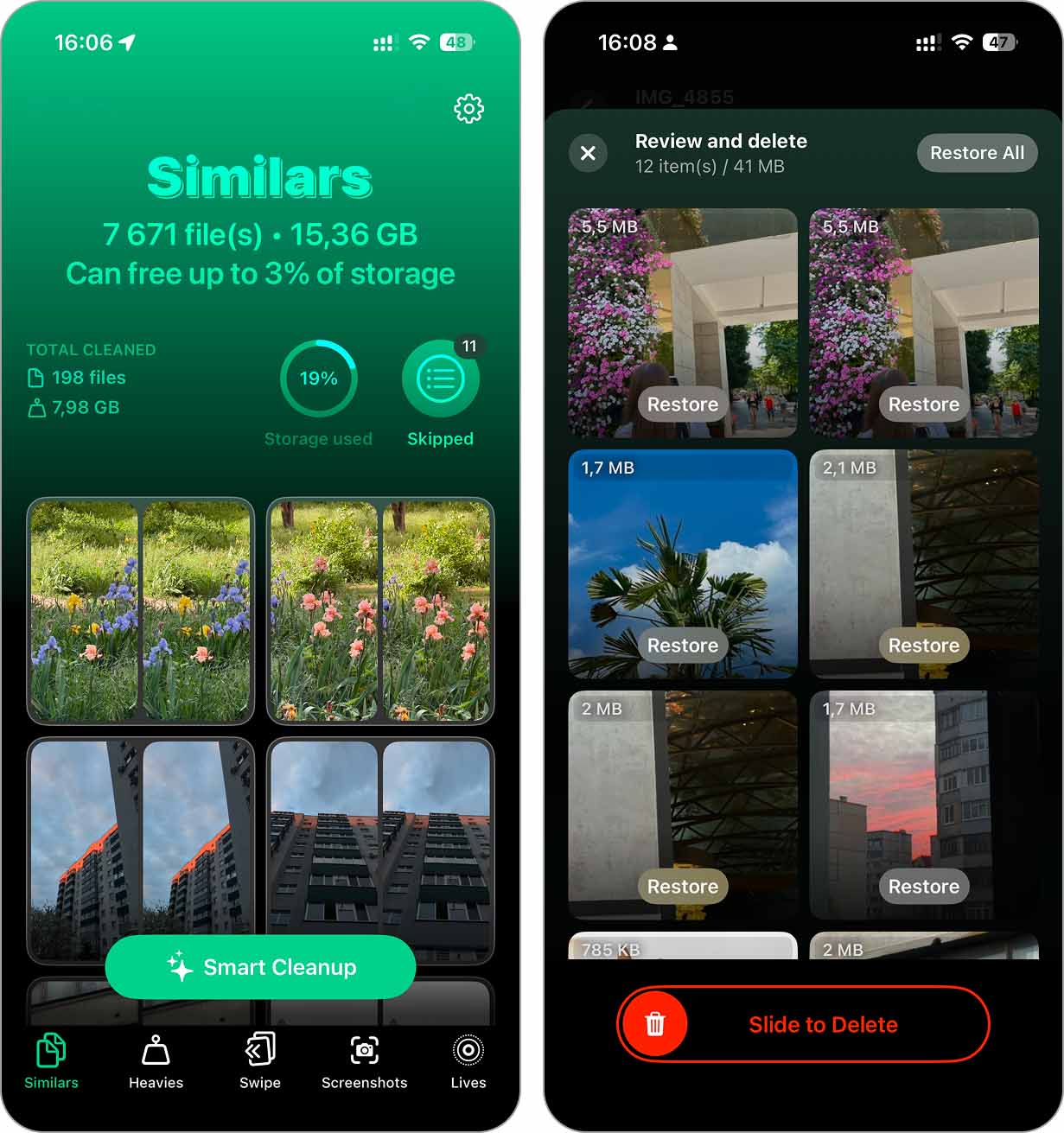
Clever Cleaner: AI CleanUp App is a free iPhone app from the CleverFiles team. It’s built to help you quickly sort out a messy photo gallery. It holds a strong ★4.8 rating on the App Store, and it’s easy to see why. The app has powerful and surprisingly accurate AI for spotting similar images and the best shots – we’d say it’s one of the most accurate we’ve tested. You can check our full review for all the details.
One feature we didn’t expect but really liked is Lives – a pretty clever tool, we don’t remember seeing it before in other apps. It can in a tap convert all your Live Photos into normal still images (this way you clear storage yet everything pretty much stays the same only a short clip is gone.)
Its layout is clean, with color-coded tools that are easy to find. We liked how this free photo organizer app shows, in real-time, how much space each cleanup will free up, and how fast it scans – most tasks take just seconds. While the app handles a lot automatically, it also gives you the option to work in a semi-automatic way, letting you pick and choose what stays and what goes. If you want to be more hands-on for better accuracy, you can.
Download link: App Store
Key Features:
- AI-powered Similar Photo Detection (not just duplicates)
- Screenshot Cleanup with batch selection
- Heavies feture turns it into a photo sorting app (sorts files by size)
- Video compression with minimal quality loss
- Swipe mode for manual photo review (delete them with simple left/right swipes)
- Live Photo Conversion to still images
- Real-time space tracking and cleanup estimates
- Can be used for free
- AI is accurate for similar photos and best shots
- Live Photo conversion is fast and useful
- Clean layout with easy-to-use tools
- Shows real-time space savings before you delete
- Should stay free for early users
- No similar video cleanup tools
- Different result sorting options across features
Price: 100% free.
2. Slidebox: Photo Cleaner App
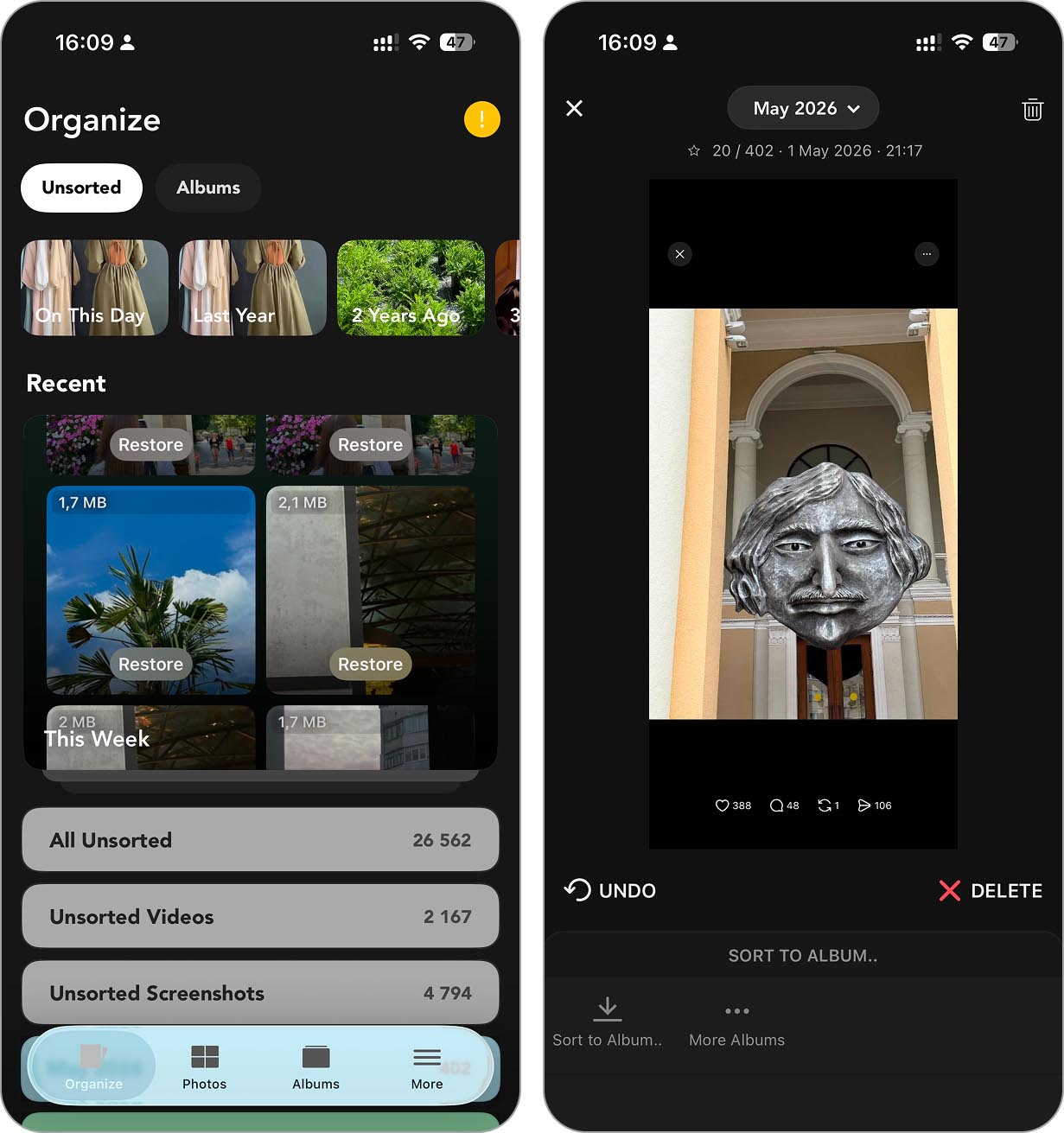
Slidebox is one of the most popular iOS photo organizer apps on the App Store, with over 16K ratings and a solid ★4.8 score. It’s been around for a while and has built a loyal following thanks to its dead-simple, gesture-based interface.
This app takes this approach: you swipe through your photos one by one (like Tinder for your camera roll) and quickly delete, favorite, or move them into albums. No bloated menus or extra steps – just flick, tap, done. We liked how it brings back a bit of control over your gallery in a way that feels smooth and satisfying.
It’s not trying to be a full-on cleaner with AI or storage optimization, and that’s okay. Slidebox is great for manual photo decluttering, especially if you want to go through your images without missing important ones. You can clean as you scroll, and it even lets you create and manage albums on the fly, which is something a lot of “smart” cleaners skip.
Download link: App Store
Key Features:
- Swipe-based photo cleanup (delete, favorite, organize)
- Sort photos into albums with a single tap
- Syncs with your iOS Photos app
- Supports iCloud
- Minimalist and fast interface
- Super intuitive swipe-to-clean interface
- Lets you organize into albums as you go
- GIF support
- Clean and fast design
- No automatic AI cleanup
- Limited editing capabilities
- No cloud storage integration beyond iCloud.
Price: Free to download with in-app subscriptions:
- Monthly Subscription: $4.99
- Membership (Yearly): $9.99
- Premium Upgrade: $19.99 (one-time purchase)
3. Cleansmith: Photo Cleaner
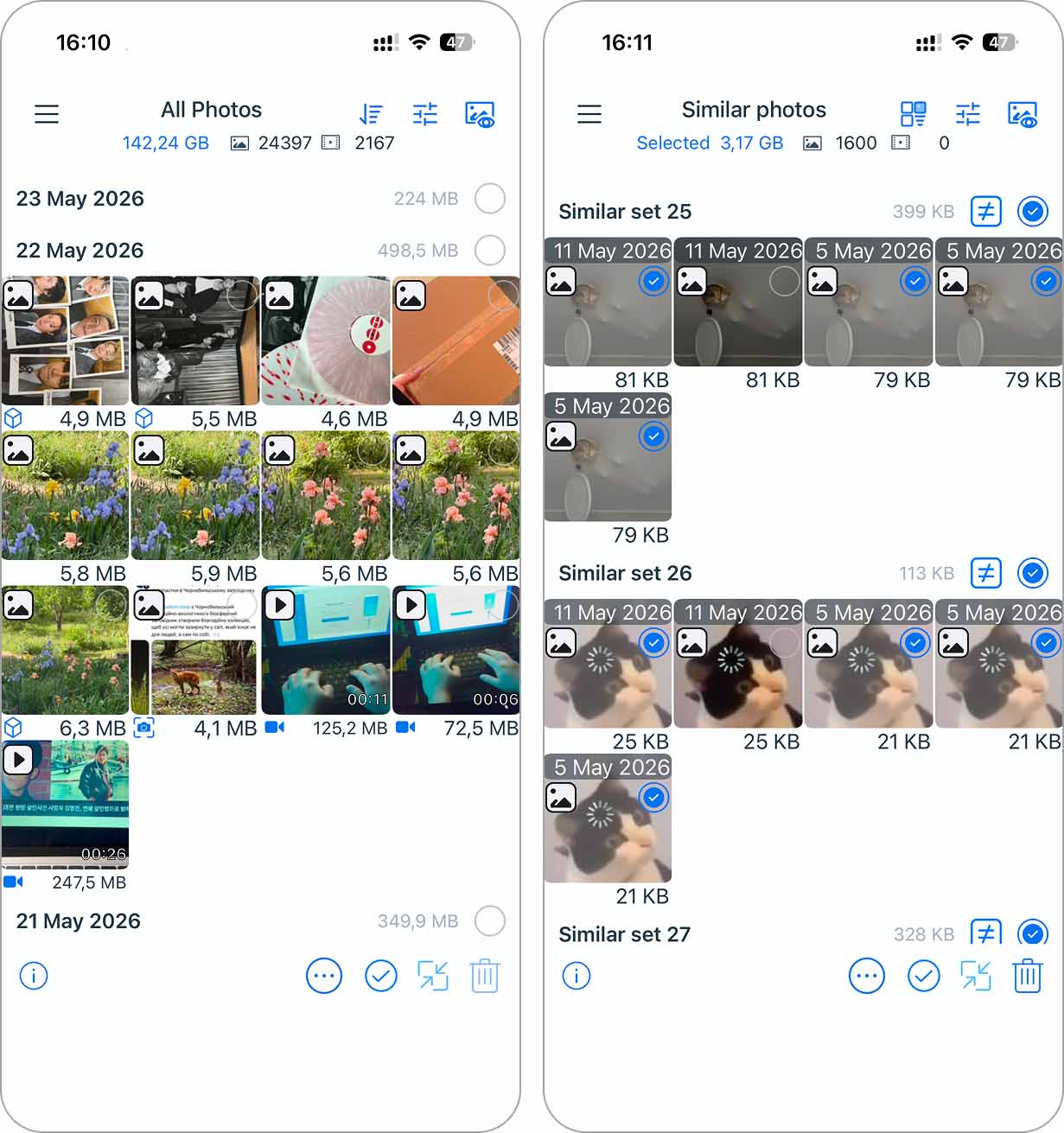
CCleansmith: Photo Cleaner sits somewhere between a cleaner app and the best gallery app for iPhone. It currently holds a strong ★4.7 rating from nearly 5,000 reviews, and, if you came here looking specifically for advanced sorting options, this app deserves a spot on your shortlist.
What makes it stand out is how it mirrors your actual photo and video library. The app pulls in everything – your custom albums, default iOS media categories, favorites, hidden photos, and iCloud content – and then gives you advanced tools to work with all of it. You can clean duplicates, similar photos and videos, large files, low-resolution images, and more, but the real highlight is the sorting system.
Basically, every category, album, or cleanup mode can be sorted by date or file size. Still not enough? You can also filter results by a specific time range, choose file size ranges with sliders, decide whether iCloud Photos should be included, and even exclude Favorites or Hidden items from cleanup. For us, that level of control was genuinely amazing. At first, the interface may feel a bit overwhelming because the app has a pretty layered structure with lots of menus and filters. But once you understand how everything is organized, it starts making a lot more sense.
Download link: App Store
Key Features:
- Duplicate and similar photo cleanup
- Large file cleanup
- Low-resolution photo detection
- Custom album support
- Favorites and Hidden album filtering
- Advanced photo and video sorting
- Sorting by file size or date
- Custom time/size-range filtering
- Works with custom albums and iCloud libraries
- Very detailed control over cleanup results
- Useful for large and messy galleries
- Flexible cleanup filters compared to most competitors
- Cleanly mirrors the native Photos library structure
- Complex interface at first
- Daily deletion limit for free users
- Requires watching ads to extend free cleanup limits
Price: Free with in-app subscriptions:
- Weekly Subscription: $9.99
- Yearly: $34.99
- Lifetime: $59.99
Best iPhone Photo Management Apps
The next category is all about control and customization. If you want to catalog your photo collection exactly the way you like it – with smart albums, custom tags, filters, privacy options, calendar views, and more – this is where you’ll find the right tools.
This list includes the best photo management apps for iPhone users who want more than just basic iOS gallery tools.
1. HashPhotos
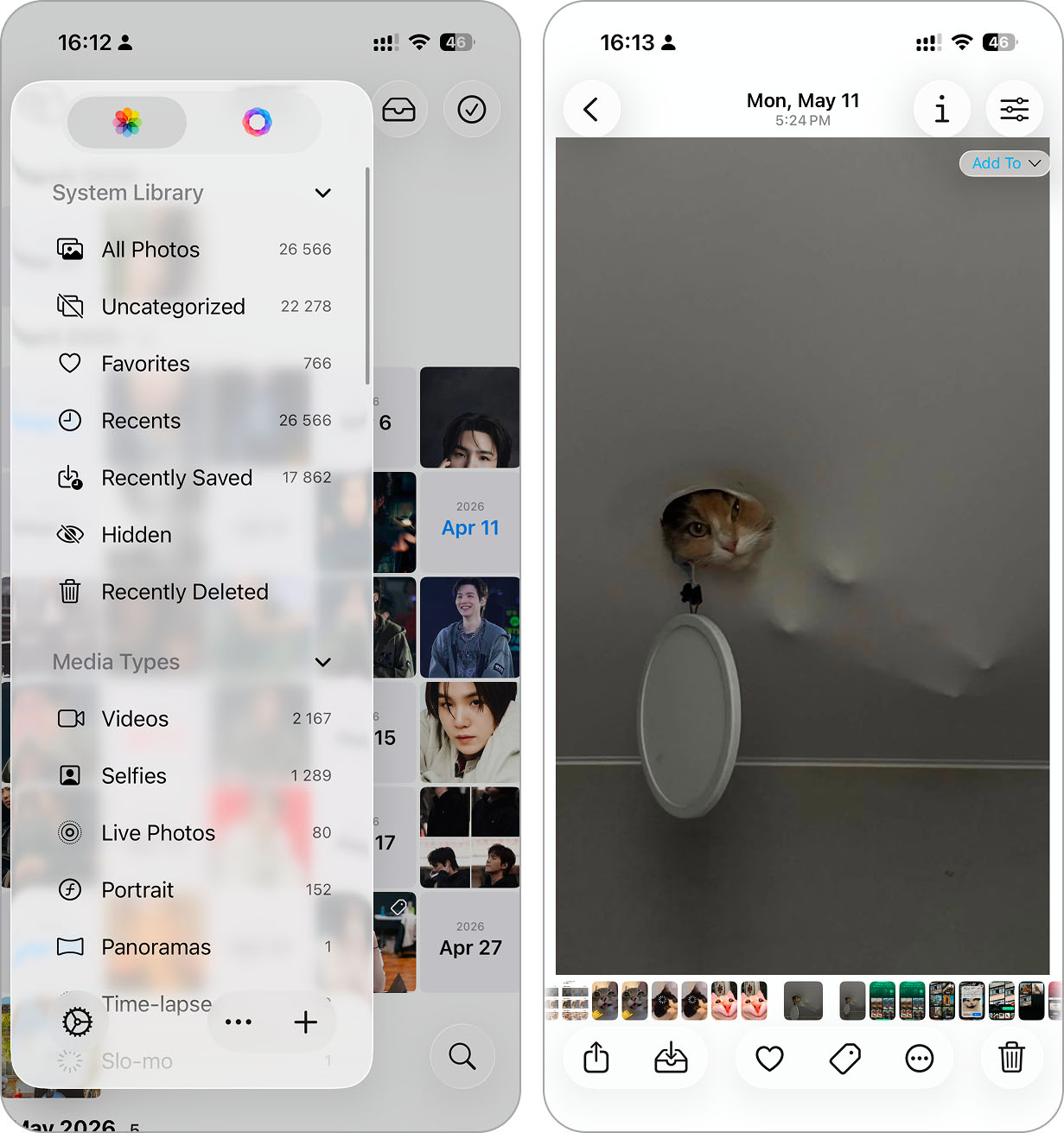
HashPhotos currently holds a strong ★4.7 rating from around 2.4K reviews. Compared to some other apps on this list, that audience may seem relatively small, but after testing it ourselves, we genuinely think this is the best photo album app for iPhone and deserves far more attention than it gets.
This app feels like a complete replacement for Apple’s native Photos app while layering much more advanced organization tools on top of it. HashPhotos mirrors the entire Photos library, including albums, favorites, screenshots, videos, and other media categories, but then expands what you can actually do with them. You can create custom albums, add keywords and tags to photos, build smart albums with custom rules, and filter media by things like file size, image dimensions, format, or location.
One especially interesting feature is tagging. HashPhotos allows you to attach keywords directly to photos and later use those tags while searching through your library. Combined with advanced filtering, it makes organizing large photo collections much easier than in Apple Photos. The app also includes its own Local Library for private content, giving you another option beyond the standard Hidden album inside iOS.
Download link: App Store
Key Features:
- Organize media by date, file size, dimensions, format, location, and more
- Add searchable tags to photos for easier library management.
- Create custom albums with automatic sorting rules
- Separate sensitive media from the main Photos library.
- Detects duplicates and visually similar images.
- Adjust thumbnail size, grouping, sorting style, and sidebar behavior
- Supports Face ID, passcodes, and protected private albums.
- Includes cropping, filters, blur, drawing tools, background removal
- Works as a true alternative to Apple Photos
- Supports keyword tagging and smart albums
- Strong privacy and Local Library features
- Highly customizable interface and gallery layouts
- Great for managing very large photo libraries
- Many features are limited in the free version
- Requires time to fully learn all tools and menus
- Overkill for users who just want basic features
Price: Free with in-app subscriptions:
- Monthly Subscription: $1.99
- Yearly: $9.99
- Lifetime: $22.99
2. Secret Photo Vault: Keepsafe
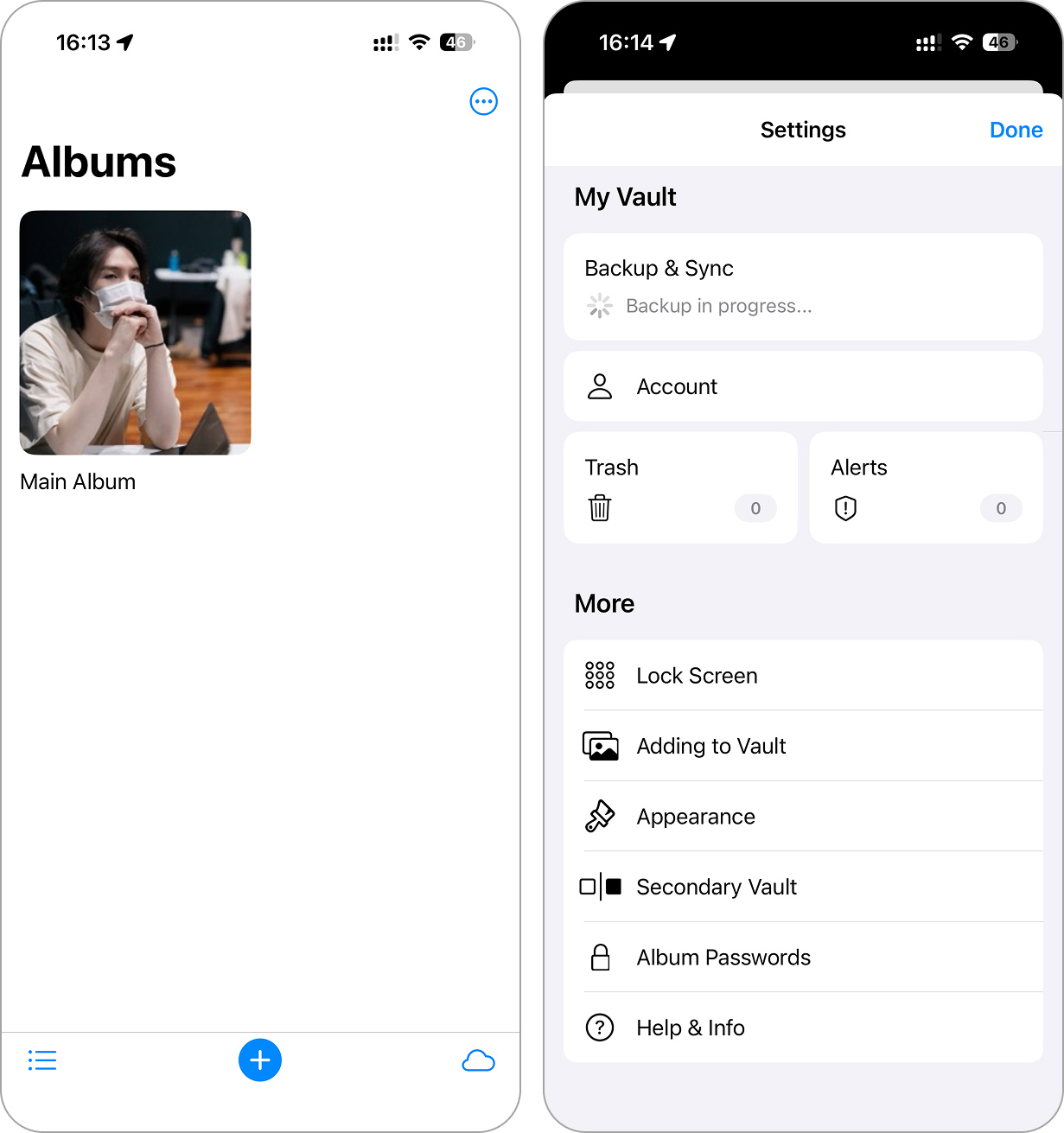
If your main goal is keeping certain photos completely private, Keepsafe is one of the most trusted apps for the job. It’s sitting at a ★4.7 App Store rating with 374K+ reviews, and it’s been around for years. You get PIN protection, Face ID, encrypted cloud storage, and even the option to lock individual albums separately.
We liked how clean the app feels. Everything is password-gated, and once your content is inside Keepsafe, it’s hidden from your main library and out of reach unless you unlock it. It even has “Safe Send” for sharing files that disappear after a few minutes – great for anything you don’t want hanging around.
Download link: App Store
Key Features:
- PIN, fingerprint, and Face ID support
- Encrypted private cloud backup
- Lock individual albums
- Built-in camera and file viewer
- Optional photo compression
- “Safe Send” with time-limited sharing
- Secure and encrypted storage
- Supports album-level locks
- Multiple options for photo backup and sharing
- Cross-device syncing
- Time-limited photo sharing
- Free version is pretty limited
- Sync can be slow or buggy
- No smart sorting or tagging
Price:
- Free trial
- Monthly subscription: $15.49
- Yearly subscription: $42.99
- Lifetime: $179.99
3. Mixbook | Photo Book Creator
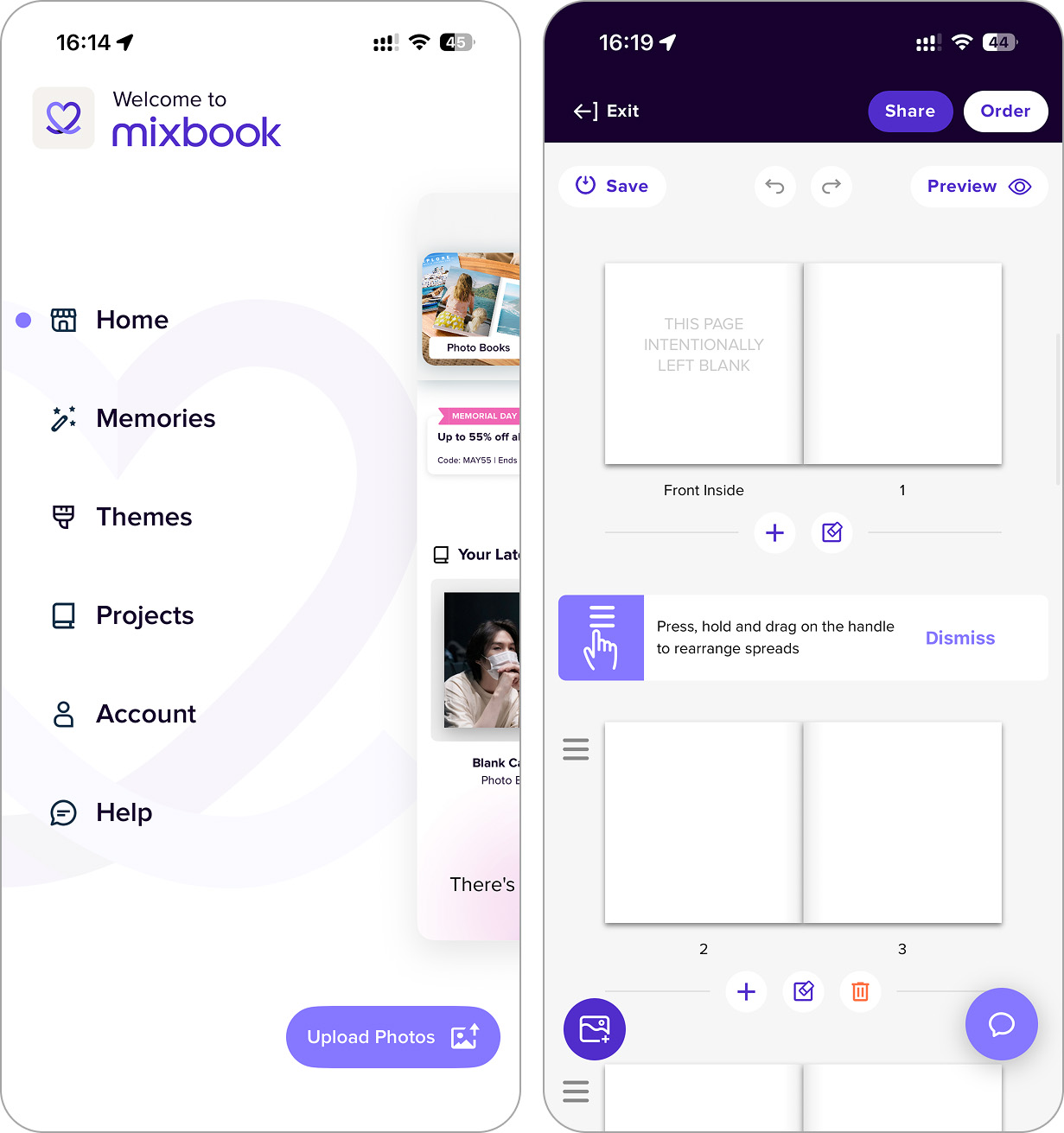
Last but not least in our Best iPhone Photo Management Apps category is Mixbook. This app isn’t just about organizing your photo library – it’s about transforming it into beautiful, printed keepsakes. With a solid ★4.8 App Store rating and 13K+ reviews, Mixbook is well-loved for its balance of simplicity and creative freedom.
For us, the standout here is the “Memories” feature – it scans your camera roll, finds meaningful photo sets, and turns them into photo-book-ready albums automatically. It also has AI-assisted layout suggestions, tons of modern themes, and great customization tools.
That said, we’ve noticed some issues. For example, the app sometimes asks you to log in again just to switch tabs, and it might be hard to find your work-in-progress albums. Navigation between drafts is clunky – it takes a few taps to even locate where they’re stored. We think that’s something the developer should improve. Still, it’s a hard app not to like. Even just opening it feels satisfying – it’s fun to look at.
If you’re looking for an iPhone photo album app that can double as a creative studio, Mixbook nails it.
Download link: App Store
Key Features:
- “Memories” smart photo grouping
- Auto-Create and recommended layouts
- Full design customization, stickers, and themes
- Printed photo books, wall décor, cards, and calendars
- Photo storage with safe backups
- Digital sharing options for finished albums
- Easy to use with creative tools
- Memories feature is a time-saver
- Print-ready albums look great
- Tons of themes for every occasion
- Physical + digital sharing
- Focuses more on creating gifts than everyday organization
- No built-in tagging or sorting features
- Photo upload can take time on large libraries
Price: Free to use, pay only for printed products.
Best Apps to Organize, Sync, and Share iPhone Photos
The final category is all about flexibility and connection. These apps don’t only organize your photos – they help you sync them across devices, back them up, and share them with friends, family, or even a wider audience.
1. Flickr
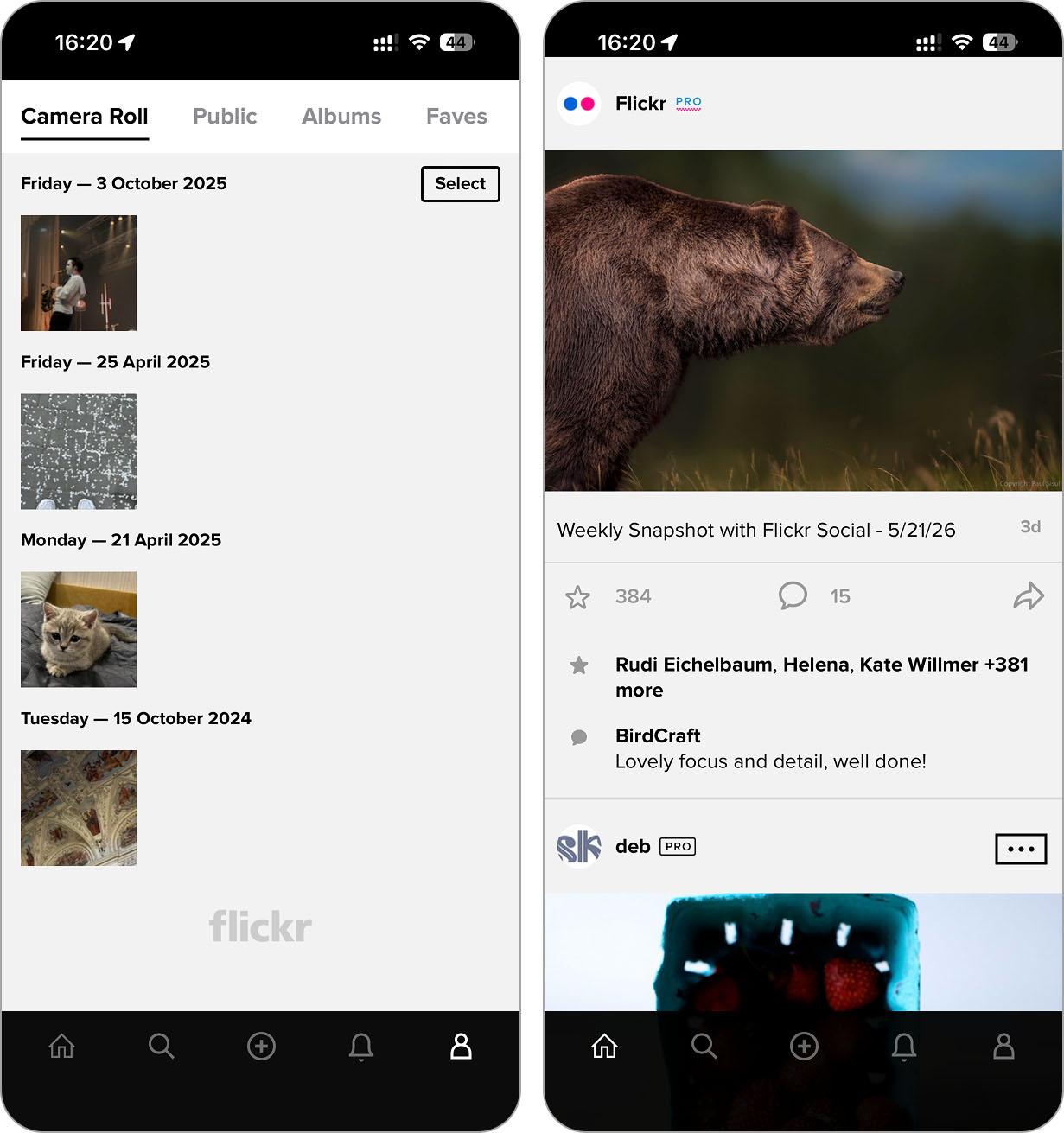
This category’s all about sharing, so we’ll start with Flickr – a well-known iPhone photo organizer app built around showcasing your best work. With over 15,000 App Store ratings and a ★4.5 score, it’s still going strong after all these years. And it’s not only for pros. Whether you want a private online backup or to join a global community of photographers, Flickr covers both.
You can upload and organize thousands of photos, tag them, group them into albums, and even back them up automatically with a Pro plan. Plus, the Flickr community is huge, and still pretty active. If you’re into social-style feedback and want a platform focused on actual photography (not trends), this is one of the last good ones standing.
Be ready for a few quirks, though – not all web features are available in the mobile app. Navigation can feel limited at times, and editing your About page or accessing full album tools still requires switching to desktop. We’re not saying the iPhone version is useless (far from it) but you might need your computer for some stuff. Still, it’s hard not to appreciate the platform’s longevity and its focus on photography over likes.
Download link: App Store
Key Features:
- Organize, tag, and group photos into albums
- Integration with various platforms
- Cloud backup (Pro) and full-resolution storage
- Filters and basic editing tools built-in
- Active global photo-sharing community
- Custom privacy settings for every image
- Free account with generous storage limits
- Huge creative community
- Clean organization tools
- Full-res uploads with Pro
- Good privacy and sharing options
- Large, dedicated community of photographers
- Some features only on desktop
- Navigation can feel limited on mobile
- Free plan is quite limited
Price:
- Free basic plan
- $15.00/month for Pro
- $119.00/year for Pro
2. Mylio Photos
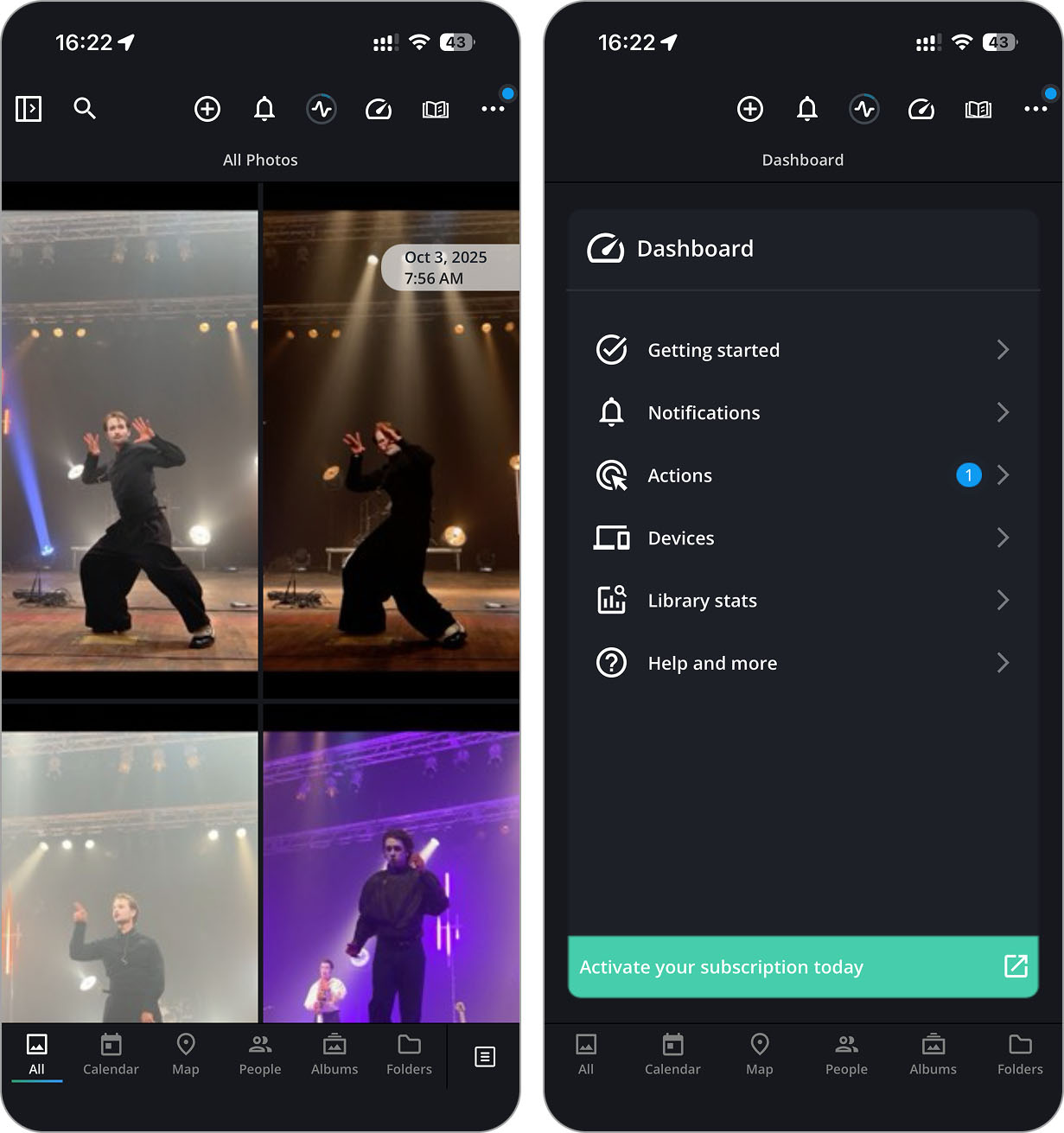
Mylio Photos isn’t your typical iPhone photo organizer app. It’s made for people who take photo management seriously, especially if you want to keep everything off the cloud. Instead of syncing to someone else’s server, Mylio lets you connect multiple devices (including external drives) and manage your full library privately. With built-in AI tagging, quick filters by camera or location, and a smart “Declutter” tool for finding similar shots, Mylio is definitely made for power users.
It has a lot going for it – burst photo detection, real-time syncing, tagging, face recognition, and even tools to pull in old photos from your social media accounts. If you’re someone who’s juggling multiple devices and want everything in one place without paying for cloud storage, Mylio is a great pick.
That said, this app isn’t really for beginners. It currently holds a ★3.9 rating on the App Store, which reflects a mix of praise for its powerful features and feedback on its setup complexity. It takes some time and effort to get everything going. The UI has a bit of a learning curve, and syncing issues have popped up for some users (especially if devices aren’t under the same account.) But if the key features sound like what you need, it’s genuinely powerful. Just take your time, read the docs, and you’ll be rewarded with one of the most advanced photo management setups on iPhone.
Mylio is hands-down one of the best options for power users.
Download link: App Store
Key Features:
- Cloud-free syncing across devices and drives
- Smart AI tagging with face, object, and activity detection
- Declutter tool to remove burst-mode and similar photos
- SafeShare feature for stripping personal metadata
- Built-in photo and video editor
- Pulls photos from Facebook, Instagram, Google, and more
- No cloud storage required
- Excellent privacy tools
- Cross-device syncing with local drives
- Great for massive libraries
- Smart auto-tagging and decluttering
- Setup takes effort
- UI isn’t super intuitive
Price: Free plan available; Premium starts at $25.00/month.
3. Google Photos
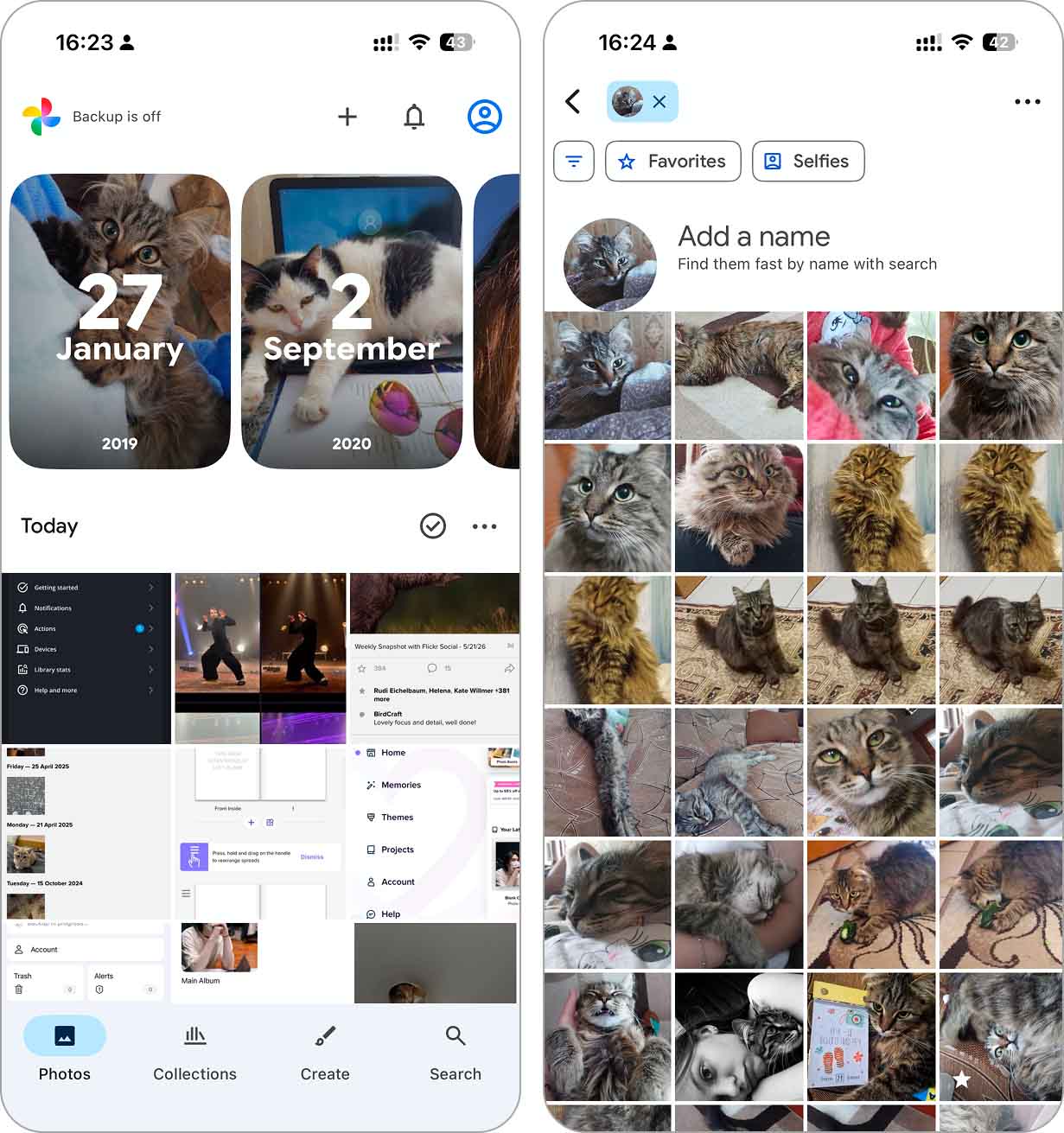
Google Photos has been one of the most popular photo management tools for years (with a staggering 1.2M ratings and a ★4.8-star score on the App Store). It gives you 15 GB of free cloud storage, smart AI search, face and object recognition, easy cleanup tools, and powerful auto-sync across devices. Plus, it’s one of the few apps that can truly replace your native gallery app. You can edit, sort, free up space, and share – all in one place.
The downside? That 15 GB fills up fast, especially since Gmail and Google Drive share the same quota. After that, you’ll need a Google One plan to keep uploading. Also, offline functionality is limited, so this isn’t the app to rely on if you’re frequently disconnected.
That said, the cross-platform support, smart features, and sheer reliability let us recommend this app to just about anyone. And if you’re already deep into the Google ecosystem, it’s a no-brainer. Easily one of the top photo organizer apps for iPhone users.
Download link: App Store
Key Features:
- 15 GB of free storage across Google services
- Automatic backup and sync across all devices
- Free up local iPhone storage with one tap
- Smart search by face, object, or location
- Collage, movie, and animation auto-creation
- Built-in Google Lens and editing tools
- Live Albums and shared libraries for easy group access
- Excellent cross-platform support
- Powerful AI search and auto-grouping
- Auto cleanup and storage management
- Smart photo editing tools and filters
- Live Albums update automatically
- Storage shared with Gmail and Drive
- Requires paid plan after 15 GB
- Offline use is limited
Price:
- Free with 15 GB
- 100GB for $1.99 per month
- 200GB for $2.99 per month
- 2TB for $9.99 per month
- 100GB for $19.99 per year (annual option)
Our Verdict
We ended up with 9 best photo organizer apps for iPhone in our rating. As you can see, the apps we chose cover a wide range of use cases, so for most people, there’s at least one iPhone photo manager that might be a perfect fit. It’s really about how you manage your photos and what you care most about – speed, structure, privacy, creativity, or something else entirely.
- For initial decluttering, we’d start with Clever Cleaner. It’s a great free app that gives you a fast way to sort out similar photos and remove clutter automatically – without paywalls or ads slowing you down.
- Next, for structured management, we’d go with HashPhotos. It’s one of the best photo management apps for iPhone users who want folder-based sorting, custom album covers, privacy features, and a calendar view to organize photos over time.
- Finally, for backup and cross-platform access, we’d choose Google Photos. Its smart features, automatic sync, and AI features make it one of the most practical photo tools out there, especially if you’re already using other Google services (like we do).
That said, these are our picks and yours might be different based on what you actually need. For example, if privacy is your top priority, Secret Photo Vault: Keepsafe might be a better fit. If you’re more into creating polished photo books and gifts, Mixbook brings a lot of creativity to the table.
Bottom line. The best photo organizer app for iPhone is the one that fits your personal workflow. Use our list as a guide and try these apps for yourself – we’re sure at least one of them will feel like it was made just for you.