
10 Best AI Humanizer Tools in 2025: Tested and Ranked
If you’re looking for a tool to make your GPT, Claude, or any other AI model output sound more human (or pass an AI detector), you’ve probably noticed the endless list of options out there. Problem is, most of them leave a lot to be desired. They either work poorly, barely changing the structure, or rewrite your text into something way off. And the ones that do work often cost more than they’re worth.
So we rolled up our sleeves and tested the most popular AI humanizers ourselves to figure out which ones are actually worth your time. You’ll find plenty of solid choices here – including some free ones.
Let’s get into it.
How We Ranked These AI Humanizers
To test and find the best AI humanizer tools, we generated a sample of text using the latest GPT-5 model, centered around a Mac-related topic. When we ran that sample through two popular AI detection tools – ZeroGPT and Originality.ai – the results were flagged unmistakably as AI-written. You can see this in the screenshots below: both detectors lit up with high AI probability scores.

No surprise there. No matter which model you use (GPT, Claude, Gemini, or Grok), they all tend to fall into recognizable patterns (sentence structures, wording, rhythm). Detectors pick up on these tells, and to be fair, so do a lot of people.

So here’s how we evaluated each AI humanizer. We took the same GPT-5 text and ran it through each tool. Then we checked the results using the same AI detectors.
But we also looked at the humanized text ourselves to judge whether it actually sounded like something a person might write.
You’d be surprised how many tools can fool a detector but still produce something that no real person would ever say. Some rewrote text so aggressively it lost all sense. Others introduced awkward grammar or strange phrasing just to dodge detection. When we came across tools like that, they didn’t make the cut. And yes, there were plenty of them.
Alongside that, we also evaluated all the usual stuff: features, pricing, free plan limitations, interface quality, and how much control you get over the output. But the two main things that shaped our rankings were:
- How well the tool rewrites AI content to sound more human to actual humans
- How effectively it bypasses modern AI detection algorithms
10 Best AI Text Humanizers
Now let’s get into our ranking of the best AI humanizers out there. We’ve listed them in the order of how well they performed in our test – the higher the tool on the list, the better job it did.
For each one, we’ll break down what it’s good at, where it struggles, and how well it was able to humanize our AI sample.
Let’s start at the top.
1. Clever Ai Humanizer

At number one, we’ve got Clever Ai Humanizer, and it earned the spot because it does the one thing it claims to do, and it does it well. This tool is completely free, requires no sign-up, and gives you up to 120,000 words per month with no ads or paywalls. That alone is quite rare in this space.
| Category | Details |
| Pricing | 100% Free |
| Word Limit | Up to 120,000 words/month; 4000 words/run |
| Customization | Minimal: no sliders or advanced tone controls |
| Text Editor | Basic formatting options (bold, italic, underline, lists, etc.) |
| Export Options | Copy to clipboard or export as HTML |
- ZeroGPT: ⭐⭐⭐⭐⭐ (5.64% AI detection)
- Originality.ai: ⭐⭐⭐⭐⭐ (8% AI detection)
- Our Evaluation: ⭐⭐⭐⭐⭐ (No major tone issues or grammar errors. Reads naturally with a conversational rhythm.)
Pros:
- 100% free
- No signup required
- Keeps the structure of your original content intact
- Very natural output
- Minimal risk of breaking grammar
- Smooth interface
- Content History
Cons:
- No advanced customization or tone control
Bottom line: If your goal is to make your AI-written content feel more human, without overcomplicating things, Clever Ai Humanizer is one of the best AI humanizer tools you can try right now.
We’d recommend it to just about anyone, from students to technical writers, especially if you need a fast, readable result with minimal effort.
And since it’s completely free (at least for now), there’s no risk in trying it. According to the developer, Clever Ai Humanizer will stay free for at least a year or two, with paid premium features added later on. So if you’re looking for a solid free AI humanizer, this is absolutely one to bookmark.
2. QuillBot

At number two, we’ve got QuillBot – a veteran (if anyone can be called that in this still-new space) in the AI rewriting game. While it wasn’t originally built as a pure “AI humanizer,” its newer mode (and strong paraphrasing capabilities in general) make it a solid option for making AI text feel more natural.
What sets it apart is the level of customization: you can fine-tune tone, style, and structure more than most tools on this list.
| Category | Details |
| Pricing | Free tier available. Premium starts at $4.17/month (billed annually) |
| Word Limit | Free users get 125 words per paraphrase. |
| Customization | Synonym slider controls rewrite creativity; multiple modes available: Standard, Fluency, Formal, Creative, Humanize, and more |
| Text Editor | Clean interface with formatting options (bold, italics, lists, etc.) |
| Export Options | One-click “Copy All” or export to clipboard or .docx; integrates with extensions and apps |
- ZeroGPT: ⭐⭐⭐⭐⭐ (8.21% AI detection)
- Originality.ai: ⭐⭐⭐⭐ (11% AI detection)
- Our Evaluation: ⭐⭐⭐⭐ (Output reads clearly and flows better than the original, though phrases sometimes still feel a bit “tool-generated.”)
Pros:
- Offers tons of modes, so you can tweak tone to your needs
- Synonym slider gives control over how much rewriting happens
- Free tier is functional for short fixes
Cons:
- Free version is limited to 125 words and only two modes
- Sometimes rewrites feel a little generic or lose nuance
- Doesn’t excel at fooling robust AI detectors—even the Humanize mode still leaves some patterns behind
Bottom line: QuillBot is a sturdy, flexible tool that’s great for polishing AI content. If you want to adjust tone or style with some control, say, making something sound more formal or natural, QuillBot’s varied modes are a solid bet.
Plus, the free tier is handy for short tasks. But if your main goal is to slip past AI detectors, it may not be enough on its own. For readability and tone alone, it’s among the best AI humanizer tools.
3. HIX.AI

Up next: HIX.AI’s HIX Bypass, this tool blends a humanizer with a detection scanner. It claims to convert AI-generated text into versions that typically slip past major detectors.
It offers 4 modes (Fast, Balanced, Aggressive, Latest), so you can lean into stealth, speed or clarity as needed.
| Category | Details |
| Pricing | Basic: $14.99/mo for 5,000 words
Pro: $29.99/mo for 50k words Unlimited: $59.99/mo (all include per-request caps) |
| Word Limit | Basic: 5,000 words/mo, 500 words/request
Pro: 50,000 words/mo, 2,000 words/request Unlimited: unlimited words, still ~2,000 words/request max |
| Customization | Choose output mode: Fast, Balanced, Aggressive, and Latest |
| Text Editor | Basic paste-and-edit interface with option to “Humanize” and then detect |
| Export Options | Copy output or download |
- ZeroGPT: ⭐⭐⭐⭐ (11.02% AI detection)
- Originality.ai: ⭐⭐⭐⭐ (16% AI detection)
- Our Evaluation: ⭐⭐⭐⭐(Polished and often bypasses detectors without mangling meaning. However, Aggressive mode risks tone loss)
Pros:
- Combines rewriting with a built-in detector
- Works well for quick iteration.
- Bypasses detectors reliably when used in Balanced or Aggressive mode
- Supports 50+ languages
- Offers multiple humanizing intensities
Cons:
- No long-term free tier, though it offers a short free trial
- Word limits per request (especially in cheaper plans) are very restrictive
- Mixed reviews around support and cancellation hassles
Bottom line: HIX.Bypass stands out because it blends humanization, AI detection, and multi-mode control in one tool. If you’re writing in multiple languages or care about easily bypassing detectors, this tool can do much of the heavy lifting.
Just be mindful of how you use it. In our tests, the Aggressive mode – while effective at AI detection scores – often strayed too far from the original tone and intent. It’s best suited for short passages or rewrites where tone flexibility is less critical.
Also, we came across a good amount of user complaints about billing practices. If you decide to subscribe, make sure you understand the plan terms and monitor your usage.
4. StealthWriter
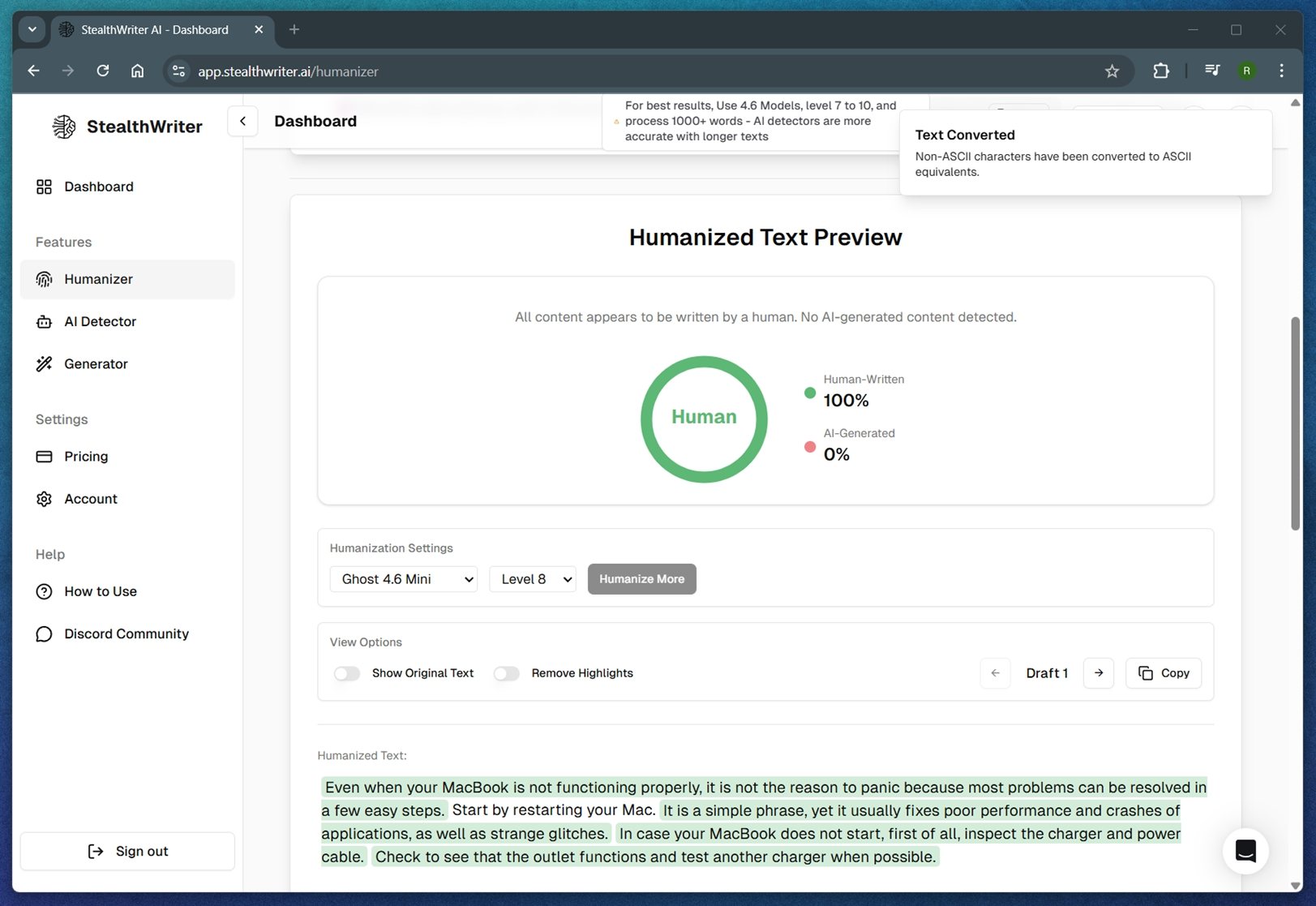
At number four, we’ve got StealthWriter, a service designed to turn AI text into something that slips under the radar. It offers a built-in detector and claims consistent bypassing of systems like GPTZero, Originality.ai, and Turnitin. It gives you multiple models, style tuning, and a built-in AI checker so you can test results right after generation. You get access to “Ghost” and (formerly) “Ninja” models with adjustable bypass levels (Level 1–10). There’s also an impressive list of output tones like Simple, Academic, University Student, or even High School Student.
| Category | Details |
| Pricing | Basic: $20/mo; 2,000 words/request, Ghost Pro (20k words), Generator access
Standard: $35/mo; 3,000 words/request, Ghost Pro (50k), Style changing Premium: $50/mo; 5,000 words/request, all features unlocked including Beta tools and Discord support |
| Word Limit | Free Plan: 1,000 words/request, 6,000/day, Ghost Mini only
Based on subscription tier (Standard plan = 100,000 words/month) |
| Customization | Strong: model selection, bypass level (1–10), output persona (casual, academic, and many more) |
| Text Editor | None (plain-text input and output) |
| Export Options | Copy or download results (HTML and .txt formats supported) |
- ZeroGPT: ⭐⭐⭐⭐ (10.73% AI detection)
- Originality.ai: ⭐⭐⭐⭐ (14% AI detection)
- Our Evaluation: ⭐⭐⭐⭐(Often detector-friendly, but occasional awkward phrases or tone shifts. Needs a careful eye before final use.)
Pros:
- Two humanization models (Ninja and Ghost) offer some variation
- Style switching for different tones (Academic, Casual, Student, etc.)
- Built-in AI detection
- Capable of bypassing many detectors while retaining clarity
- Integrated Generator feature in paid plans
Cons:
- Interface can feel a bit overwhelming
- Best results often require trial and error with model levels
- Ghost Pro (strongest model) is locked behind paid plans
- The tone can sound slightly robotic unless you use style modifiers
Bottom line: StealthWriter is a capable tool for anyone serious about bypassing AI detection without sacrificing readability. The Ninja and Ghost models offer useful flexibility, and a real-time detector built in is handy.
But make no mistake: this tool takes tuning. You’ll need to experiment with model levels, styles, and modes to find what actually works for your use case. We’ve seen people online call the output “illegible” in some settings – and we get it. In our tests, higher stealth levels (like 8–10) did bypass detection… but the final text felt too far off from the original tone or quality to confidently publish without edits.
If you’re up for trial and error and don’t mind tweaking things, it’s powerful. But if you want one-click ease, this might not be your best first choice.
5. Twixify

Next on the list is Twixify, a rewriting tool that focuses on reducing AI detection scores while staying simple to use. It’s not as customizable as others on this list, but it does give you some control over how your text is processed (sliders for sentence randomness, length, and synonym use).
It’s a minimalist utility that works for people who want something faster and less complicated.
| Feature | Details |
| Pricing | Basic: $8/month (400 words/cycle, 75 monthly requests)
Standard: $13/month (600 words/cycle, 150 monthly requests)
Premium: $27/month (1000 words/cycle, 200 monthly requests) |
| Word Limit | Free Plan: 150 words/request (4 requests/mo) |
| Customization | Sentence randomness, length, synonym strength, bypass intensity |
| Text Editor | Plain-text input/output only |
| Export Options | Copy or download as plain text |
- ZeroGPT: ⭐⭐⭐⭐ (15.01% AI detection)
- Originality.ai: ⭐⭐⭐⭐ (22% AI detection)
- Our Evaluation: ⭐⭐⭐(Less nuanced than others. Great for fast edits but weaker in preserving complex tone or structure.)
Pros:
- Clean, human-readable output
- Quick processing with little to no delay
- Solid detection bypass performance across major checkers
- Affordable pricing tiers for pro users
Cons:
- No export options like .docx or HTML
- Output consistency drops with very technical or niche prompts
- Barebones interface
Bottom line: Twixify is a no-fuss option for people who want to quickly reduce detection scores without digging into advanced controls. It’s best for casual or semi-formal use cases where minor tone shifts or structure loss are acceptable.
If you’re looking for something clean and relatively effective, Twixify hits that niche. But if your writing requires precision, tone control, or deeper formatting options, you’ll likely outgrow it fast.
Also, we weren’t fans of the interface – the font size and styling felt cramped. It works, but it’s not the most pleasant workspace to spend time in.
6. Ahrefs Free AI Text Humanizer

Our pick for number 6 is Ahrefs Free AI Text Humanizer – a lightweight tool from the well-known SEO brand that aims to humanize AI-written content with a single click. It’s free, browser-based, and requires no login. Just paste your text, click, and you’ll get a rewritten version that usually reads a lot smoother.
| Feature | Details |
| Pricing | Free (no login, no watermark) |
| Word Limit | 2,048 characters per request (roughly 300–400 words) |
| Customization | No tone/style sliders |
| Text Editor | Minimal. Paste box + variant dropdown, nothing else |
| Export Options | Copy to clipboard or save as .txt file |
- ZeroGPT: ⭐⭐⭐ (27.42% AI detection)
- Originality.ai: ⭐⭐⭐ (35% AI detection)
- Our Evaluation: ⭐⭐⭐(Doesn’t consistently bypass AI detectors)
Pros:
- 100% free, no signup needed
- Very easy to use
- Speeds up light editing
- Doesn’t mangle meaning
Cons:
- No detection bypass guarantee
- No control over tone, depth, or style
- Limited length (under 2,048 characters)
Bottom line: Ahrefs’ Free AI Text Humanizer is pretty basic. It doesn’t offer advanced controls or modes, and we didn’t see stellar results when testing for detector bypass.
That said, it’s a completely free AI humanizer, and for that alone, it earns a spot on this list. If you’re working with short chunks of text and just want to improve flow or fix robotic phrasing without overthinking it, this one’s worth bookmarking. Just don’t expect miracles.
7. WriteHuman.ai

Number 7 goes to WriteHuman.ai, a growing player in the AI humanizer space that markets itself as “elevating AI to human perfection.” It offers a generous set of features for a relatively affordable price point – tone presets, an enhanced model for stronger stealth rewriting, and even a built-in AI detector to check your results.
The tool gives you the option to choose from a wide range of tones like Standard, Professional, Academic, Blog/SEO, Creative, Casual, and more. There’s also a toggle to activate the “Enhanced Model,” which the developers claim is tuned for tools like Turnitin, GPTZero, and Originality.ai.
| Category | Details |
| Pricing | Free plan available (limited daily uses)
Basic: $12/month – 600 words/request Pro: $18/month – 1,200 words/request Ultra: $36/month – 3,000 words/request, unlimited use |
| Word Limit | Depends on tier; Free tier: 200 words/request |
| Customization | Tone presets (Standard, Creative, Academic, etc.) + Enhanced Model toggle |
| Text Editor | Basic textbox input/output with navigation arrows for multi-step results |
| Export Options | Copy to clipboard only (no DOCX, PDF, etc.) |
- ZeroGPT: ⭐⭐⭐ (25.82% AI detection)
- Originality.ai: ⭐⭐⭐ (29% AI detection)
- Our Evaluation: ⭐⭐⭐⭐(Readable and much smoother than base output. Tone presets help, but Enhanced Model may over-sanitize in some cases)
Pros:
- Offers free AI humanizer tier
- Includes built-in AI detector
- Useful tone customization presets
- Enhanced Model
- Clean, minimal UI
Cons:
- Free plan is limited to just 3 short requests/month
- No export formats beyond plain text
- Enhanced Model sometimes changes tone too much
Bottom line: WriteHuman.ai is a solid all-around pick for anyone looking to humanize AI writing with more tone control and detector awareness. With tone presets and a stealth-optimized model, it brings more flexibility than most free or low-cost tools.
While it didn’t score quite as high on detector bypass as some tools ranked higher, the results are still decent. We also liked the fact that it transparently warns users when it thinks a rewrite might not bypass detection – and lets you try again without using up a request.
8. HumanizeAI.io

Stepping in at number eight is HumanizeAI.io, a browser-based AI humanizing tool that stands out for offering affordable pricing and useful extras like tone presets and a “keyword locking” feature. That lets you preserve specific terms while the tool reworks the rest, a handy tweak for SEO, branding, or technical terms.
| Category | Details |
| Pricing | Standard: $4/month (600,000 words/year)
Premium: $6/month (unlimited words) Elite: $7/month (unlimited words, fastest processing) |
| Word Limit | Standard: 1,000 words/request
Premium: 2,000 words/request Elite: 3,000 words/request |
| Customization | Freeze 3-12 keywords/phrases depending on plan
Choose processing speed: Standard, 2×, or 4× |
| Text Editor | Integrated tools: grammar checker, AI summarizer, formatter, translator |
| Export Options | Copy or download output |
- ZeroGPT: ⭐⭐⭐ (19.55% AI detection)
- Originality.ai: ⭐⭐⭐ (23% AI detection)
- Our Evaluation: ⭐⭐⭐(Sometimes over-rewrites, but mostly held meaning)
Pros:
- Good value for the price
- Supports large word limits, even in cheap plans
- Allows keyword freezing for context-sensitive rewriting
- Includes full suite of tools (summarizer, grammar, formatter)
Cons:
- Interface feels dated
- Results can be hit or miss with complex or poetic text
Bottom line: HumanizeAI.io may look a bit dated at first glance, but it’s surprisingly capable when it comes to bypassing AI detectors. Its results hold up well in testing, and the pricing tiers are among the most affordable we’ve seen.
A solid budget-friendly AI writing humanizer for longer content, even if it’s not the slickest interface out there.
9. Walter Writes AI

WalterWrites.ai is a full humanization platform with built-in AI detection and a feedback loop that lets you test, rewrite, and retest your content until it slips past the radar. You paste in your text, check for AI scores, humanize it, and then run another check.
We placed it lower in the list because its detection quality wasn’t the highest overall. That said, the user community speaks highly of it. It has a loyal following for a reason.
| Category | Details |
| Pricing | Starter: $7/month (10,000 words/month)
Pro: $11/month (55,000 words/month) Unlimited: $28/month (unlimited words/month) |
| Word Limit | Starter: 500 words/request
Pro: 1,200 words/request Unlimited: 1,700 words/request |
| Customization | Enhanced Mode available on all plans
Pro & Unlimited unlock: • Advanced content styles • Free AI Detector |
| Text Editor | Not available (no built-in editor, just input/output boxes) |
| Export Options | Copy-paste only |
- ZeroGPT: ⭐⭐⭐ (30.02% AI detection)
- Originality.ai: ⭐⭐⭐ (36% AI detection)
- Our Evaluation: ⭐⭐⭐(Nice control over tone, but required retries to get clean passes)
Pros:
- Built-in AI detection tool (on paid plans)
- Iterative workflow: rewrite, test, and adjust
- High word limits per request
- Enhanced Mode adds more finesse
- Clean UI and flexible tone customization
- Annual pricing is competitive
Cons:
- Output quality is inconsistent (sometimes sounds robotic)
- Detection bypass wasn’t top-tier in our test
- Free/Starter plan doesn’t include AI detector or advanced features
- Interface feels slightly cluttered
Bottom line: WalterWrites is a feature-rich AI text to human text generator built for users who want more control over the rewrite process. It offers custom readability and purpose settings (like “High School” or “University”), which help tailor the tone of the rewrite. One standout feature is its ability to show side-by-side history of previous outputs – great for tweaking and testing.
Despite its somewhat awkward phrasing in certain rewrites, it allows long-form rewriting with up to 1,700 words per request on the Unlimited plan, and includes a decent feedback loop via re-scanning. This makes it a strong option for anyone dealing with large text volumes.
10. Writesonic Humanizer

Writesonic Humanizer concludes our list of websites that humanize AI writing. While not as powerful or customizable as some standalone tools, it provides a quick and basic solution for users already inside the Writesonic ecosystem.
| Category | Details |
| Pricing | Free (with signup). Advanced tools require a Writesonic account. |
| Word Limit | 200 words per request (free tier). |
| Customization | Choose from: Engaging, Direct, Persuasive, Conversational and more |
| Text Editor | Real-time humanized output preview; manual edits allowed |
| Export Options | Copy or continue editing in full Writesonic platform |
- ZeroGPT: ⭐⭐⭐ (38.21% AI detection)
- Originality.ai: ⭐⭐⭐ (41% AI detection)
- Our Evaluation: ⭐⭐⭐(It smooths out robotic phrasing quickly, but doesn’t reliably bypass high-end detectors. Good for blog posts or social content.)
Pros:
- 100% free to start
- Super beginner-friendly interface
- Offers tone-of-voice options like Engaging, Direct, Persuasive, and Conversational
- Works well for social media posts or blog hooks
Cons:
- Output often still reads like AI
- Limited word count on the free tier
- No formatting tools
- No export beyond copy-paste
Bottom line: In our testing, Writesonic Humanizer delivered fairly readable output that can pass some AI detectors. Compared to other tools in our list, the natural phrasing wasn’t always as strong, especially with longer or technical inputs. However, for short-form content like social posts, blog intros, and captions, it does the job with minimal fuss.
We liked that you can adjust tone and language, and it’s got an easy-to-use interface with clearly labeled buttons.
AI Humanizer Performance Summary (Based on Detection + Manual Review)
Now, to make it easier to compare each tool side by side, we’ve put together a full table with performance scores. This chart gives you a quick way to spot the winners.
| Rank | Tool | ZeroGPT Score | Originality.ai Score | Our Evaluation |
| 1️⃣ | Clever AI Humanizer | ⭐⭐⭐⭐⭐ (5.64%) | ⭐⭐⭐⭐⭐ (8%) | ⭐⭐⭐⭐⭐ – Reads naturally, no major issues |
| 2️⃣ | QuillBot (Humanize mode) | ⭐⭐⭐⭐⭐ (8.21%) | ⭐⭐⭐⭐ (11%) | ⭐⭐⭐⭐ – Clear output, slightly tool-like |
| 3️⃣ | HIX.AI Bypass | ⭐⭐⭐⭐ (11.02%) | ⭐⭐⭐⭐ (16%) | ⭐⭐⭐⭐ – Strong, but tone loss in Aggressive |
| 4️⃣ | StealthWriter | ⭐⭐⭐⭐ (10.73%) | ⭐⭐⭐⭐ (14%) | ⭐⭐⭐⭐ – Flexible but needs fine-tuning |
| 5️⃣ | Twixify | ⭐⭐⭐⭐ (15.01%) | ⭐⭐⭐⭐ (22%) | ⭐⭐⭐ – Simple and fast, but limited nuance |
| 6️⃣ | Ahrefs Humanizer | ⭐⭐⭐ (27.42%) | ⭐⭐⭐ (35%) | ⭐⭐⭐ – Free and smooth, but not stealthy |
| 7️⃣ | WriteHuman.ai | ⭐⭐⭐ (25.82%) | ⭐⭐⭐ (29%) | ⭐⭐⭐⭐ – Smooth with tone presets |
| 8️⃣ | HumanizeAI.io | ⭐⭐⭐ (19.55%) | ⭐⭐⭐ (23%) | ⭐⭐⭐ – Keyword lock is nice, UI outdated |
| 9️⃣ | WalterWrites.ai | ⭐⭐⭐ (30.02%) | ⭐⭐⭐ (36%) | ⭐⭐⭐ – Good history tracking, uneven tone |
| 🔟 | Writesonic Humanizer | ⭐⭐⭐ (38.21%) | ⭐⭐⭐ (41%) | ⭐⭐⭐ – OK for social content, not for stealth |
Final Thoughts
The world of AI that makes text more human is evolving by the day – and it’s getting very competitive. As new detection models roll out and generative tools get smarter, humanizers have to keep up. But here’s the catch: AI compute isn’t cheap. So whether you’re using a free AI humanizer or a premium service, expect word caps, feature limits, or processing slowdowns, especially at the entry level.
A bunch of free tools we tested didn’t make the cut – not because they weren’t clever, but because they wrecked grammar, twisted the meaning, or just returned content that didn’t read well. A tool that rewrites your blog post into a confusing mess might sneak past ZeroGPT, sure – but what’s the point if it ruins your content?
On the flip side, options like Clever AI Humanizer, Ahrefs Free AI Text Humanizer, and WriteHuman.ai showed that free or affordable tools can work if they’re built right.
One last reminder: don’t expect perfect “0% AI detection” results every time – even from human-written content. AI detectors throw false positives constantly, and we’ve seen plenty of legit, human-written text get flagged as likely AI. So take those detection scores with a grain of salt. Look at them as ballpark estimates, not hard truths. No tool (on either side) is perfect.
This whole push and pull between AI-generated text and AI detection is still in its early stages, and we’ll be watching closely to see how it evolves.
FAQ
That said, students should still review and tweak the results. Many schools have rules around AI use, and even real human writing can get flagged by AI detectors. A humanizer tool is best used to clean up tone and flow, not to completely rewrite an assignment.
Always read the tool’s privacy policy. Some AI humanizers might store your data to “improve their models,” which could mean your text isn’t 100% private. If you’re working on something sensitive stick to tools with a solid reputation and clear data-handling policies.
Turnitin uses a combination of AI detection algorithms and plagiarism checks. Even if a humanizer rewrites your text to sound more natural, Turnitin might still flag it if the structure or patterns resemble AI-written content, or if the content too closely resembles sources in its massive database.
- Clever AI Humanizer, this tool is clean, distraction-free, and surprisingly solid for turning robotic AI text into something more readable. It doesn’t mess with the grammar too much and feels more refined than most freebies we’ve tested. Bonus: no registration required.
- Ahrefs Free AI Text Humanizer is a lightweight AI humanizer that works great for short-form copy and content snippets. Simple interface and good output for tweets, meta descriptions, or intro blurbs.
Here’s a simplified breakdown of what happens:
- The tool first reads your original AI-generated content and identifies patterns that sound too mechanical or unnatural.
- The AI rewrites the content by adjusting vocabulary, sentence structure, and rhythm. It may shorten or expand certain phrases to match the selected tone.
- Some tools also optimize for passing AI detectors like GPTZero or Turnitin, though no tool can guarantee 0% detection.
Think of it like a second pass over your draft – just automated. It doesn’t magically make it “human,” but it can get you close enough that with a quick human polish, the content feels much more natural.
- Paraphrasers focus on rewording your content to avoid repetition or plagiarism. They often change words and rearrange sentence structure but don’t always improve flow or readability. They’re great for academic rewriting, SEO tweaks, or summarizing (but can still sound robotic).
- AI humanizers, on the other hand, make AI-generated text feel human – more natural, emotionally resonant, and engaging. They adjust rhythm, vocabulary, and even grammar style to better reflect how people actually speak or write.