gumman Posted January 22, 2012 Share Posted January 22, 2012 (edited) Hey guys, this thread is about installing OS X on the HP8530p/w and how to enable most of the hardware. The guide consists of many different chapters. Those are currently: [Probably Outdated] Modifying the HP8530p/w [Outdated] Install Lion 10.7.x [Outdated] Dual Booting Lion and Windows 7 on GUID Partition Installing Mavericks 10.9.x - Non Dual Booting What’s working so far (last update 15-01-2014): Audio (AD1984A) (DSDT + modified AppleHDA.kext) Ambient Sensor (DSDT) Battery/AC Status (DSDT + KEXT) Brightness (DSDT) Bluetooth (OOB) DTGP (DSDT) EHCI ICH10 (DSDT) FN-Keys + Special HP Keys (Brightness/Volume) (DSDT + KEXT) Touchpad (OOB) NVidia FX770m QE/CI (DSDT) Intel 82567LM (KEXT) SATA ICH10 (DSDT) SMBUS (DSDT) SLEEP (OOB) SLEEP on LID (DSDT) Speedstepping (Chameleon) USB ICH10 (DSDT) VGA (DSDT) Webcam (OOB) WLAN (OOB) What’s *not* working so far: Audio – External Microphone Input Cardreader (Ricoh 5-in-1) DVD-RW Drive (is not detected properly - maybe it's just my drive as no one else has this bug) HDMI, DVI (via Dock) HDMI-Audio What's currently untested: Fingerprint Support Firewire Attached is the latest dsdt file and the additional kext files needed for proper installation. dsdt_hp8530pw_09-01-14_v2.zip Extra_15-01-14.zip SLE_15-01-14.zip Many thanks to: - RehabMan for his VoodooPS2Controller, ACPIPS2Controller and the FakeSMC Branch. - Macintoshy for the HPET fix from his DSDT - The dudes from pcbeta/51nb for many dsdt fixes - All the others I've forgotten Cheers,Gumman Edited January 15, 2014 by gumman 3 Link to comment https://www.insanelymac.com/forum/topic/274941-guide-%E2%80%93-hp8530p8530w-%E2%80%93-mavericks-1091/ Share on other sites More sharing options...
yeuthem Posted February 1, 2012 Share Posted February 1, 2012 Can you give us a guide, instruction, or direction of how to start? I am new, any help will be appreciated. Thanks Link to comment https://www.insanelymac.com/forum/topic/274941-guide-%E2%80%93-hp8530p8530w-%E2%80%93-mavericks-1091/#findComment-1791567 Share on other sites More sharing options...
gumman Posted February 2, 2012 Author Share Posted February 2, 2012 Hi yeuthem, if you need help for your VAIO, then you'll have to look up the forums I can and will only help users that have a hp 8530p/w, but if I look at your specs, i'm pretty sure that you won't get your ATI HD 3650 with 3D acceleration working. Also that WIFI 5100 seems to be a hopeless case. So the options for you will be: Check if your notebook support switching of graphic cards (MXM-Slot) - and check if you can install another wifi pci express card into your notebook (and if you need to hack your bios to enable it). If I was wrong, and you also have a hp 8530p, then wait until i wrote the first chapters of my guide They will follow soon.... Cheers, Gumman Link to comment https://www.insanelymac.com/forum/topic/274941-guide-%E2%80%93-hp8530p8530w-%E2%80%93-mavericks-1091/#findComment-1791878 Share on other sites More sharing options...
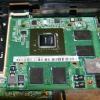
gumman Posted February 2, 2012 Author Share Posted February 2, 2012 --- Chapter 1 - Modifiying the HP8530p --- Hey Guys, here's the first part of my guide. This is not about installing Mac OS X, this is about modifiying your hp8530p/w, to achieve full hardware support afterwards. In short words, it is about changing the graphic card, wifi card and enabling them. ** Short Note: I'am not responsible for any damages that you do to your notebook! In my case, my hp8530p got an ATI HD 3650 inside, which has no support after Leopard 10.5. I've googled a lot, but I've didn't found any solution. So I decided to switch graphic cards. Also my Intel Wifi 5300bgn has no support under Mac OS X, so it needs to be switched, too. After reading a lot on changing hardware on the hp8530, i found out, that only hardware which was built in stock hp 8530p notebooks will work. So i looked at the original maintenance and service guide from HP. Get it here -> http://h10032.www1.h...l/c02030275.pdf If you look on Page 23, there you'll see all wlan cards that are supported in the hp8530p/w, and none of them has support for Lion - what a bummer! So you need to hack the bios to allow other wlan cards to work. But someone already did that for us After digging a lot on the mydigitallife.info forums, i've found a link to a nice site with bios patches for hp notebooks without wlan whitelisting. Get your Bios there: http://forum.noteboo...7x0p-25x0p.html If you're on a hp8530w, you need to install the bios of the hp8530p - they are the same. Flash this Bios from Windows on your Notebook. (My advice is to better have a running windows to check that you've changed your hardware properly, before beginning to use mac os x) If you look on Page 24, there you'll see all graphics that are supported by your hp8530p/w. For graphic cards there is NO Whitelisting patch or something like this. You'll need to use on of the graphic cards listed there. Look at the nVidia NB9P-GLM2 there. It's a NVidia Quadro FX 770m which is also known as NVidia 9600GTm and has support for Lion! (and hopefully above... ) So you'll need to try to get your hands on that graphic card. Search ebay for "502338-001" if you want to keep sure, you get the original one used by hp. If you'll buy a standard 9600GTm MXM (maybe from a Acer notebook) or from "not-an-HP-book" you'll proably need to flash the right VBIOS to the MXM Card. I know that this is possible, but it's not easy. To get the idea, you'll need a bootable usb stick, which starts the vbios patching automatically, because you won't be able to see anything on your display... . I can't help you with that process, so my approach would be googling "MXM Flash VBios". Where to get that VBIOS? Someone uploaded it here: http://www.techpower...face=&memSize=0 In my case I bought the right FX770m with the right bios inside on ebay from a guy from Lithuania http://myworld.ebay....sid=p4340.l2559 It seems that he's selling more of these video cards, so if you think it's worth the money, get one... Now, the WLAN Module, after you've flashed the whitelisting bios, your able to install a wifi card of your choice. I bought an Atheros AR5BXB92 from an original macbook, which seems to work very fine in Lion. But it's your choice, lookup the forums, and install a wifi card which is working properly under lion How to change the hardware? This process is far from easy. It's not like changing graphic cards in an standard pc. You'll have to nearly disassembly the complete notebook, to be able to switch the graphic card. Don't do it, if you really *need* the notebook, the chance to brick it is high! Still reading here? Okay. The process of changing graphic cards is described in the original maintenance and service guide from HP, which I posted the link to above. If you're carefull and do anything as described there, you can't go wrong. If you read the guide very accurate, you'll maybe noticed, that HP uses an other Headsink for the NVidia Graphic Card (maybe a better one). In my case, i still used the Heatsink from the ATI Graphic Card for the NVidia Graphic Card - without any problems. I used an thermal conductor from Arctic Cooling, and the temps seems to be better than with the ATI Graphic Card before! "bad" ATI 3650 "good" NVidia FX770m (9600GTm) Changing the Wifi card is quite easy and is described in the service manual If you're done changing your hardware, boot up windows, check if everythings working properly. Install new graphic card drivers / wlan drivers.... and head up to Chapter 2 ! Cheers, Gumman --- if you'll find any Typo's or misspelling, I'm not a native speaker -- 1 Link to comment https://www.insanelymac.com/forum/topic/274941-guide-%E2%80%93-hp8530p8530w-%E2%80%93-mavericks-1091/#findComment-1791897 Share on other sites More sharing options...
gumman Posted February 2, 2012 Author Share Posted February 2, 2012 --- Chapter 2 - Installing Lion 10.7.x --- Hey Guys, this is Chapter 2 of my guide, it's on how to install lion 10.7.x, in my case 10.7.2. This guide is based on many of those guides flowing around in these forums, so i won't describe *every* step i did, i only write about the ones you'll need to care about or the steps you have to add, to get it working on your hp 8530p/w. Basically you can use the guide posted by mald0n here: http://www.insanelym...pic=256729&st=0 Mainly all guides are depending on an running mac os x somewhere... but what do you do if you don't have a running mac os x? There are some solutions, maybe you can try to put the Lion Install dmg to your USB Drive using a windows tool or something like that.... But my way was to install Mac OS X to a VMware device and putting the Install.dmg from there to my usb stick (as shown my mald0n). There are plenty of tutorials out there, how you can install a Mac OS X in VMware, google it! Okay in my case I had an old installation of Leopard in VMware, so i didn't have to figure out how to install it to a vmware anymore But it's easier to follow those guides, if you have a working mac os installation somewhere... So basically, follow the guide from mald0n, and stop after you installed the extra pkg and the chameleon pkg to your usb drive. Then open your Finder, go to your Lion Install USB Drive, go to /System/Library/Extensions. Locate the "IOFireWireFamily.kext" there and delete it! If you won't delete this kext, you'll get a kernel panic after installation. We add the IOFireWireFamily.kext in a later chapter again, after we fixed the Firewire IRQs using DSDT The Installation Process: Boot your HP8530p/w, go to Bios, reset everything to default (you don't need to set specific options for running Lion on an hp8530p/w ) Boot your USB Drive, Lion Installation should appear but it may wan't you to add a USB Keyboard to start Installation. I was lucky to have a usb keyboard flying around... so no problem (there are also other ways to fix this problem, lookup the forums) In Lion Installation format your Harddisk Drive to a 2 Partition Layout (GUID) - 2 in case you want install Windows 7 afterwards, if you don't want to, just create one partition. I partitioned my 250gb drive with the first partition (lion) (125gb - Mac OS Extended (Journaled) and the second partition for seven (125gb) (MS-DOS FAT). I'm sorry that I didn't make any pictures of this process, but it's far more easier than it sounds;)! After you properly formatted your harddrive start installation. It should install fine and boot hopefully lion afterwards Now you need to install a Chameleon Bootloader to your harddrive, if you don't, you'll need to boot your usb installation stick everytime, you want to boot up mac from your harddrive. In Lion Install Chameleon to your harddrive using Chameleon Wizard by janek202: http://www.insanelym...howtopic=257464 If you want to install Windows 7 now, see the next Chapter. If you don't need to install Windows 7 head over to Chapter 4 Cheers, Gumman 1 Link to comment https://www.insanelymac.com/forum/topic/274941-guide-%E2%80%93-hp8530p8530w-%E2%80%93-mavericks-1091/#findComment-1791935 Share on other sites More sharing options...
macintoshy Posted February 22, 2012 Share Posted February 22, 2012 Hi gunman, thank you for such a nice guide. My problem is to fix a dsdt problem for a real HP 8530w with Nvidia FX 770 and 2.8 GHz T9600 CPU. I never managed to fix all compiler errors even with the ICH09 Patches from oldnapalm http://www.insanelym...howtopic=223205 What has be changed to fix my battery indication and my 2.8 Ghz CPU to your DSDT File? When I try make use of VoodooBattery.kext in /S/L/E, battery is not recognized. My Cpu seems run 300 Mhz less than possible: 2.5 instead of 2.8 Ghz. Which Extensions do you have in /Extra and additionally in /S/L/E? Without your DSDT File, I wouldn't be able make use of the display and sound. hp8530w_unmodifed_dsdt.zip Link to comment https://www.insanelymac.com/forum/topic/274941-guide-%E2%80%93-hp8530p8530w-%E2%80%93-mavericks-1091/#findComment-1799442 Share on other sites More sharing options...
gumman Posted February 22, 2012 Author Share Posted February 22, 2012 Hey macintoshy, I've modified your dsdt with the patches that I applied to my dsdt to get it to compile in first place! So i didn't add any other patches ICH etc.. but all of your compiler errors are fixed. So you can start doing some DSDT patches by yourself ! Don't use my DSDT if your using another CPU than my T9400. My DSDT has Speedstepping for the T9400 inside. If you use my dsdt, you'll probably kill your CPU... At the moment i'm very busy at work, so I don't have time to play around with my hackbook But as soon as it's getting better, i'll finish my tutorials and explain the other dsdt patches i've been using. I also don't have battery indication working yet, so I can't help you at this point. If you want to get your FX770 working, have a look at the "PEGP.DGFX" part in my DSDT. I think you can copy that exactly to your DSDT and it *should* work! But, did I understand you correctly? You have sound working on your 8530w? Using AppleHDA.kext or VoodooHDA? Cheers, Gumman hp8530w_modifed_dsdt.zip Link to comment https://www.insanelymac.com/forum/topic/274941-guide-%E2%80%93-hp8530p8530w-%E2%80%93-mavericks-1091/#findComment-1799555 Share on other sites More sharing options...
macintoshy Posted February 22, 2012 Share Posted February 22, 2012 Hi Gunman, thank you for the fix of my dsdt file ! :thumbsup_anim: Yes I do use Voodoohda.kext in /S/L/E and AppleHDADisabler in /E/E. Now I will try the finalize the dsdt file and will report after testing. CPU is still working with your Speedstep settings. Most important to me is the missing HDMi output and DVI output via docking station. Extensions in Extra.zip Link to comment https://www.insanelymac.com/forum/topic/274941-guide-%E2%80%93-hp8530p8530w-%E2%80%93-mavericks-1091/#findComment-1799651 Share on other sites More sharing options...
gumman Posted February 22, 2012 Author Share Posted February 22, 2012 Nice .. I think I try VoodooHDA next time. The last days I made some progress with the Original AppleHDA, but didn't get it to work so far. Macintoshy.. if you'll made some progress in enabling hardware that i've didn't enabled yet, would you please so kind to post your dsdt solution here? Thanks Link to comment https://www.insanelymac.com/forum/topic/274941-guide-%E2%80%93-hp8530p8530w-%E2%80%93-mavericks-1091/#findComment-1799666 Share on other sites More sharing options...
macintoshy Posted February 23, 2012 Share Posted February 23, 2012 Hi Gunman, of course, I will do so. I think I will test out some DSDT NVCAP values next week for HDMI out. Link to comment https://www.insanelymac.com/forum/topic/274941-guide-%E2%80%93-hp8530p8530w-%E2%80%93-mavericks-1091/#findComment-1799765 Share on other sites More sharing options...
Hank Posted February 23, 2012 Share Posted February 23, 2012 Hi gumman, I have one 8530p almost as same as yours, i changed the video card to FX770 and Wireless card to AR5008. Thanks for your dsdt file which solve 80% of the issues of mine in Lion OSX. But another big issue for me is i would like to output the screen to bigger monitor, such as 24" monitor for home use. Unfortunately it won't work when i connected it to my HP notebook hub. (It works great in windows system.) Do you know how to solve it? Since you are busy now, i will waiting for your futher articles for this topic and new dsdt file later. Thanks and have a good one! Link to comment https://www.insanelymac.com/forum/topic/274941-guide-%E2%80%93-hp8530p8530w-%E2%80%93-mavericks-1091/#findComment-1799771 Share on other sites More sharing options...
gumman Posted February 23, 2012 Author Share Posted February 23, 2012 Macintoshy, the funny thing is that the hdmi port is working! If you use my NVCAP Values - you'll clearly see OS X notifying that there is another display. But the problem is, the new monitor is created in the same device where the internal display is created. You can see this in IORegExplorer. I didn't found a solution for this problem yet, but I'm not sure if it's just the NVCAP Values. Maybe you'll have to declare it as a third device in DSDT. Hank. Very nice! Nice to see that someone really used this guide I don't have HP Notebook Hub for my 8530p, so I can't help you with that. If you're using my dsdt you should have VGA Output Support under Lion - so this will be the first workaround for you until we get HDMI working. Maybe if HDMI works, your HP notebook hub also will ... Cheers, Gumman Link to comment https://www.insanelymac.com/forum/topic/274941-guide-%E2%80%93-hp8530p8530w-%E2%80%93-mavericks-1091/#findComment-1799780 Share on other sites More sharing options...
robertoSTUDIOS Posted February 24, 2012 Share Posted February 24, 2012 Hi Gunman, thank you for the fix of my dsdt file ! :thumbsup_anim: Yes I do use Voodoohda.kext in /S/L/E and AppleHDADisabler in /E/E. Now I will try the finalize the dsdt file and will report after testing. CPU is still working with your Speedstep settings. Most important to me is the missing HDMi output and DVI output via docking station. Hi! Can you share your voodooHDA kext? I not found a vorking kext Please help me! Link to comment https://www.insanelymac.com/forum/topic/274941-guide-%E2%80%93-hp8530p8530w-%E2%80%93-mavericks-1091/#findComment-1800196 Share on other sites More sharing options...
macintoshy Posted February 27, 2012 Share Posted February 27, 2012 Hi! Can you share your voodooHDA kext? I not found a vorking kext Please help me! There you are: VoodooHDA.kext_10.7.3.zip Link to comment https://www.insanelymac.com/forum/topic/274941-guide-%E2%80%93-hp8530p8530w-%E2%80%93-mavericks-1091/#findComment-1801208 Share on other sites More sharing options...
robertoSTUDIOS Posted February 29, 2012 Share Posted February 29, 2012 There you are: Many Thanks!!!! There you are: Battery meter works for you? If yes, you can post the battery kext? Pls Thanks! 1 Link to comment https://www.insanelymac.com/forum/topic/274941-guide-%E2%80%93-hp8530p8530w-%E2%80%93-mavericks-1091/#findComment-1801788 Share on other sites More sharing options...
qdt9999 Posted March 3, 2012 Share Posted March 3, 2012 Hi Gumman, I have a Hp EliteBook 8530w, i'm use your DSDT and smbios MacBook Pro 6,1 (in MultiBea*st 4.2.1) Brightness control via FN key work with me. But the SpeedStep look seem not work. I'm use app CPU-X to monitor, CPU always running at max speed. May i know which smbios are you using ? Thanks. Link to comment https://www.insanelymac.com/forum/topic/274941-guide-%E2%80%93-hp8530p8530w-%E2%80%93-mavericks-1091/#findComment-1802709 Share on other sites More sharing options...
macintoshy Posted March 3, 2012 Share Posted March 3, 2012 Hi qdt9999, CPU-X is only capable to show the maximum cpu frequency. Make use of SMCMonitor to find out at what speed your cpu might run. Battery meter works for you? If yes, you can post the battery kext? Pls It won't help to install an older AppleACPI..kext, because there is an issue on DSDT battery syntax. I did not find time the read out the whole story here: http://www.insanelymac.com/forum/index.php?showtopic=272459 Cpu-x_SMC_Monitor.tiff Link to comment https://www.insanelymac.com/forum/topic/274941-guide-%E2%80%93-hp8530p8530w-%E2%80%93-mavericks-1091/#findComment-1802780 Share on other sites More sharing options...
qdt9999 Posted March 4, 2012 Share Posted March 4, 2012 Hi macintoshy, Thanks you for your info. i'm use your app SMCMonitor, the speedstep working but min speed is 1.6GHz (in Win7 CPU T9400 min is 800MHz). About battery, i found a kext working under Lion, but sometimes KP Remember backup your orginal kext AppleACPIPlatform.kext Battery Lion.zip Link to comment https://www.insanelymac.com/forum/topic/274941-guide-%E2%80%93-hp8530p8530w-%E2%80%93-mavericks-1091/#findComment-1802938 Share on other sites More sharing options...
macintoshy Posted March 4, 2012 Share Posted March 4, 2012 Hi qdt9999, did you try out speed_stepper? MSRDumper will help to find out P-States. http://www.insanelym...c=258611&st=280 Link to comment https://www.insanelymac.com/forum/topic/274941-guide-%E2%80%93-hp8530p8530w-%E2%80%93-mavericks-1091/#findComment-1802976 Share on other sites More sharing options...
macintoshy Posted March 4, 2012 Share Posted March 4, 2012 Trackpad and Keyboard enhancement? http://www.osx86.net..._ps2_32-64.html I'll try.... After removing all old PS2 keyboard related kexts, I installed the gesture package, but I doesn't seem to work after sleep mode. Trackpad is out of function. But the PreferencePane is nice. Link to comment https://www.insanelymac.com/forum/topic/274941-guide-%E2%80%93-hp8530p8530w-%E2%80%93-mavericks-1091/#findComment-1803012 Share on other sites More sharing options...
qdt9999 Posted March 5, 2012 Share Posted March 5, 2012 Hi macintoshy, The speed_stepper and MSRDumper, it's seem too complex with me. Now my CPU T9400 running in 2 speed 1.6Ghz and 2.53Ghz, it's enough now About the PS2 keyboard and Trackpad, i'm using PS/2 Key kexts in MultiBea*st 4.2.1, it's working after sleep, but you need to press any key after sleep (if not Trackpad crazy ) Link to comment https://www.insanelymac.com/forum/topic/274941-guide-%E2%80%93-hp8530p8530w-%E2%80%93-mavericks-1091/#findComment-1803361 Share on other sites More sharing options...
macintoshy Posted March 5, 2012 Share Posted March 5, 2012 Hi qdt9999, Nice to hear, sometimes the trackpad doesn't work after sleep. Most of the time it seems to work properly. @gumman: Did you mange to find out what has to be changed in your DSDT file to make the battery indicator work? Link to comment https://www.insanelymac.com/forum/topic/274941-guide-%E2%80%93-hp8530p8530w-%E2%80%93-mavericks-1091/#findComment-1803465 Share on other sites More sharing options...
gumman Posted March 7, 2012 Author Share Posted March 7, 2012 Hey Guys... found some time to write the next chapter of my guide ... This chapter is about how to install Lion and Windows 7 on a GUID Partition... --- Chapter 3 - Dual Booting Lion and Windows 7 on GUID Partition --- Since it's quite a while, that i've done this... i've only remember the basic steps.. In the last step we've installed lion - and we've created a second partition in MS-DOS format while installing lion using the lion installer usb stick. Windows 7 won't install on that native GUID Partition, if you insert a Windows 7 CD or Boot Stick and try to install it, you'll see Windows 7 needs a MBR entry on your harddisk - to get one you'll need gptsync. I'll remember there's a mac version floating around somewhere, but the version that i've tried didn't worked so i did it using a Ubuntu Live CD. Get the Ubuntu 10.04 Installer here - we'll only need it to boot up the live linux system from it - no need to install linux ! http://www.ubuntu.co...ubuntu/download Grab that image, burn it to cd/usb stick - bootup linux. Once Linux is up - Look at the Startbar,(don't know the exact linux name), there's somewhere a menu about software sources. Enable Universe Sources there. Then open up a shell somwhere (e.g. bash) and type "sudo apt-get install gptsync". After gptsync is installed, run the command: gptsync /dev/YOURDEVICE ... YOURDEVICE is something like "sda" or "hda" There are plenty of ways to find out the device name of your harddisk... so it should not be that difficult Once gptsync was successfull shutdown and remove the ubuntu cd. Then Install Windows 7 to the MS-DOS Partition -> reformat it to NTFS -> install - now it should work!.. If your done installing windows - you'll probably notice that you cannot boot lion anymore. To fix this, boot up your Lion Installation USB Stick - and boot Lion from there. Once your back again in Lion - Reinstall Chameleon Loader to your harddrive... If you reboot now, you'll see windows 7 and lion in chameleon boot menu. done. Cheers, Gumman 1 Link to comment https://www.insanelymac.com/forum/topic/274941-guide-%E2%80%93-hp8530p8530w-%E2%80%93-mavericks-1091/#findComment-1804093 Share on other sites More sharing options...
macintoshy Posted March 8, 2012 Share Posted March 8, 2012 Hi, next thing I need to make work is the SD card reader (Ricoh R5C822). My old dell Vostro has the same device Id as the HP 8530w. In the Projectosx forum you can download and try the non dma driver and a driver with dma support, both dif not work a Dell Vostro1500 or HP 8530w. http://www.projectos...indpost&p=16792 As already said, my tests to make HDMI work stuck. Trying on NVAP value in DSDT: "04000000 00000d00 40000000 00000007 00000000" was used in MVinject.kext once. http://www.insanelym...howtopic=205472 Link to comment https://www.insanelymac.com/forum/topic/274941-guide-%E2%80%93-hp8530p8530w-%E2%80%93-mavericks-1091/#findComment-1804359 Share on other sites More sharing options...
gumman Posted March 9, 2012 Author Share Posted March 9, 2012 (edited) macintoshy, that's exactly the value i'm using in my dsdt - that's also why i'm pretty sure it isn't the NVCAP Value - it's display initialization.. found some time today .... time for some digging into the hdmi thing But i have some questions to you guys: * Is your CD-Rom Drive also missing in Lion - or is it just mine that won't work? * Some people wrote that they have sleep enabled? - Mine won't even go to sleep? Fixes? * Why do you install a Trackpad and Keyboard enhancement? - For gestures? (didn't tried that out yet) * Internal Mic isn't working with VoodooHDA right? - So no real solution? Cheers Found out that the NVCAP Values are responsible for the display mappings. I've modified them to initialize hdmi at the B-Display but, it seems that HDMI and the internal display are using the same channel of the graphic card.. so no luck. . I'm still pretty sure the NVCAP values are correct. Maybe we need a modified VBIOS to split internal channel and hdmi channel .... In this post http://www.projectosx.com/forum/index.php?showtopic=370&view=findpost&p=16436 kossak was almost in the same situation with his 8540p... krazubu made him a modded vbios maybe that's our chance, too (even for docking station hdmi...) Edited March 9, 2012 by gumman Link to comment https://www.insanelymac.com/forum/topic/274941-guide-%E2%80%93-hp8530p8530w-%E2%80%93-mavericks-1091/#findComment-1804559 Share on other sites More sharing options...

Recommended Posts