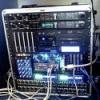
garybeard333 Posted October 23, 2007 Share Posted October 23, 2007 Ok this is my first post here. Ill first give you guys my system spex. OS - Jas Mac OSX 10.4.8 install DVD, Jas 10.4.9 combo update, 10.4.10 Mac OS X delta update CPU - Intel Core 2 Quad Q6600 - Working perfectly with all cores Motherboard - Gigabyte GA-P35-S3 - Seems that anything in the PCI slots are not working Disk Controllers - Intel ICH 9 - 2 of 4 SATA connectors work - Gigabyte GBB36X - IDE port works fine as does Raid 1 on the SATA ports Floppy Controller - Standard - Not tested (I hate floppy disks) Hard Drives - Seagate 320GB ST3320620AS (I have two of these in removable caddies, one with my main XP installation and one with MAC OS X which i swap out depending on what os i want to use) - Fully working - Western Digital 75GB Raptor (This is my second XP installation that I use purely for audio software) - Shows up on MAC OSX and can be read but not written to as it is NTFS - Western Digital 75GB Raptor (This is my third installation of XP which i use for the internet, it is isolated from the other installations to reduce the risk of virus spread) - Doesnt Show in OSX as it is on one of the SATA ports that doesnt work with OSX - 2X Seagate 320GB ST3320620AS (these are on the GBB36X controller in RAID 1 mode) - Shows up in OSX and can be read but cannot be written to as they are NTFS Optical Drives - ASUS DRW-1608P3S DVD reader (IDE) - Fully working - ASUS DVD-E616A2 DVD Writer (IDE) - Fully working and Burning at full speed Video Card - Winfast 256MB GeForce 7800GT - Fully working at all resolutions on both screens using Natit Dual V02 Kext Sound Cards - Realtek ALC889A (onboard) - Not working - ESI Juli@ (PCI) - Not working even with the latest MAC OSX drivers from ESI website - 2X MOTU 828MKII (Firewire) - Both working perfectly USB - All onboard (on the PCI-E bus) - All fully working Firewire Card - Belkin 3-Port F5U504EA (PCI-E) - Fully working Network Cards - Realtek RTL8168/8111 onboard (on PCI-E Bus) - Not working - Netgear GA311 (PCI Card) - Not working even with the latest MAC OSX drivers from Netgear website RAM - 3GB (2X512MB 2X1GB) OCZ DDR2 Platinum 800MHZ - All 3GB recognised and fully working MIDI Controller - Novation X-Station 25 (USB) - Fully working even as a soundcard since it has one built in Card Reader - Akasa (USB) - Working with no problems LCD Display - Matrix Orbital (USB) - Does not work since there is no software or drivers for MAC OSX OK so there is my system specs, which I hope will help people when it comes to choosing hardware for their Hackintosh. I know that I find it usefull knowing what does and doesnt work. Ill explain how I installed OSX on this system. I first removed all other HDD's from my machine other than the one I wanted to install OSX on to be on the safe side, just in case i messed up (all my HDD's are in removeable caddies which maes it nice and easy for me). Next I disabled AHCI mode on the ICH9 controller and set the GBB36X controller to IDE mode and I also set all drives to legacy mode (instead of Native mode). Next I installed the JAS 10.4.8 DVD (obvously booting from the JAS DVD) and selected only the intel SS3 patch. Once OSX was installed I plugged in all the HDD's again and set the ICH9 controller back to ACHI mode, the GBB36X controller back to RAID mode and re-enabled Native mode on all drives. At this point I installed the Natit Dual V02 Kext (this can be awkward since the command language for terminal in OSX is screwy ("Sudo Chown"!?!?! LOL WTF!)). After the obvious reboot I installed the Jas 10.4.9 combo update (which totally screws core audio BTW). Again a reboot then I installed the 10.4.10 Mac OS X delta update (not sure who made this one - got it on BTMON) which fixed the core audio problem. Now I have a stable copy of MAC OS X running on my custom machine and am able to use all the software I have tried so far. I mostly use LOGIC 8 STUDIO which runs like a dream. Hope that helps some1 The only problems I have with this setup are: 1) I cant get any pci cards to be recognised even with the official drivers. I have had no luck getting the ESI Juli@ Soundcard or the Netgear Gigabyte network card to work. 2) I cant get the onboard sound (which im not too fussed on) or the onboard netwrok card to work either. 3) It would be nice to get those other two SATA ports on the ICH9 controller to work If any1 has any suggestions i would greatly apreciated them Ive also included some pics of my setup for those that are interested. Link to comment https://www.insanelymac.com/forum/topic/67406-all-working-except-the-pci-cards-it-seems/ Share on other sites More sharing options...
daffycus Posted October 23, 2007 Share Posted October 23, 2007 Ok this is my first post here. Ill first give you guys my system spex. OS - Jas Mac OSX 10.4.8 install DVD, Jas 10.4.9 combo update, 10.4.10 Mac OS X delta update CPU - Intel Core 2 Quad Q6600 - Working perfectly with all cores Motherboard - Gigabyte GA-P35-S3 - Seems that anything in the PCI slots are not working Disk Controllers - Intel ICH 9 - 2 of 4 SATA connectors work - Gigabyte GBB36X - IDE port works fine as does Raid 1 on the SATA ports Floppy Controller - Standard - Not tested (I hate floppy disks) Hard Drives - Seagate 320GB ST3320620AS (I have two of these in removable caddies, one with my main XP installation and one with MAC OS X which i swap out depending on what os i want to use) - Fully working - Western Digital 75GB Raptor (This is my second XP installation that I use purely for audio software) - Shows up on MAC OSX and can be read but not written to as it is NTFS - Western Digital 75GB Raptor (This is my third installation of XP which i use for the internet, it is isolated from the other installations to reduce the risk of virus spread) - Doesnt Show in OSX as it is on one of the SATA ports that doesnt work with OSX - 2X Seagate 320GB ST3320620AS (these are on the GBB36X controller in RAID 1 mode) - Shows up in OSX and can be read but cannot be written to as they are NTFS Optical Drives - ASUS DRW-1608P3S DVD reader (IDE) - Fully working - ASUS DVD-E616A2 DVD Writer (IDE) - Fully working and Burning at full speed Video Card - Winfast 256MB GeForce 7800GT - Fully working at all resolutions on both screens using Natit Dual V02 Kext Sound Cards - Realtek ALC889A (onboard) - Not working - ESI Juli@ (PCI) - Not working even with the latest MAC OSX drivers from ESI website - 2X MOTU 828MKII (Firewire) - Both working perfectly USB - All onboard (on the PCI-E bus) - All fully working Firewire Card - Belkin 3-Port F5U504EA (PCI-E) - Fully working Network Cards - Realtek RTL8168/8111 onboard (on PCI-E Bus) - Not working - Netgear GA311 (PCI Card) - Not working even with the latest MAC OSX drivers from Netgear website RAM - 3GB (2X512MB 2X1GB) OCZ DDR2 Platinum 800MHZ - All 3GB recognised and fully working MIDI Controller - Novation X-Station 25 (USB) - Fully working even as a soundcard since it has one built in Card Reader - Akasa (USB) - Working with no problems LCD Display - Matrix Orbital (USB) - Does not work since there is no software or drivers for MAC OSX OK so there is my system specs, which I hope will help people when it comes to choosing hardware for their Hackintosh. I know that I find it usefull knowing what does and doesnt work. Ill explain how I installed OSX on this system. I first removed all other HDD's from my machine other than the one I wanted to install OSX on to be on the safe side, just in case i messed up (all my HDD's are in removeable caddies which maes it nice and easy for me). Next I disabled AHCI mode on the ICH9 controller and set the GBB36X controller to IDE mode and I also set all drives to legacy mode (instead of Native mode). Next I installed the JAS 10.4.8 DVD (obvously booting from the JAS DVD) and selected only the intel SS3 patch. Once OSX was installed I plugged in all the HDD's again and set the ICH9 controller back to ACHI mode, the GBB36X controller back to RAID mode and re-enabled Native mode on all drives. At this point I installed the Natit Dual V02 Kext (this can be awkward since the command language for terminal in OSX is screwy ("Sudo Chown"!?!?! LOL WTF!)). After the obvious reboot I installed the Jas 10.4.9 combo update (which totally screws core audio BTW). Again a reboot then I installed the 10.4.10 Mac OS X delta update (not sure who made this one - got it on BTMON) which fixed the core audio problem. Now I have a stable copy of MAC OS X running on my custom machine and am able to use all the software I have tried so far. I mostly use LOGIC 8 STUDIO which runs like a dream. Hope that helps some1 The only problems I have with this setup are: 1) I cant get any pci cards to be recognised even with the official drivers. I have had no luck getting the ESI Juli@ Soundcard or the Netgear Gigabyte network card to work. 2) I cant get the onboard sound (which im not too fussed on) or the onboard netwrok card to work either. 3) It would be nice to get those other two SATA ports on the ICH9 controller to work If any1 has any suggestions i would greatly apreciated them Ive also included some pics of my setup for those that are interested. Hi, I have the same board, and installed with Uphuck 1.3. Using the Realtek R1000 driver the network worked fine. ALthough it may have been what was causing system instability. I could not get the sound to work on this board either. used a cheap usb sound dongle instead. Link to comment https://www.insanelymac.com/forum/topic/67406-all-working-except-the-pci-cards-it-seems/#findComment-478554 Share on other sites More sharing options...
garybeard333 Posted October 23, 2007 Author Share Posted October 23, 2007 Thanks for the reply. You say that those drivers ur used caused instability? What were the effects of this? I think that unless i can get drivers that are stable that i m likely to just go without the networking :censored2: Rather have a stable system without network support. O BTW I tried a USB network adapter - it was a netgear FA120 i believe and that didnt work either. Link to comment https://www.insanelymac.com/forum/topic/67406-all-working-except-the-pci-cards-it-seems/#findComment-478575 Share on other sites More sharing options...
daffycus Posted October 23, 2007 Share Posted October 23, 2007 Thanks for the reply. You say that those drivers ur used caused instability? What were the effects of this? I think that unless i can get drivers that are stable that i m likely to just go without the networking :censored2: Rather have a stable system without network support. O BTW I tried a USB network adapter - it was a netgear FA120 i believe and that didnt work either. I gave up on the board because I was getting random kernal panics, could happen after 4 hours, or 4 min. (I am using the Gigabyte 965-S3 right now) Although recently I read a thread regarding instability of the R1000 driver, I can't seem to find the right thread. There were alternative drivers posted to the forum though. Might be worth a try! It would be interesting to see if you get the same problem if you were to install the same R1000 drivers from the UpHuck release. Link to comment https://www.insanelymac.com/forum/topic/67406-all-working-except-the-pci-cards-it-seems/#findComment-478582 Share on other sites More sharing options...
garybeard333 Posted October 23, 2007 Author Share Posted October 23, 2007 MMM thats strange i havent had any trouble Link to comment https://www.insanelymac.com/forum/topic/67406-all-working-except-the-pci-cards-it-seems/#findComment-478606 Share on other sites More sharing options...
garybeard333 Posted October 23, 2007 Author Share Posted October 23, 2007 I havent tried those drivers tho so i will give them a try and let u know if they cause kernel panicks. Do u have a link to those drivers? would make my life easier Link to comment https://www.insanelymac.com/forum/topic/67406-all-working-except-the-pci-cards-it-seems/#findComment-479364 Share on other sites More sharing options...

Recommended Posts